


.png)


As many of you know, I help organisations with endless Power BI challenges and these are some common questions I regularly (and still) get:
- What is MS Fabric?
- Is MS Fabric and Power BI the same thing?
- Will MS Fabric replace Power BI?
- Do we need to move or do something?
So, I can answer most of the above concerns right now, right here: No, MS Fabric is not the same thing, Power BI is not being replaced by MS Fabric and no, if all you are doing is using Power BI you are not forced to make any changes or migrate to anything else. I also understand why the confusion exists, even now after its been a while since MS Fabric came to the market. We will explore in more detail, but to put your mind to ease, Microsoft had launched, rebranded and merged so many of its data products, already existing experiences into a single platform... MS Fabric, all living under ONE umbrella. So, one platform, one experience. Yes, I know it sounds like marketing jargon for the first time readers, but stay with me.
So, what is MS Fabric?
MS Fabric is an all in one, SaaS data analytics platform that lets you ingest, transform, store, govern and analyse data all in ONE place. One again, emphasis on the "one" and you will see why as you progress further below.
Before Fabric, a "proper" Microsoft data platform usually meant stitching together data integration tools like Azure Data Factory to move data, Azure Synapse for SQL warehousing and Spark, ADLS for raw storage and Power BI for business intelligence, reporting and every piece came with its own setup, billing model and other unique niche scenarios. So, it worked but it was heavyweight and you needed a fairly mature data team just to keep it all going.
Fabric takes all those elements and wraps them into one joined-up platform with shared OneLake storage, shared capacity and a far more consistent security and governance layer, so engineers, analysts and the business can collaborate without living in different portals.
Honest take, is it trying to replace everything? Not necessarily. But it is trying to remove the stitching and enable everyone to live and build within a single platform. From working with clients, that is where the value shows up, especially if you do not have a huge data engineering bench to keep the works alive.
OneLake: The Layer That Underpins It All
Above, I used the word ONE a lot, and here is why. If there is one concept you take away from this blog, let it be OneLake. It underpins MS Fabric and all within it.
OneLake is Fabric’s built-in data lake. It comes with every MS Fabric tenant. You will likely see its described as the OneDrive, but for your organisation’s data. So, Fabric uses OneLake as the storage layer underneath your workspaces, so Lakehouses, Warehouses, notebooks and pipelines are all operating over the same shared data, and Power BI can sit on top of it without you copying files all over the place.
Why does this matter? Because it kills the copy-paste data estate, meaning reduces overall duplication of data. In the old world - and not saying this is the case in all scenarios, but just so you visualise it better: engineering lands files in a ADLS (lake - this is the raw data), warehousing copies the data into tables (so, this is another copy) and Power BI Imports the data into a semantic model (another copy). Again, different cases different outcomes, for example I could have used DirectQuery in Power BI so that wont be another copy, but you should now get the idea... Same data, three places, three cost lines.
With OneLake, data sits in one place in an open format (Delta Parquet) and the Fabric workloads sit on top of it. Lakehouses write Delta tables into OneLake meaning data stored in the Lakehouse is automatically available across the platform, Warehouses write their own tables into OneLake and Power BI can connect to those Delta tables through Direct Lake without doing a full import copy. Now, if you are wondering what Direct Lake is, read our blog: Power BI Storage Modes Demystified.
OneLake also supports Shortcuts, think of it as pointers, so you can surface data that lives outside Fabric without copying it in. That is a big deal if you are not ready to go all-in on Fabric but still want the benefits or when a lot of data lives in another system but IT wont let you yet touch it.
But, MS Fabric now lives in Power BI or is it the other way round?
The simplest way to think about it is this: Power BI is now one of the core workloads within Microsoft Fabric. So, Fabric is the wider platform and Power BI is one experience within it, alongside things like Data Factory, Data Engineering, Data Warehouse and Real-Time Intelligence.
So no, Fabric does not technically “live inside” Power BI. It is more accurate to say that what used to feel like the Power BI world now sits within the broader Microsoft Fabric platform.
You can actually see this reflected inside the portal itself. In the below screenshots I put together, you can see in the bottom left of app.powerbi.com, you now have two options, Power BI and Fabric. You can switch between them. Power BI keeps you in the familiar business intelligence reporting experience, while switching to Fabric opens the broader platform. Same environment, two options.
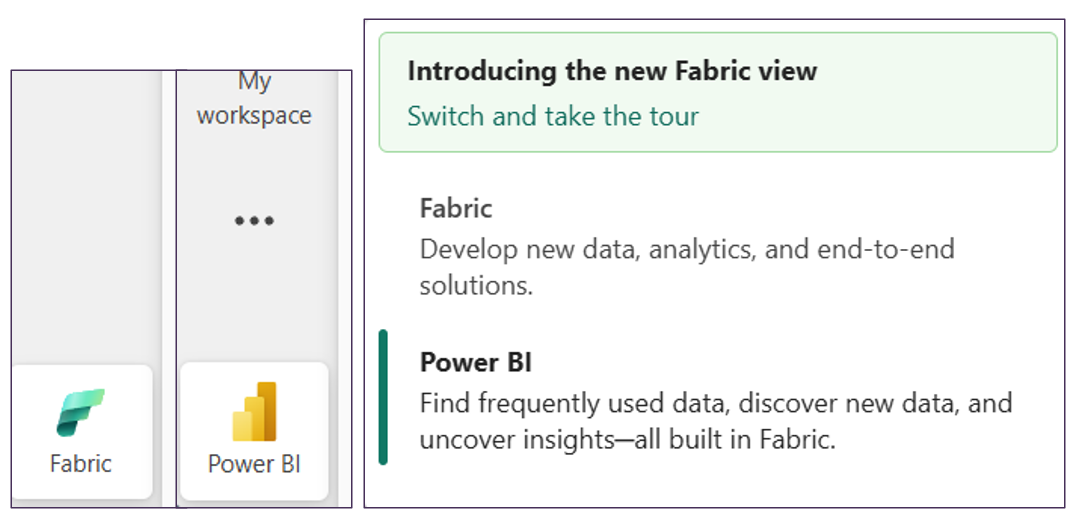
Now, importantly, this does not mean your reports suddenly became something else or that you need to rebuild everything. If you are an existing Power BI user, your reports, semantic models, workspaces and overall experience will still feel familiar, they just now sit within a much bigger platform.
The Workloads
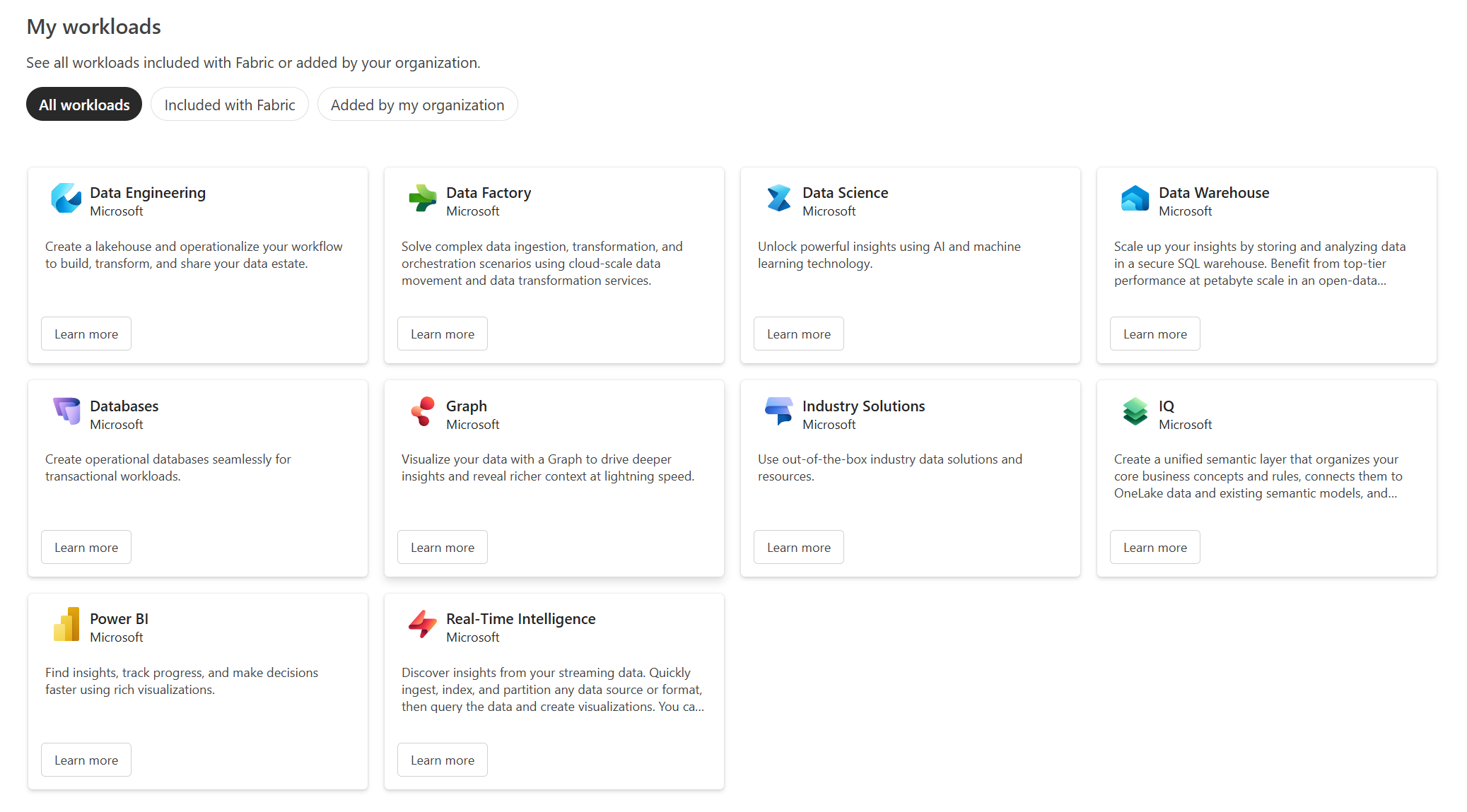
Before we go further, this is worth clearing up because it can get confusing fast. If you look inside Microsoft Fabric itself, you will see the full list of workloads or experiences available. I added a screenshot above so you can see the full list.
At the time of writing, that includes the items listed below, and added the description as is from MS Fabric:
- Data Engineering: Create a lakehouse and operationalise your workflow to build, transform and share your data estate.
- Data Factory: Solve complex data ingestion, transformation and orchestration scenarios using cloud-scale data movement, data integration and data transformation services.
- Data Science: Unlock powerful insights using AI and machine learning technology.
- Data Warehouse: Scale up your insights by storing and analysing data in a secure SQL warehouse. Benefit from top-tier performance at petabyte scale in an open-data format.
- Databases: Create operational databases seamlessly for transactional workloads.
- Graph: Visualise your data with a Graph to drive deeper insights and reveal richer context at lightning speed.
- Industry Solutions: Use out-of-the-box industry data solutions and resources.
- IQ: Unifies business semantics across data, models and systems to power intelligent agents and decisions grounded in a live, holistic view of the business.
- Power BI: Find insights, track progress, and make decisions faster using rich visualizations.
- Real-Time Intelligence: Discover insights from your streaming data. Quickly ingest, index, and partition any data source or format, then query the data and create visualisations.
So yes, in the full list inside the portal is broader than what you will often see in Microsoft’s higher-level overview diagrams which is below:
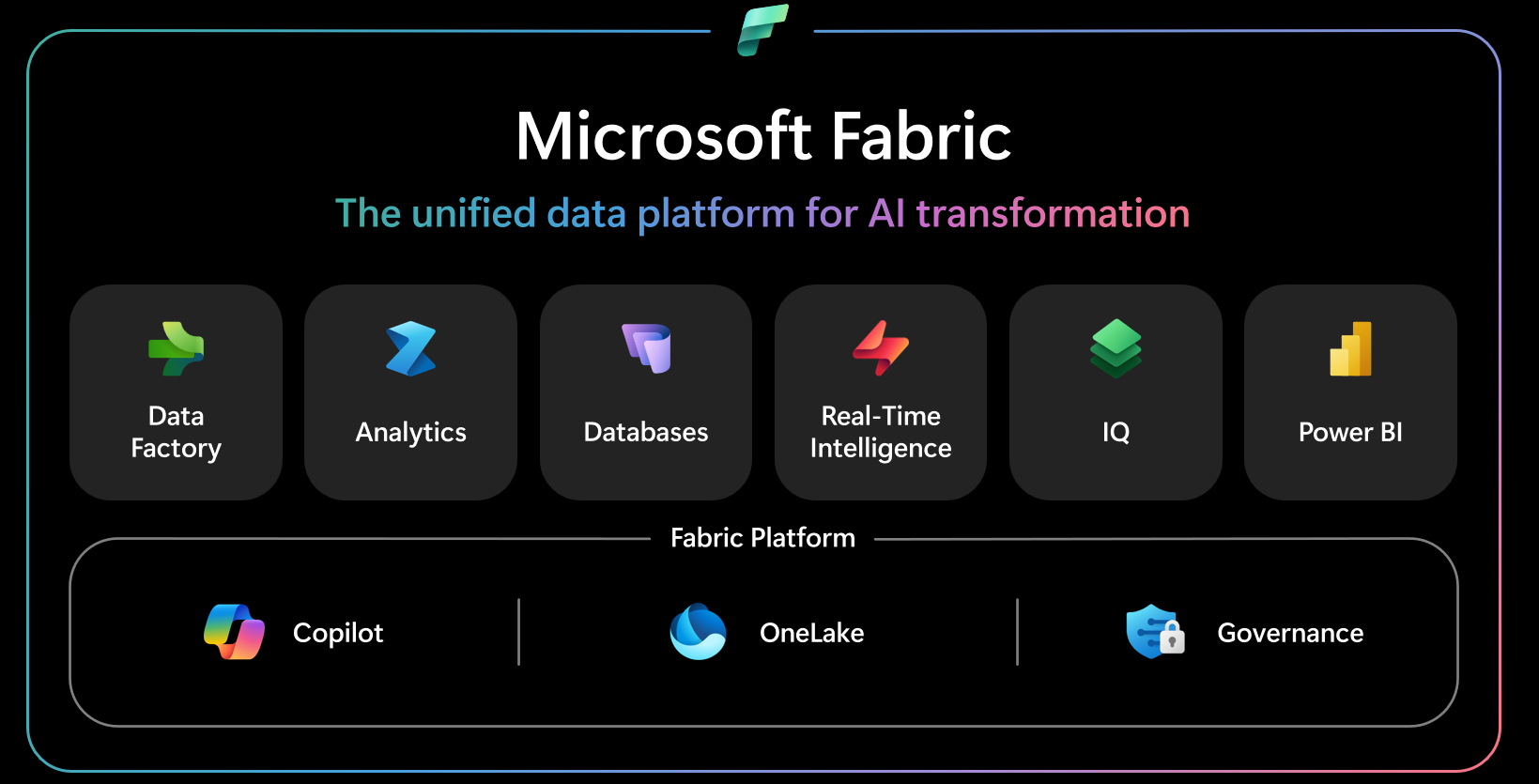
At a high level though, Microsoft now often presents Fabric more simply as Data Factory, Analytics, Databases, Real-Time Intelligence, IQ and of course, Power BI. That is the more platform-level view. So, if you are wondering why one screenshot shows more and another shows less, it is not because one is wrong. It is because Microsoft is sometimes showing the fuller list of experiences and other times showing a simplified grouped view of the platform.
So, what is the main point here? It is not just that these workloads exist, it is that they all sit within the same Fabric environment and are designed to work together rather than feeling like a bunch of separate tools awkwardly stitched together. That is a big part of the Fabric pitch. Different types of work, same underlying platform.
Think of the workloads as different doors into the same house. Data Factory is primarily for moving and orchestrating data and handling data integration, with data transformation also a part here through its ability to call things like Dataflows (think Power Query but online) and notebooks. Databases covers the operational database side of things. Real-Time Intelligence is there for event-driven and real-time analytics scenarios. IQ, which is one of the newer additions and currently in preview, is about unifying business meaning and context across your data. And last but not least, we have Power BI, which REMAINS the reporting and analytics experience most people already know. In Microsoft's newer visual, Analytics appears to be used as a broader label, likely covering experiences such as Data Engineering, Data Science and Data Warehouse, rather than showcasing each one individually.
That is really the point Microsoft is pushing with Fabric. The workloads are specialised, yes, but they operate over the same platform foundations, including OneLake, governance with Purview and Copilot, so teams can share data and items without unnecessary duplication. That is a big part of why Fabric is easier to explain as a platform rather than just another Microsoft product with a new badge on it.
And just to be clear, you do not need to use every workload. Most organisations will only touch a handful of them. The value is that, when you do need more, it is already sitting in the same ecosystem. What you actually use should depend on your needs, your architecture and what problem you are trying to solve, not because Microsoft put a shiny new icon in front of you.
Who Is Fabric For?
This is where I want to be upfront. In my view, Fabric is not for everyone, at least not right now. If your organisation already has a well-established Azure data platform with Azure Synapse, Data Factory and ADLS, and everything is working well, Fabric might not be an urgent move. It is worth exploring, but there is no urgency to rip and replace something that works.
That said, if you are starting your data platform journey, Microsoft Fabric absolutely needs to be a consideration. One of its biggest strengths is that it brings multiple analytics capabilities together into one platform, rather than forcing you to stitch lots of separate services together from day one. Microsoft positions Fabric as an end-to-end data analytics platform, and the unified capacity model means you are drawing from a shared pool of compute across workloads, rather than thinking about each experience in isolation.
It also works well for Microsoft-centric organisations. If your team already lives in Microsoft 365, SharePoint, Teams and Power BI, Fabric integrates in naturally. The integration is tighter, and the identity and access model is consistent through Microsoft Entra ID.
What About Licensing?
A full licensing deep dive is not what this blog was for and in all honesty that deserves its own dedicated piece, and we have already written two worth bookmarking.
If you want the comprehensive breakdown, our Navigating Power BI & Fabric Licensing covers the full picture in detail. If you are running a smaller operation, What are the Power BI licensing options for small businesses? is the more focused read, though it does not go deep on Fabric F SKUs specifically.
For now, here is what you need to know at a high level. Fabric uses a capacity-based model. You purchase a Fabric Capacity, measured in Capacity Units and that pool of compute is shared across all your workloads, so your Lakehouse, Warehouse, Notebooks, Pipelines and Power BI all draw from the same bucket. There are various differences compared to the previous per-capacity model and the per-user licensing most people are used to.
Licensing in Fabric has a few moving parts, and getting it wrong is an easy way to either overspend or run into unexpected limitations. The two blogs I shared above are the right starting point.
Summary
So, what is Microsoft Fabric really?
At its core, it is Microsoft’s attempt to bring data movement, storage, engineering, data analytics and reporting into one joined-up platform. That is the big idea. Not that every organisation needs to suddenly jump into every workload, and not that Power BI is going away, but that the overall Microsoft data story is becoming far more connected than it used to be.
If you are a Power BI user, the main thing to take away is this: do not panic. Power BI still matters, it is still very much alive, and it now sits as an important part of a much broader platform as you saw from this blog. If anything, Fabric gives Power BI a stronger surrounding ecosystem.
If you are earlier in your data platform journey, Fabric is absolutely worth serious consideration. Also, if you already have a mature Azure setup, Fabric is still worth understanding and exploring, even if the right answer for now is simply to keep an eye on it rather than rush into change.
Either way, this is the key message: Microsoft Fabric is not something to ignore, but it is also not something to fear. It is simply the direction Microsoft is taking its analytics platform, and the more you understand it, the easier it becomes to decide where, when and if it fits into your world.
And that really is the point of this blog. Not to tell you that you must move, and not to throw more jargon at you, but to help you make sense of what Fabric actually is, how it relates to Power BI and why so many people are talking about it. Lots more blogs on MS Fabric to come, so be sure to keep an eye out.


%20(8).png)
.png)
.avif)