


I have been writing more blogs on MS Fabric recently, and this is one where I had a very interesting discussion with a client. What is the difference between Mirroring and Shortcuts? When should we use one over the other? Is it not the same as loading data through a pipeline? So, here is a blog that should offer some clarity to anyone asking similar questions.
From also doing some of my own research and playing around with these options in Microsoft Fabric, I was keep seeing Shortcuts and Mirroring been used interchangeable. But there are some obvious differences that would play a huge role in which to consider for your setup.
At the simplest level, a Shortcut points to data where it already lives, while Mirroring creates a continuously synced replica in OneLake as Delta tables.
Key takeaways
- Shortcuts provide data virtualisation by referencing existing data without directly copying it, including sources such as Azure Data Lake Storage Gen2 and Amazon S3.
- Mirroring continuously replicates data from supported sources into OneLake, including sources such as Azure SQL Database, Azure Cosmos DB and Snowflake.
- The core architectural decision is whether you want Fabric to reference external data or continuously replicate it into OneLake.
- Both options have also expanded, especially with Shortcut Transformations and Mirroring extended capabilities.
The core problem people are actually trying to solve
Here is the thing... most teams do not wake up asking for Shortcuts or Mirroring. I mean, I know I did not. They wake up saying "We have data in Azure SQL, ADLS, Snowflake, S3 or somewhere else. We want to analyse it in Microsoft Fabric without building another pipeline unless we genuinely need one".
Once you start from the actual problem, the answer becomes clearer. If the source already holds the data you want to work with and you do not want another copy, a Shortcut may be exactly right. If the source is an operational database and you want that data continuously replicated into OneLake for analytics, then Mirroring is usually a strong move.
Shortcut vs Mirroring in plain English
Before we get technical, let me be clear on the simplest possible explanation.
Shortcuts point to the data source. So, you can see the data in Microsoft Fabric, but the data itself remains at the source. Fabric is effectively pointing to it, not directly copying it or physically storing a new copy of it. A useful way to think about that is as a signpost... it shows Fabric where the data lives, but the data stays where it is. That is also why a Shortcut does not, by default, give you a Delta table in OneLake, but Mirroring does.Mirroring also creates a built-in SQL analytics endpoint over that replica,
Mirroring continuously replicates data into OneLake. Fabric is not just pointing at the source, it is bringing a replica into its own analytics layer and keeping it in sync in Delta Lake table format. Think of this more like a storeroom... the data is being brought into Fabric and kept there for analytics use.
Shortcut vs Mirroring at a Glance
If you want the short version, this table below shows where the real differences are. One points to data where it already lives, the other brings a replica into OneLake.
When I first heard of Shortcuts, my brain immediately went to performance. Almost a bit like DirectQuery in Power BI, where the data still lives at source. Not the same thing, but from a high-level performance point of view, that instinct is still useful. If Fabric is pointing to data rather than owning the replica, performance will always depend much more on the source, the path to it, and how that access behaves in practice. Which, to be fair, makes complete sense.
.png)
Capabilities worth factoring into the decision
The base definitions are useful, but they are not the whole story. Before showcasing both through a few demos, there are two elements worth knowing about.
Shortcut Transformations
Shortcut Transformations are currently in public preview. They let you take structured files referenced by a OneLake shortcut, such as CSV, JSON or Parquet, and have Fabric Spark compute copy and convert that data into a managed Delta table in the Lakehouse table area. Fabric polls the shortcut target every two minutes, detects new, modified and deleted files, and keeps the resulting table in sync.
That matters because a Shortcut does not always have to stay as just a pointer. In the right file-based scenario, Fabric can materialise a queryable Delta table for you without you building a separate ETL pipeline. It is still not a replacement for every engineering pattern, but it does make Shortcuts far more practical for certain use cases.
Mirroring extended capabilities
Extended capabilities in Mirroring are worth understanding properly. Announced by Microsoft at FabCon and SQLCon 2026, they are optional, paid features that build on the core mirroring experience. At the moment, two stand out: Delta change data feed and Mirroring views.
Delta change data feed tracks row-level inserts, updates and deletes so only changed data is processed. Microsoft says this supports near real-time analytics without full reloads or heavy ETL pipelines, and supports downstream incremental processing.
Mirroring views replicate logical views from the source system instead of only physical tables. Microsoft says this can bring source filters, joins and transformations into OneLake without building separate engineering pipelines, reduce extra processing in Fabric, and help downstream users query shaped data. There is an important caveat though: views are currently only supported in preview in mirroring for Snowflake.
The practical point is simple. Core Mirroring already gets supported source tables into OneLake with near real-time freshness, Delta Lake format and Fabric integration. Extended capabilities go a step further by adding incremental change processing and view replication on top of that core mirroring foundation.
Demo walkthrough: the real difference in practice
The demos below were built around a real QuickBooks Online analytics solution running on Microsoft Fabric. Metis BI uses that pipeline as an actual working analytics setup. I spun up the Azure SQL and ADLS Gen2 resources specifically to demonstrate these patterns cleanly, but the broader Fabric environment and QuickBooks Gold layer are real.
Demo 1a - Shortcut: Just a Pointer
The first demo starts with a Chart of Accounts CSV file sitting in an ADLS Gen2 storage account (external to MS Fabric). The file lives there, that is where it stays.
Inside a Fabric Lakehouse, I right-clicked "Files" and selected "New shortcut". Fabric presented a list of supported external sources such as ADLS Gen2, Amazon S3, Google Cloud Storage, Dataverse, OneDrive and SharePoint among them. That list alone tells you something useful about what Shortcuts are designed for, file and object storage patterns, not databases.

For this demo, I selected Azure Data Lake Storage Gen2, connected using the storage account key and navigated to the chart-of-accounts folder. Fabric found the CSV immediately.

One important step I want to call out when going through the wizard was that Fabric offered an optional Transform step, asking whether I wanted to convert the CSV to Delta at that point. I skipped it deliberately. The point of this first demo is to show the Shortcut in its purest form... a pointer, nothing more.

Once created, the shortcut appeared under Files in the Lakehouse explorer. Notice the shortcut icon, it looks distinct from a regular folder. That visual difference matters as it is not native Lakehouse storage but a reference to data that still lives in ADLS Gen2.

To prove the point, I ran a simple PySpark read against it in a notebook:
df = spark.read.csv("Files/chart-of-accounts/chart_of_accounts.csv", header=True)df.show()
All 10 rows returned cleanly. Fabric read the file directly from ADLS Gen2 through the Shortcut. The Tables section of the Lakehouse remained completely empty because nothing moved.

That is what a Shortcut is. Fabric can see and work with the data but the data itself has not gone anywhere.
Demo 1b - Shortcut Transformation: From Pointer to Delta Table
Demo 1a above proved the Shortcut works as a pointer... hooray! As we saw, the data was readable, but nothing had moved into the Lakehouse. Demo 1b picks up exactly where that left off and shows what happens when you take that same source and go one step further.
This time, instead of right-clicking Files, I right-clicked the "dbo" schema under Tables and selected "New table shortcut". Same connection, same ADLS Gen2 source, same chart-of-accounts folder. But this time, when the Transform step appeared in the wizard, I did not skip it like we did above.

Fabric had already detected the CSV format and auto-applied the transformation, as you can see above the delimiter is set to comma, first row as headers on. No manual configuration was needed here.

The final summary in screenshot above confirmed the full picture, source in ADLS Gen2, destination in Tables/dbo, CSV converting to Delta table. One click of Create and it was done.
After clicking Create, the table appeared under Tables/dbo in the Lakehouse explorer immediately. All 10 rows were visible in table view with the correct column schema: account_id, account_name, account_type, category, is_active, inferred automatically from the CSV headers.

That screenshot is worth pausing on. Both objects now exist in the same Lakehouse explorer at the same time. The original shortcut still sits under Files, still just a pointer to ADLS Gen2, nothing copied into Lakehouse storage there. The transformed table sits under Tables, a fully managed Delta table, queryable through SQL, Spark and Direct Lake, and kept in sync from the same source.
No pipeline was built, no notebook was written to create the table, Fabric handled the conversion for me. From that point, the table was queryable like any other Delta table in the Lakehouse:
%%sql
SELECT * FROM chart_of_accounts
To finish up here, the point of this demo is not that Shortcut Transformations replace all engineering effort. But for structured files in supported formats, they remove a lot of low-value plumbing and give you a Fabric-native Delta table far faster than many teams expect.
Demo 2a - Mirroring: A Continuously Maintained Replica
The second demo starts with a completely different kind of source. Not a file, but a live operational database... a "client_engagements" table sitting in an Azure SQL Database.
The setup on the Azure side was deliberately minimal. A free-tier serverless Azure SQL Database, one table, ten rows of dummy engagement data. The point is not the source complexity. The point is what Fabric does with it.
Inside Fabric, I created a new item and searched for Mirrored. The list of supported mirrored database options is worth a screenshot on its own.
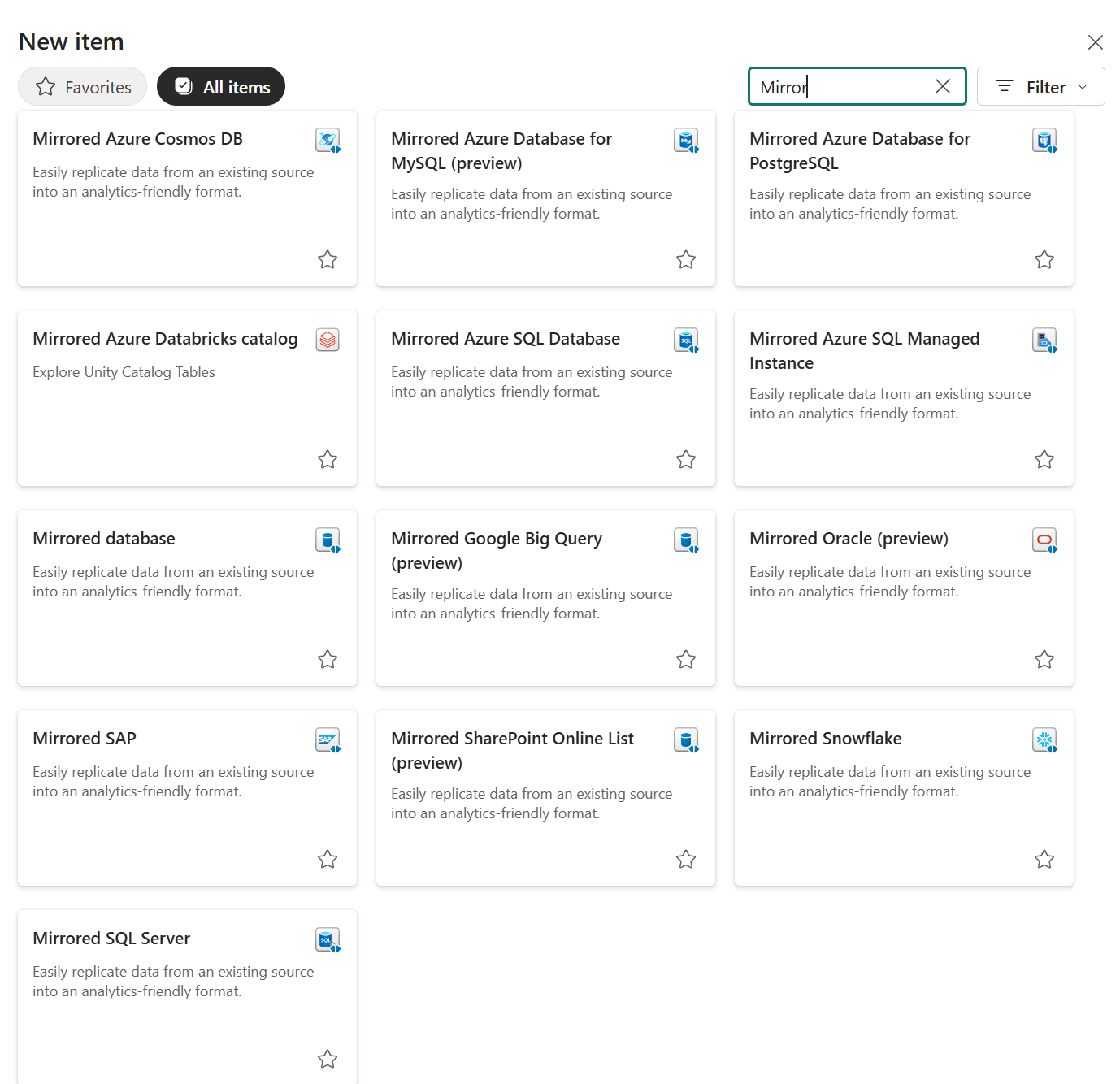
That list tells you something useful straight away. Mirroring is designed more for databases and operational systems, not file storage. Also, a quick side note... Microsoft documents more than one type of mirroring approach in Fabric which are Database, Metadata and Open Mirroring. That said, this blog is focused on Database Mirroring, because that is the one most people will compare most directly against Microsoft Fabric Shortcuts. Continuing, every source on that list has a change mechanism or database engine behind it. That is a very different proposition from a CSV sitting in ADLS.
I selected Mirrored Azure SQL Database, connected using SQL authentication and navigated to the "metis-engagements-demo" database. Fabric immediately showed a data preview of the dbo.client_engagement table with all 10 rows visible before replication had even started.
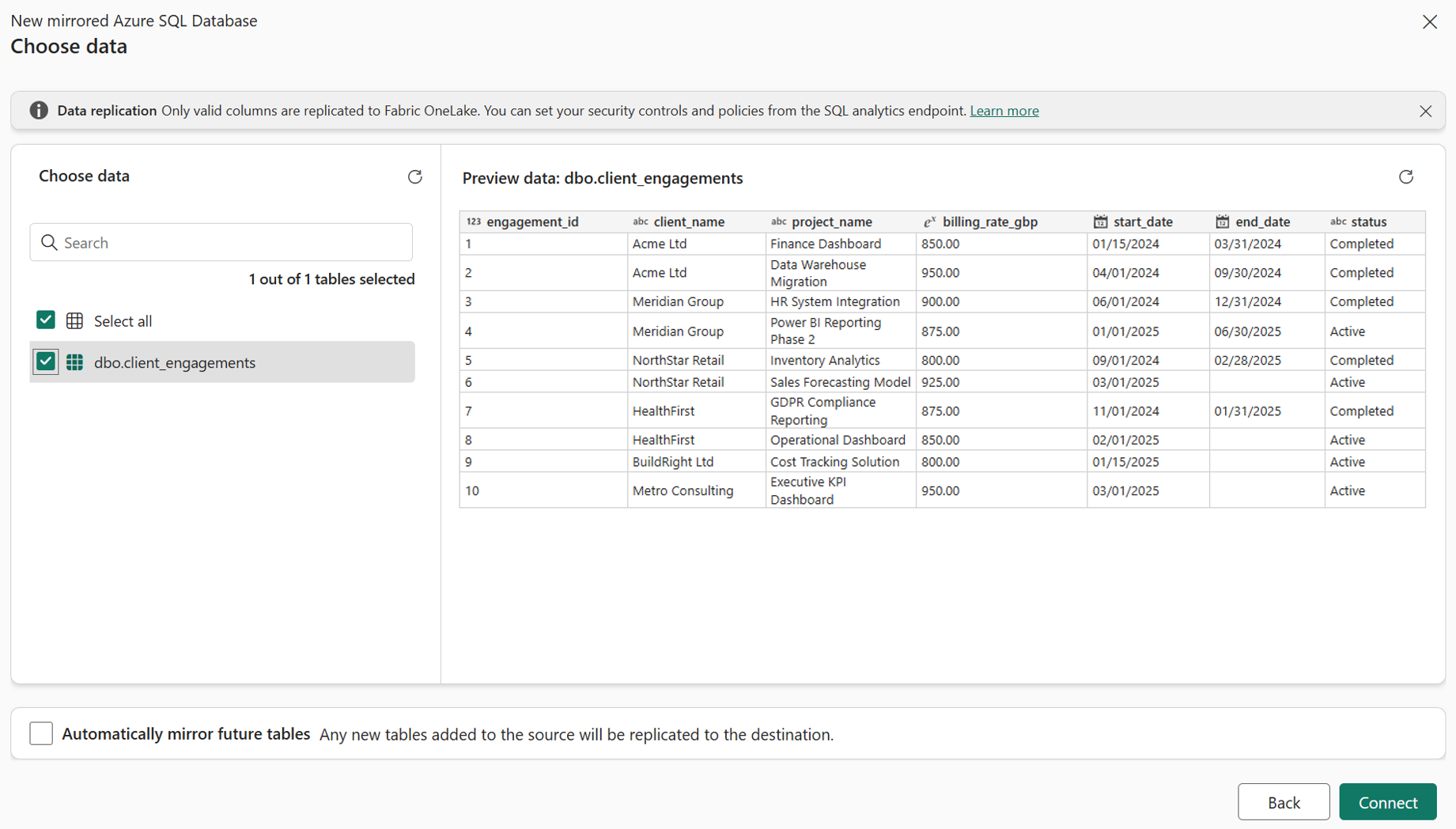
One thing worth noting at this step... Fabric flagged an error on the first attempt because the system-assigned managed identity on the Azure SQL logical server was not enabled. Once that was turned on in Azure, the connection worked immediately. It is a one-time setup step, but it is easy to miss.
After clicking "Connect" and naming the destination, Fabric created the mirrored database item in the workspace and began replication immediately. The replication status dashboard appeared straight away. Within a couple of minutes, refreshing the dashboard showed the table fully replicated.

Now, from above screenshot, notice there is nothing to monitor with a Shortcut because nothing is being replicated. However, Mirroring has this view because it is actively managing a replica and it tells you exactly what you need to know: what landed, when it landed and how far behind the source it currently is.
The data is now in Fabric as a continuously maintained Delta table. Mirroring also creates a built-in SQL analytics endpoint over that replica. To prove it is queryable like any other Fabric asset, I ran a simple query against the mirrored table and all 10 rows returned cleanly, client names, project names, billing rates, dates and statuses all present.

The data came from Azure SQL, which now lives in OneLake as a Delta table. Fabric is keeping it in sync automatically. No pipeline was built, no schedule was configured, no copy job was wired up. So, that is what Mirroring is.
Demo 2b - Extended capabilities: Delta Change Data Feed and Mirroring Views
Demo 2a above showed core Mirroring working exactly as described... Azure SQL replicating into OneLake, status view running, rows visible, changes picked up automatically.
At FabCon and SQLCon 2026, Microsoft also called out extended capabilities in Mirroring. These are optional, paid features that sit on top of the core mirroring experience. So lets have a look at Delta Change Data Feed and Mirroring Views.
Here is my understanding of Delta Change Data Feed in simple terms. Core Mirroring already keeps the table in OneLake up to date. But as a downstream consumer, you are still mostly looking at the current state of that table. Delta Change Data Feed is where things get more interesting. It captures row-level inserts, updates and deletes, so only changed data is processed rather than you having to keep treating the table like a full-state reload every time. Microsoft describes this as incremental, change-only processing that supports near real-time analytics without heavy ETL or full reload patterns.
That distinction matters. Let us say four rows change in the source. With core Mirroring, the replica updates and you see the latest values. With Delta Change Data Feed enabled, you can also work specifically with the rows that changed, including whether they were inserted, updated or deleted. That is the bit that makes this more useful for downstream incremental processing. Even though this is what I think, I would not describe it as “Mirroring used to do a full refresh and now it does delta” because that is not quite what Microsoft says in the docs. But I do think it is fair to say CDF gives you a much more delta-style way of consuming change downstream.
The other extended capability worth calling out is Mirroring Views. This is not about row-level changes but about logic. Microsoft says Mirroring Views can replicate logical views from the source system instead of only physical tables, which means source-side filters, joins and transformations can come across into OneLake as well. That matters when useful business logic already exists in the source and you do not want to rebuild it yet again in Fabric. There is an important caveat though... at the time of writing, this is currently only supported in preview for Mirroring for Snowflake.
The practical point is simple though, core Mirroring already gets supported source tables into OneLake with near real-time freshness, Delta Lake storage and Fabric integration. Extended capabilities go a step further as the Delta Change Data Feed helps you process what changed. Mirroring Views helps you bring over source-side logic. For the right use case, both are meaningful upgrades rather than just extra checkboxes, but remember these are paid for separately.
At the time of writing, I could not complete a full hands-on demo of this in my current environment due to it still being available, so I do not want to pretend otherwise. But the Microsoft documentation is clear enough to understand the value: if you are building incremental downstream processing on top of mirrored data or you already have useful view logic defined in the source, these are two extended capabilities genuinely worth watching.
Demo 3 - The Payoff: One Cross-Source Query, No Pipeline
Demos 1 and 2 above proved each feature works in isolation and we saw some extended elements. Now, in this demo we will see what becomes possible once mirrored data is live in OneLake, joining the mirrored client_engagements table against customer data sitting in a completely separate QuickBooks Gold Warehouse, in a single query, with no pipeline built to connect them.
Two separate systems, one query, that is what OneLake as a single logical lake means in practice. The query ran directly in the Fabric Warehouse query editor. On one side, "client_engagements" was continuously replicated from Azure SQL through Mirroring. On the other side, customer data from the QuickBooks Gold Warehouse, built through a separate medallion-style pipeline pulling from QuickBooks Online. Two completely different origins, two different ingestion patterns.
SELECT
ce.client_name,
ce.project_name,
ce.billing_rate_gbp,
ce.status,
dc.customer_type
FROM [metis-engagements-demo].[dbo].[client_engagements] AS ce
LEFT JOIN dbo.vw_demo_customers AS dc
ON ce.client_name = dc.customer_name
All 10 rows returned. Every engagement record matched to its customer type. No bespoke movement pipeline was built to make that join possible, no staging table, no copy job. The data was already there, one source through Mirroring, one source through the existing QuickBooks pipeline and Fabric made them queryable together.
That is the practical meaning of OneLake as a single logical lake. Not a marketing phrase. A working query joining two systems that were never explicitly stitched together with another bespoke pipeline.
Do not use a Shortcut when:
- You need data replicated into OneLake rather than referenced in place.
- You need a managed local table rather than a no-copy connection to existing data.
- The source is an operational database pattern that is better suited to replication than storage-based virtual access.
Shortcuts make the most sense when data already sits in external or shared storage and you want Fabric to work with it without copying it first.
Do not use Mirroring when:
- The source is not a supported Mirroring source.
- You do not need continuous replication into OneLake.
- A no-copy Shortcut to existing storage would meet the need without introducing a replicated database pattern.
Mirroring makes more sense when you want analytics to run from a replicated copy in OneLake rather than relying on direct access to the operational source system.
Summary
Here is the thing. Shortcuts and Mirroring are not competing features and I think that is where a lot of the confusion comes from. They are different answers to different architectural questions.
If your data already lives in a sensible place and you just want Fabric to reach into it without creating yet another copy, Shortcuts are often the cleaner move. If, on the other hand, you want Fabric to own an analytics-ready replica of a supported source and keep that replica inside OneLake, that is where Mirroring starts to make far more sense.
If you want the simplest possible way to remember it, think of a Shortcut as a signpost and Mirroring as a storeroom. One tells Fabric where the data already lives. The other brings a replica into Fabric and keeps it there for you to work with.
That distinction matters more than it might sound at first. Get it wrong and you usually feel it later. Either you introduce replication you did not really need or you keep pointing at a source when what you actually wanted was a Fabric-native copy you could build around properly.
If you are trying to work out which pattern makes sense in your own Fabric architecture, this is exactly the sort of decision worth pressure-testing properly. The right answer depends on the source, the query pattern, the cost model and, just as importantly, what your team will realistically maintain once the initial excitement has worn off. That is exactly the sort of conversation we help clients through at Metis BI, cutting through the noise, weighing the trade-offs properly, and designing something that is practical for the real use case rather than just technically possible.


.png)
.png)
.png)