


.png)


Here it finally is - I'm writing about MCP. There's so much hype and excitement around this topic, and yes, I do have opinions. But for now, let's park those and focus on something simpler: actually understanding what the heck MCP is.
I'm not writing this as a product launch or a hype piece. It's an explainer for anyone who needs help pulling the pieces together. By the end of this blog, you should feel more comfortable with:
- What MCP is
- The core terms around its architecture
- What the two types of Power BI MCP server actually do
- How you interact with them
Keep in mind, this is the first in what will be a longer series on the subject. It's great to explore and stay curious, but always have your mind on what's the value, what's the ROI and without a doubt, security and governance. Also, worth calling out upfront… Power BI MCP is in Preview. Tread carefully, things can and probably will change.
What is the Model Context Protocol?
MCP in plain English
The simplest possible explanation:
Power BI MCP servers let AI agents interact with Power BI through natural language.
Now, to expand on that properly, it helps to look at what changed. Before the Power BI MCP servers arrived in 2025, we used large language models like ChatGPT or Claude to get generic AI suggestions. For instance, here's a DAX measure that might work, here's how you could structure the model and relationships to establish or here's a description you could add to that measure. Useful, but you were the one doing the work. You'd read the suggestion, switch to Power BI Desktop and apply it yourself.
You could make the suggestions more tailored by providing the LLM some context such as the underlying PBIP file, a VPAX extract from DAX Studio, a screenshot of the model view. And even though that helped, the LLM still didn't actually know your semantic model in any live sense. It couldn't query it, modify it, so create the actual measure or relationship - all this was still your job as a developer or person using Power BI.
This is what MCP changed! The Model Context Protocol is an open standard originally from Anthropic (now widely adopted) that provides a way for AI agents to communicate with external tools like Power BI. So, with a Power BI MCP server running, the AI isn't just suggesting DAX for you to copy and paste. It can query the model, create the measure, establish the relationship, enter a description for your measure and so on. This is the shift people mean when they talk about moving from generative AI (create something for me) to agentic AI (get something done for me), and MCP is what makes that shift possible for tools like Power BI. A common way to explain MCP is as the USB C of AI: one standard connection that works across many tools.
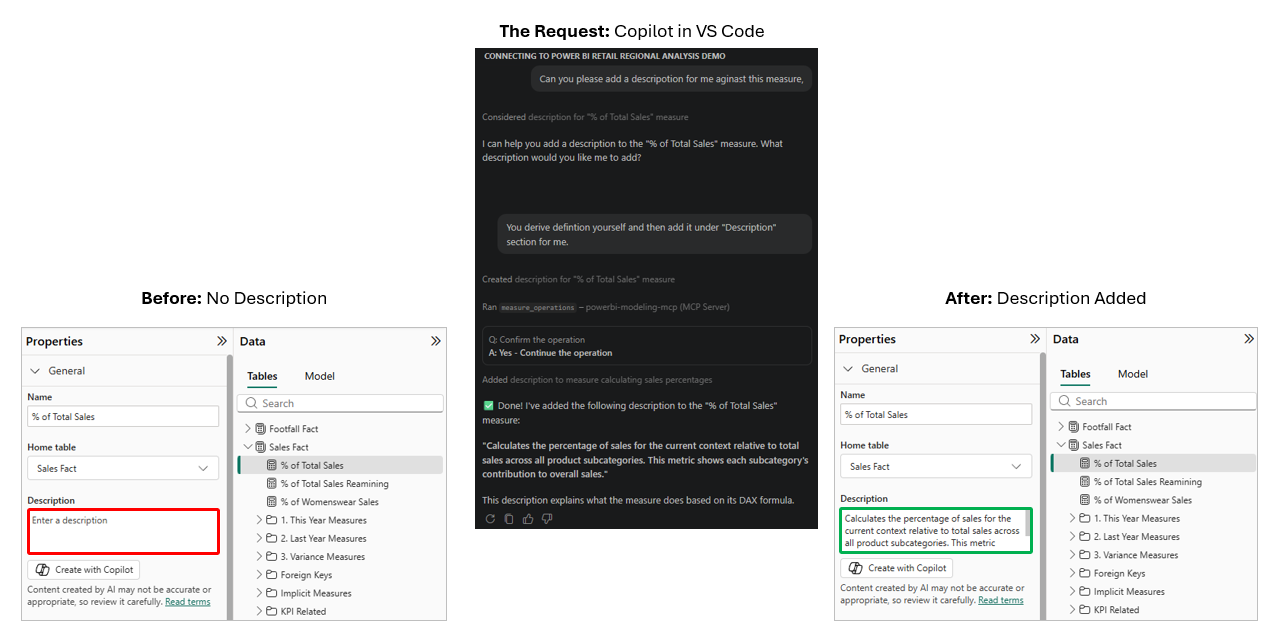
To show this in action and to really understand it, see the example below. I had a measure in my model called "% of Total Sales" with no description on it - you can see that in the left panel. I then asked Copilot in VS Code, running through the Power BI Modelling MCP Server, to generate a description for me and write it to the measure. It came back with a confirmation and a moment later the description was there on the right, live in Power BI Desktop. I didn't refresh, I didn't reopen the file, I didn't save and reload - the change simply appeared. So, hope you can see the difference with MCP vs just a generic chat with an LLM.
Also, I've seen a few places implying this is somehow a new Power BI. Maybe I misunderstood what they said, but just to clear up any confusion… Power BI stays as it is. The underlying Vertipaq engine is still the engine, data modelling still matters, we still use DAX, in fact if anything has changed for me it's this: Governance & Security concerns and considerations should go up. So, think of MCP as just another way to interact with your model just as we have Power BI Desktop, DAX Studio, Tabular Editor.
Host, Client, Server: the vocabulary that matters
Right, so MCP is the standard. But what are the actual components around the MCP architecture?
Microsoft's docs use three words and they're worth getting straight because you'll see them muddled all over the place in community posts. This was helpful for me to really nail down. Getting the vocabulary right is a small thing that signals you've actually done the reading.
Here they are:
- Host: The application you're working in, such as VS Code
- Client: The part inside the host that speaks MCP, such as Copilot
- Server: The part exposing the tools/capabilities, such as the Power BI Modelling MCP server
The easiest way I have found to make this stick is with a restaurant analogy.

Think about the flow like this:
- You walk into the restaurant. That is like opening VS Code or Claude Desktop.
- You ask the waiter for something. That is like prompting Copilot in VS Code or Claude in Claude Desktop.
- The waiter takes that request to the kitchen and brings the result back. That is like Copilot or Claude calling the Power BI MCP Server and returning the result.
Now to map that to the MCP terminology:
- The restaurant = the host: This is the environment you are working in. In our case, that is VS Code or Claude Desktop.
- The waiter = the client: This is the part inside the host that knows how to speak MCP. In our case, that is Copilot in VS Code or Claude in Claude Desktop.
- The kitchen = the server: This is the part exposing the tools and doing the actual work. In our case, that is the Power BI MCP Server.
That is the key point. You do not walk into the kitchen yourself as you do not need to. The waiter knows how to place the order, how the kitchen responds and how to bring the result back to you. That shared set of rules is MCP. So when people say MCP is a standard, this is what they mean. As long as both sides follow the same rules, the client can talk to the server in a consistent way.
Before we move on, two things worth clearing up. First, MCP itself is not one of the three parts in the diagram. MCP is the protocol, so the shared set of rules that lets the client speak to the server. Also, Power BI is not in the diagram either. Power BI is what the server works against - the semantic model itself, its tables, measures and relationships. The Power BI MCP Server is the kitchen and Power BI is the ingredients the kitchen works with.
The two Power BI MCP servers
At this point, you should now have a understanding of what the MCP server is and the components that make up its architecture. So, the next useful question is simple: what are the two Power BI MCP servers and what is each one actually for?
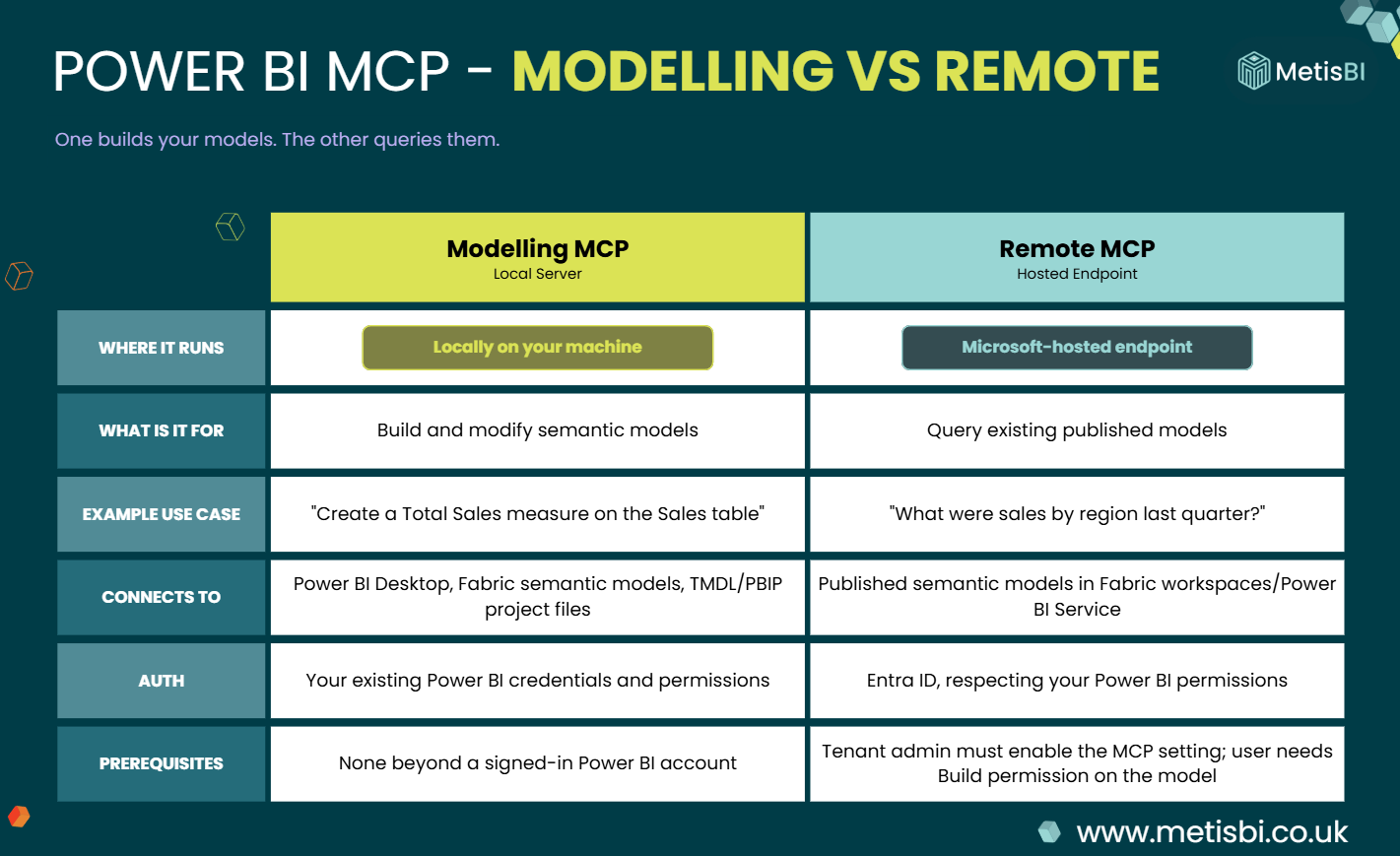
This is where I had some confusion myself when MCPs were first announced, and it is also where I still see a lot of people getting muddled. In conversations with others, I often hear people talk about the two MCP servers as if one is for modelling and the other is for reporting. Not the case! One is for building and modifying semantic models, while the other is for querying published models. If you keep that distinction clear from the start, the rest becomes much easier to follow. I will say again though, both are still in Preview, so treat all of this as early and likely to change.
Modelling MCP - the local one, for building models
The Power BI Modelling MCP Server is the one for model development work. It runs locally on your machine and is aimed at people building and managing semantic models, not just asking questions of them. Microsoft describes it as a local MCP server that lets AI agents interact with Power BI semantic models through natural language, from straightforward property updates through to more agentic development workflows.
In practice, that means it can create and manage tables, columns, measures and relationships, support bulk operations with transaction handling, work with Power BI Desktop, Fabric semantic models, TMDL and Power BI Project files, and also execute DAX queries. It acts with your Power BI credentials and permissions, so whatever access you have in Desktop or Fabric, the server operates within.
In plain English, this is the one you reach for when you actually want the AI to do modelling work for you. Not just suggest a measure, but actually create it. Not just tell you a relationship might help, but actually establish it.
Remote MCP - the hosted one, for querying models
The Remote MCP Server does not run locally on your machine. It is a Microsoft managed hosted endpoint for querying semantic models using natural language. So, to be clear, this one is not about building the model. It is about working against existing published semantic models to retrieve schema, generate DAX and execute queries. Also, to be super clear and remove a common misconception, this does not enable you to create or update report elements of your Power BI solutions.
It can automatically read the structure of the semantic model, so the AI knows what tables, measures and relationships exist before generating queries. It also uses the same DAX generation that powers Copilot for Power BI. This makes it a good fit for scenarios where you want an assistant to answer questions or generate insights from a published model rather than change it. You could always query a semantic model through things like XMLA or REST. What this changes is that an MCP-capable client can now do that conversationally, using the signed-in user’s permissions.
That matters, because the Remote MCP server uses the authenticated user’s permissions for data access. It also has a clearer barrier to entry than the local server, because a MS Fabric admin first needs to enable the setting before users can use it and users also need permission on the semantic model they want to query.
So, if Modelling MCP is the one for building, Remote MCP is the one for asking. That is the simplest way to keep them straight in your head.
Three things MCP lets you do that you couldn't before
Right, so we've covered what MCP is, the architecture around it and the two Power BI MCP servers. So, let's now see some of the things you can do with the MCPs.
It's easy to look at MCP and think it's just AI and Power BI - another chat interface bolted onto something familiar. It's more than that, but it's also less than some of the hype suggests. So let's look at three things I think are new, rather than pretending everything about MCP is a revolution.
Batch operations through natural language (Modelling MCP)
The first one is batch operations. Microsoft's docs describe this as being able to "execute batch modelling operations on hundreds of objects simultaneously with transaction support and error handling."
Now, to be fair, batch operations aren't entirely new in the Power BI world. In Power BI Desktop you can already select multiple measures or columns and change shared properties such as data type, format, display folder, all in one go. Plus, Tabular Editor has supported scripted batch work for a while, along with Best Practice Analyzer rules. So if you're a senior user, you're probably already doing batch work today.
What's different with the MCP Server isn't the batch capability itself. It's the interface to it. You describe what you want in natural language, such as "add descriptions to EVERY measure in the Sales table that doesn't have one" and the agent figures out the mechanics and executes through the server. You're not writing a C# script or clicking through multi-select - you are describing the outcome.
Now, that example was a small one though. The same mechanism applies to bigger jobs such as bulk renaming across tables, refactoring measures, translating an entire model into another language, applying security rules across a model. Work that used to need a Tabular Editor script or just got skipped because no one had time.
That's not a revolution, but it is a real shift. I mean it genuinely is useful and I can see how it can save lots of time. Also, it lowers the bar for the kind of model work that today only gets done by people comfortable scripting in Tabular Editor. How well it scales, how reliable the transaction handling really is, and whether it holds up on complex models - those are things I want to test properly in later blogs rather than claim now.
Working directly on PBIP files, no Desktop needed (Modelling MCP)
The second one is that the Modelling MCP Server can work directly against a PBIP folder, the text-based semantic model definition stored as TMDL files on disk, without Power BI Desktop running at all.
I tested this with Desktop fully closed, I pointed the MCP Server at the definition folder inside a PBIP project and the agent connected, read the TMDL files, and correctly summarised the model… 11 tables, 83 measures, descriptions and all. I started asking it various questions and asking it to make changes. Really cool! No Desktop, no binary .pbix, just files on disk.
This matters for anyone doing source-controlled Power BI work. Today, if you want to make model changes through git-based workflows or a CI/CD pipeline, you typically go through Desktop or you script it through tools like Tabular Editor, XMLA scripts or something else. With MCP, you point the server at a PBIP folder and an AI agent can read the TMDL, apply changes and write valid TMDL back to disk. Just the agent working on the model's source code directly.
This is interesting because it means AI can now participate in the same development workflow the rest of your code does, version-controlled, reviewable in pull requests, automatable. To be clear, that workflow has been possible for a while with tools like Tabular Editor scripts. What's new is having an AI agent in the loop, reading and writing TMDL directly, the same way a developer would.
Any AI agent can query a governed semantic model (Remote MCP)
The third one is on the Remote MCP side. Microsoft's docs describe Remote MCP as exposing semantic models through a hosted endpoint, with schema-aware querying, Copilot-powered DAX generation and flexible LLM integration - you can use any LLM provider supported by your MCP client.
Now, you could always query published semantic models. For instance, the XMLA endpoint, REST APIs, embedded analytics, Copilot for Power BI inside the service itself. All of those existed, but what the Remote MCP adds is a standardised way for any MCP-capable AI agent to ask natural-language questions of your governed semantic models, using the permissions of the signed-in user.
Let me name the practical implication plainly. If Remote MCP is enabled and you have a semantic model published in a Fabric workspace, an AI assistant running outside Power BI, Claude Desktop, a custom agent, something your organisation builds internally, can now query that model conversationally, without needing to understand DAX or any of the plumbing underneath. It asks the question, the model's schema is read, Copilot generates the DAX and the data comes back.
That is different from what was possible before. Whether it's useful in practice will depend heavily on how well-documented your semantic models are and how comfortable your organisation is with AI agents querying production data. But the capability itself is new and available.
Summary
So that's the intro blog to Power BI MCP, but lots more to come! We've covered what MCP actually is, the host, client, server vocabulary that gets muddled everywhere, the two Power BI MCP servers and what each one is for, and three things they let you do that weren't really possible before.
If you've followed along, hopefully you feel more comfortable with what this stuff is and, just as importantly, what it isn't. Also, MCP is not a new form of Power BI, it's a new way to interact with the Power BI you already have. I do want to say there is a lot of hype around this subject and clients are asking me about it. What I say is great to explore and stay curious, but always have your mind on what's the value, what's the ROI and, without a doubt, security and governance. There are genuinely useful capabilities here as we saw, but also real questions on security and don't forget it's still in Preview, so if you're thinking about using it for anything beyond experimentation… watch out.
As I said at the top, this is the first in what will be a longer series on the subject. In the next blog, we'll go hands-on with the setup, installing VS Code, Claude Desktop and getting the Power BI Modelling MCP Server connected to an actual model so you can start testing it yourself. After that, I'll go deeper into real-world testing to see where it holds up and where it falls short.


.png)
.avif)
.png)