


.png)


Tell a business user their reports are "in the app" and many instantly think of an application installed on their phone. The name does not help and it gets worse with all the additional items Microsoft offer with the word "app", but the concept matters, because a Power BI app is how content should reach almost all end users in your business.
The short answer
A Power BI app is the read-only, packaged version of selected items within a workspace, bundling a collection of reports and dashboards into a single package for the people who only need to consume them. You publish an app on top of the workspace, and it presents the content with clean navigation, on brand, without the technical detail and buttons of the working environment. The workspace is for development, the app is for the business and report consumers. Also, its a one to one relationship, you can have one app for one workspace.
Key takeaways
- A Power BI app bundles a set of reports, dashboards or any readable items, into a single app, built for business users and report consumers.
- Only final, production-ready content belongs in an app. Drafts stay in the workspace, and a workspace is more for testing and development.
- One app can be the front door, end users open the app in their browsers or mobile devices, and never need to set foot in a workspace.
- Who sees what within an app is handled through app audiences, each audience within the app gives a group of users a tailored view of the content.
- The Power BI Apps we will discuss in this blog are also referred to as workspaces apps, not to be confused with Org Apps or Fabric Apps.
A quick note on all the "apps"
One thing to clear up before we go deeper... everything in this blog is about workspace apps, which is simply another name for Power BI apps. Why does that need saying? Well, we now have org apps, we have app audiences, and we even have Fabric apps, so that is a lot of "apps" flying around. So to be clear again, we are focusing on Power BI apps. If you are fairly new to Power BI and someone told you to "check the app", it is almost certainly a workspace app they meant, and that is what we cover here.
What a Power BI app actually is
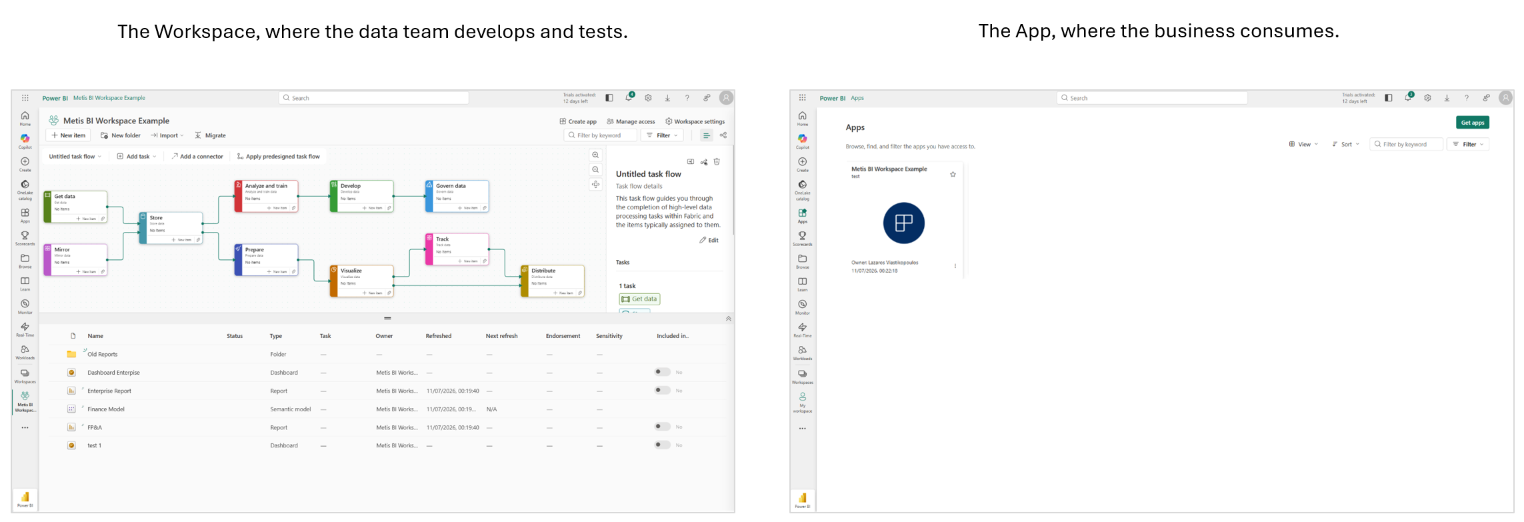
When your team builds in a workspace, everything within it is visible: drafts, test versions, semantic models (what Power BI used to call datasets), refresh settings and so much more. And here is the problem, to give someone access to one relevant item, like a report, you have to give them access to the workspace itself, which means they end up seeing everything in it. And no, shareable links are not the solution, though it is the common approach we find. An app is what you publish on top of the workspace once content is ready for consumption. When you create an app, you choose which items go in, reports, dashboards, paginated reports, so only the finished, consumable content makes it through. The consumer gets a user-friendly, easy-to-navigate experience with a structured navigation menu, your brand and nothing they can break. No Power Query Editor or Model view as we have in Power BI Desktop, no relationships between tables, no mention of task flows or technical jargon. The app allows consumers to view reports and interact with content, filtering and exploring as they need, but they cannot edit anything. It is built for the end users!
See below the difference between landing in a workspace and landing in the Apps interface. To view a report through a workspace, you have to land in the workspace itself, and yes, I did add a lot to my example, but in reality this is what a workspace can look like. On the other side, the business user simply sees tiles (or a list) of apps, clicks one, and gets the relevant packaged items, reports, dashboards and so on. The screenshots should make the point clear.
Why use Power BI apps
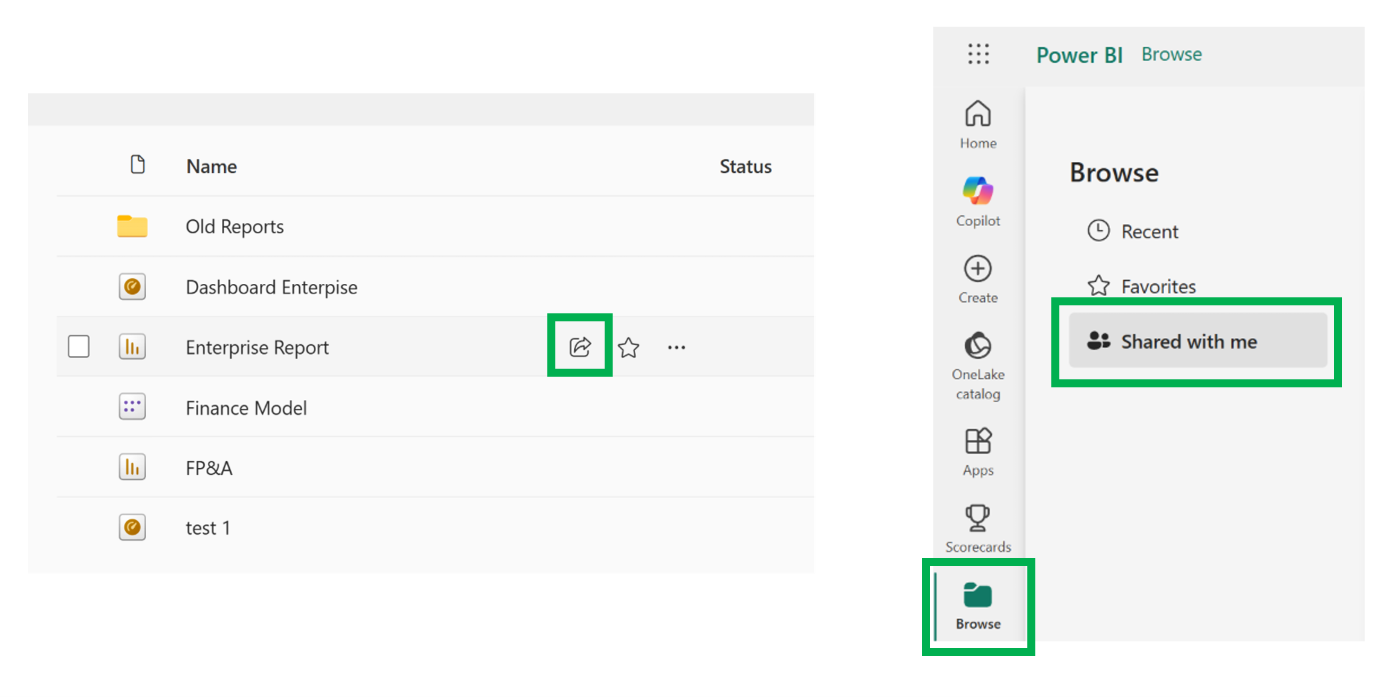
You now understand, using a workspace and giving access means viewing all items within it. There is no layered or more granular access control at the item level within the workspace. This is why shareable links are the go to solution for many organisation. People hunt through "Shared with me", nobody can say who has access to what and data sharing gets harder to govern and manage with every link sent.
Apps are a convenient way to distribute content instead, and in my view the right default for teams using Power BI day to day. You publish a single app from a production workspace, and end users get easy access to the relevant reports and dashboards, nothing more, with everyone reading the same accurate information. I have covered how you share reports in Power BI more widely in How to Share Power BI Reports, but the short version is, for regular business consumption, use apps first and links as the exception.
Apps offer scale too. A workspace suits a team of developers, a single app can distribute reports and dashboards to a broad audience, serving large groups of users from one department to the entire organisation. Apps provide curated collections of dashboards and reports with a structured layout, making it easy for users to find what they need, an efficient way to carry multiple dashboards and reports to a large audience. In my experience it helps with security and compliance as well, access is managed in one place, through audiences, which helps simplify life for whoever has to evidence who sees what. A decision-maker opening a dashboard on their phone and an analyst at a desk see the same governed content, and both can interact with the data safely.
Where the app sits in the development lifecycle
The app is the final step of the development lifecycle, not a separate world. Developers build in Power BI Desktop or directly in the Power BI Service (the Power BI web experience has improved drastically over the years), content is tested in UAT, and the app is published or updated once it is signed off. A trick we often use with clients in Metis BI is publishing a UAT app to a small group first, to gather feedback before anything reaches the business.
Updating is deliberate too, and this is one of the app's quiet strengths. When the data refreshes, the app shows the new data automatically, so a team that needs to track inventory always sees current numbers. When you change the content itself, new reports, changed visuals, the changes stay in the workspace until someone with the right permission chooses to update the app. Fabric workspace admins and members control that step, and the gap between building and releasing is a governance control worth keeping.
What a Power BI app is not
A Power BI app is not an app store download, although you can open one on mobile devices by clicking a link or through the Power BI mobile app. It is also not Power Apps, the app-building product in the Power Platform, the names are close and the confusion comes up more than you would think. Finally, it is not a workspace substitute, every app is published from one, traditionally one app per workspace, with audiences controlling what users see, and which content in the app each group gets. There is also a newer Fabric item called an org app, which allows several apps from a single workspace. It went generally available in mid 2026, and I cover where it fits in Designing a Power BI and Microsoft Fabric Framework. But, for a quick answer, the workspace app with audiences remains the proven default for most estates today.
How Metis BI helps
Most organisations we meet are somewhere between shareable-link chaos and a half-adopted app. We help teams make the app the front door of their analytics estate, structure audiences properly, streamline how content reaches the business, and keep workspaces for the people actually developing. The result is a better user experience for the business and an analytics setup you can actually govern. If your business users are still hunting through links, our Power BI and Microsoft Fabric governance assessment is a good place to start.
Frequently asked questions
Do app users need access to the workspace?
No, and ideally they should not have it. Access to the app is managed separately. The one thing consumers do need is Read permission on the semantic model (the dataset, in old terms) that a Power BI report connects to, otherwise reports within the app will not load.
Does the app update automatically when data refreshes?
Yes. Data flows through on the semantic model's refresh schedule regardless of the app. You only update the app when you want structural or visual changes to reach end users.
How many apps can a workspace have?
One, in the traditional model, with audiences handling different groups inside it. Org apps, generally available since mid 2026, allow several where the use case calls for it.


.avif)
.png)
.png)