.png)


Publish a report from Power BI Desktop and you will be asked one question before anything else: which workspace? For a lot of people that is the first time they meet the term and it is worth understanding properly, because it's linked to how you store, share, work in different environment, security and governance.
The short answer
Think of a workspace in Power BI or Microsoft Fabric as a folder in the Power BI Service (app.powerbi.com) that stores different items: reports, semantic models and dashboards. With Microsoft Fabric, that list has grown drastically, you now have pipelines, notebooks, warehouses, lakehouses and so much more. It is where your content first lands when you publish from Power BI Desktop or where its stored if you create directly inside it. Also, it is the collaborative environment where the core data team builds and tests. A workspace is also a security boundary, giving you controlled access and clear ownership over everything inside it.
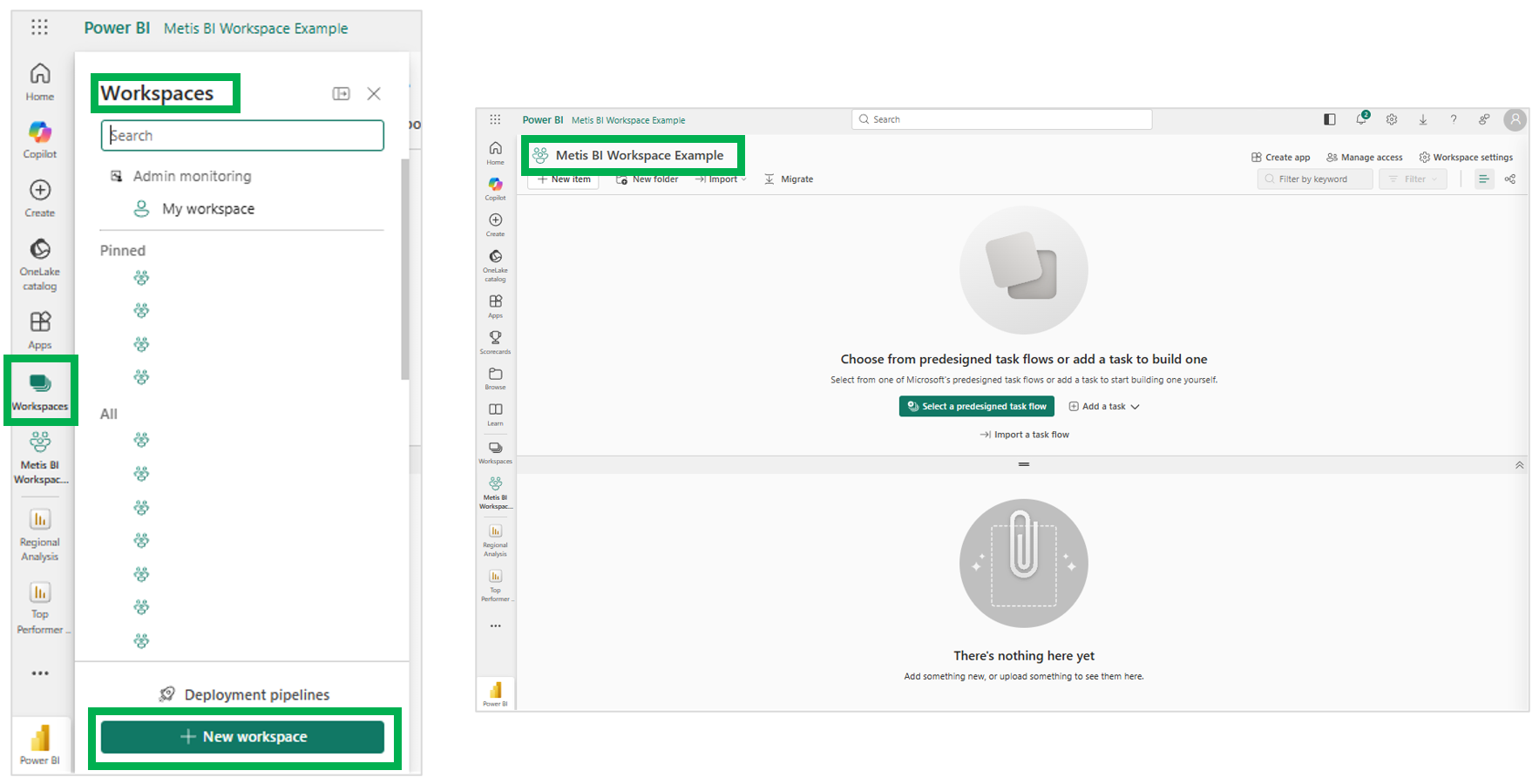
You can see the basics below: opening Workspaces in the left navigation shows your Pinned and All workspaces alongside My workspace, and selecting "+ New workspace" creates a new one, such as my "Metis BI Workspace Example". Once created, it sits empty and ready, either for items published from Power BI Desktop or for items created directly in the Service.
Key takeaways
- Think of a workspace as a folder that stores your Power BI and MS Fabric items and the landing place when you publish to the Power BI Service from Power BI Desktop.
- Workspaces are for developers and content owners, not business users or report consumers. Consumers get the app instead.
- My Workspace is a personal sandbox tied to one account. Nothing the business relies on should exist here or be stored here.
- With Microsoft Fabric, workspaces hold far more than Power BI items: notebooks, pipelines, warehouses and other Fabric items all live there too.
What lives in a workspace
Workspaces, also referred to as shared workspaces, hold various items such as reports and dashboards, dataflows, paginated reports and semantic models (what Power BI used to call datasets), each with its own settings, such as the data source connections and data refresh schedules on a model. The semantic model is the item to treat with the most care, and I have written about why in Power BI Semantic Model and Why It Matters More in the Age of AI. With Microsoft Fabric, where Power BI is one workload within the wider platform, the same workspace can also hold notebooks, pipelines, warehouses, lakehouses, real-time intelligence items and more. The workspace does not care what the item is; it is the container, the unit of organisation and a unit of security. If you want the wider picture of what Fabric adds, I cover it in What Is Microsoft Fabric?
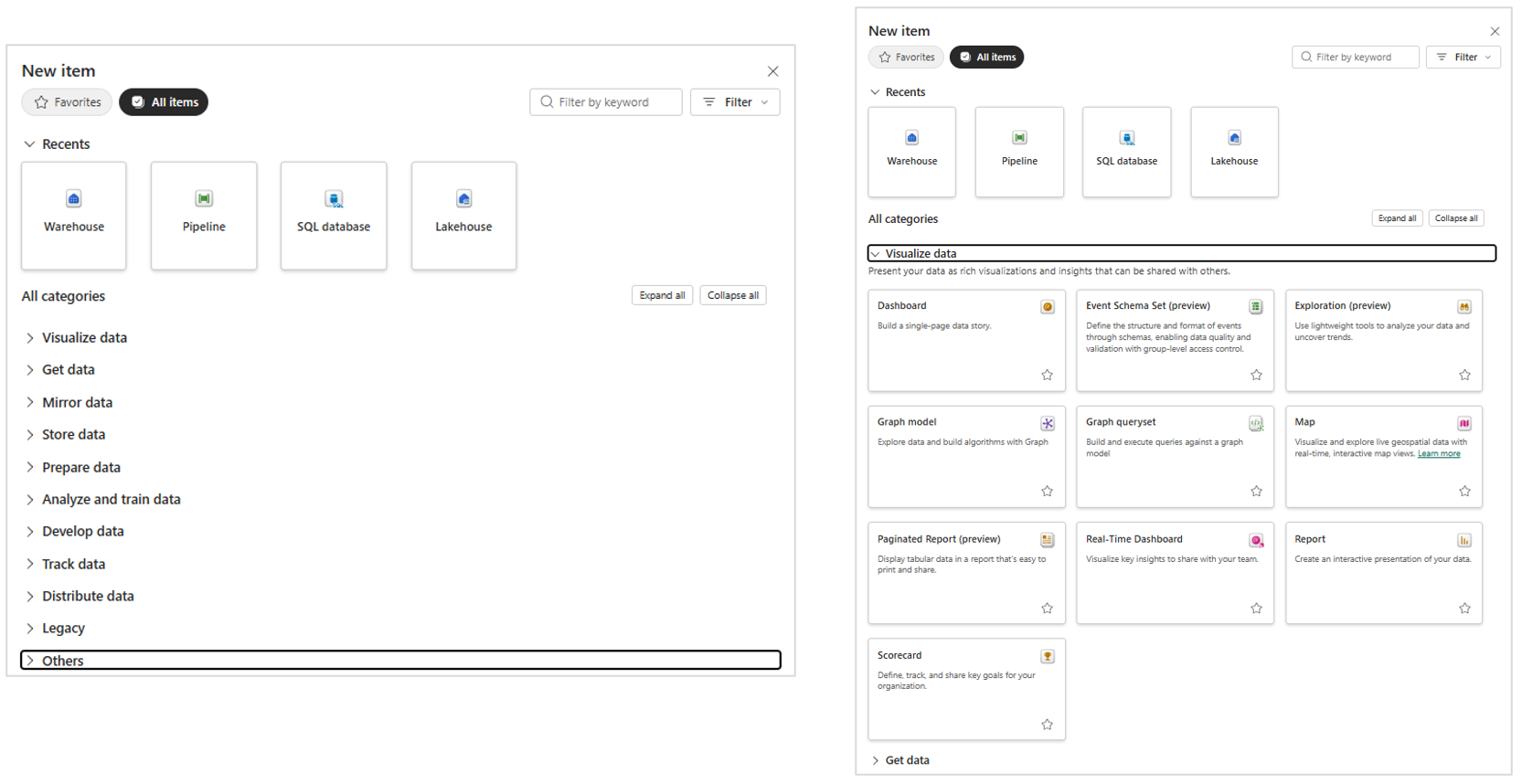
Below, you can see all the items that can created and stored within a Power BI Workspace. So, years ago the number of items were quite limited you would have reports, dashboards, workbooks (no longer the case), dataflows, paginated, etc. But with MS Fabric, well you can see many more items we would traditionally find in other portals such as the Microsoft Azure Portal.
Publishing in or building directly inside
I mentioned above that the workspace is where content lands when you publish, and that is still the main entry point for most teams. But you can also create items directly inside the workspace, which has always been true for Microsoft Fabric items such as notebooks and pipelines, and is increasingly true for Power BI items too: reports, semantic models and more. Over the years Microsoft has genuinely improved the experience of developing directly in the Power BI Service, to the point where building in the browser is more of a serious option. I have written about exactly how far that goes in Create Reports in the Power BI Service Using a Browser. Either way, the destination is the same: everything lives in a workspace.
Shared workspaces vs My Workspace
Every account gets something called My Workspace, and it is not the same thing. Think of it as a personal workspace, a private sandbox tied to one individual account. It is fine for experiments and nothing else. I have seen entire production estates hosted in a single My Workspace and distributed by shareable links, more than once, and it fails on every count. Content there cannot be governed through workspace roles, cannot be distributed through an app, cannot have access managed through groups and depends entirely on one account staying available. The best practice is blunt, if the business relies on it, it belongs in a shared workspace.
Who workspaces are for
Here is the part most organisations get wrong. Anyone with permission can create a workspace in a couple of clicks, which is exactly how business intelligence estates sprawl. A workspace is where we collaborate, build and test, aimed at the core data team and content owners, not the business users or report consumers. Access is controlled through four roles, Admin, Member, Contributor and Viewer. You add members, ideally as security groups, and assign each a role, with Admin holding full control up to and including the ability to delete the workspace. The rule of thumb is simple, developers and content owners work in workspaces, consumers from the business get the Power BI app published from it, and should never need to set foot in a workspace at all.
How many workspaces you need, and how to divide them, is a design decision in its own right, and I have written about it in more detail here: Designing a Power BI and Microsoft Fabric Framework. But, for a quick answer, it could be per project, per analysis, per report, per department and several other ways, all depending on your organisation and specific requirements.
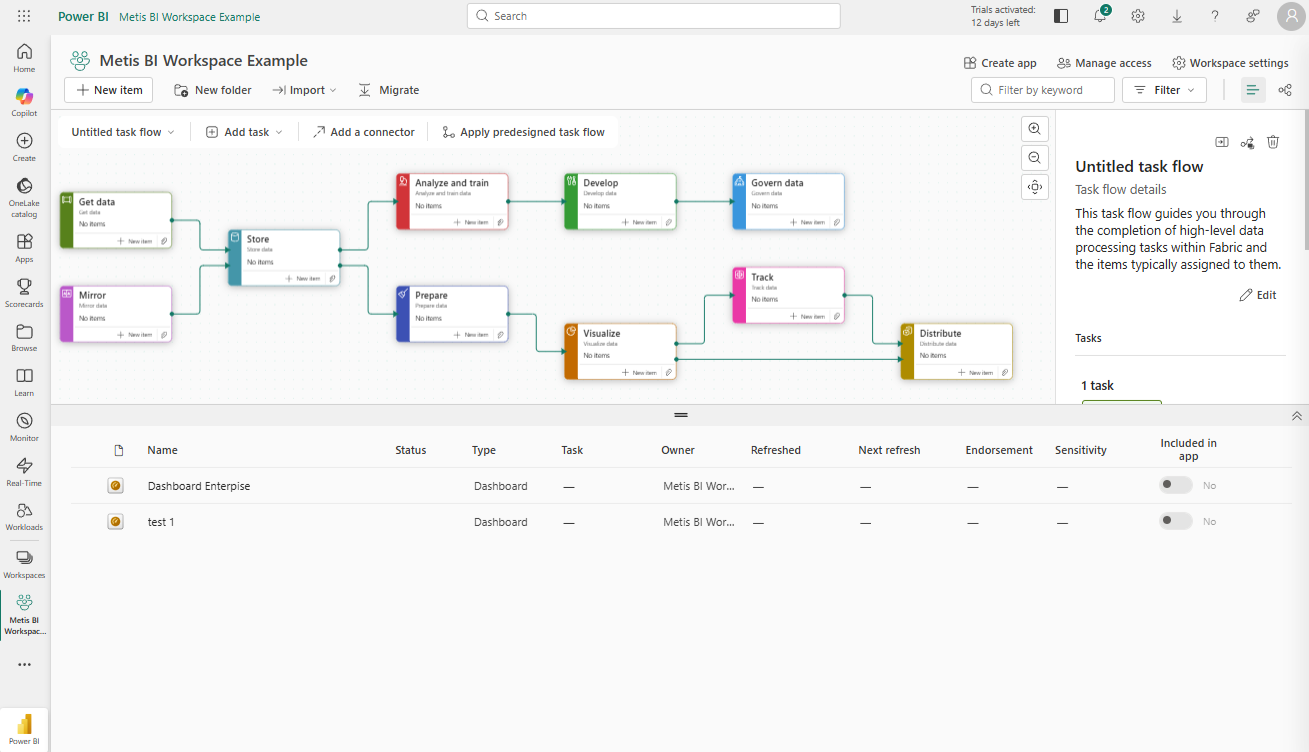
If you want proof this is no place for business users, look at the screenshot below. That is a workspace with a task flow open: Get data, Store, Prepare, Develop, Govern, Distribute, a full data processing pipeline laid out across the top, with the item list underneath. I have only added two sample dashboards here; imagine a production workspace with dozens of items, refresh schedules, endorsement and sensitivity columns, a New item menu with half of Fabric inside it. Now imagine your SLT landing in the middle of that to find one report. I always tell my clients the same thing, Microsoft has actually made this argument easier to win over the years, and task flows arriving in workspaces settled it. This is a working environment for the data team, and the app exists so nobody else ever has to see it.
How Metis BI helps
Workspaces are simple to create and easy to get wrong at scale, and most Microsoft Fabric estates we see grew one workspace at a time with nobody designing the structure. We help organisations set up a workspace framework that fits their team, and bring sprawled estates back under control. If that sounds familiar, our Power BI and Microsoft Fabric governance assessment is a good place to start.
Frequently asked questions
Is a Power BI workspace the same as a folder?
Close enough as a mental model. It is a folder in the Power BI Service that stores your items, with one important addition: it is also a security boundary, so access and ownership are controlled at the workspace level.
Can business users access a workspace?
They can be given the Viewer role, but in most cases they should not be. Workspaces contain drafts and work in progress. Business users should consume finished content through the app published from the workspace.
Do Microsoft Fabric items live in the same workspaces?
Yes. Fabric uses the same workspaces, so notebooks, pipelines, warehouses and lakehouses sit alongside your Power BI reports and semantic models in one place.