


.png)


Summary
When people ask "Where can I download the free desktop application for data analysis?", they are usually referring to Power BI Desktop. It is Microsoft’s free desktop tool for building data models, reports and dashboards. You can download it either from Microsoft’s website or from the Microsoft Store, and the choice affects how updates and version control are handled.
Key Takeaways
- The free desktop application for data analysis (Power BI Desktop) is available from the official Microsoft website and the Microsoft Store.
- The Microsoft Store version updates automatically.
- The web download gives organisations more control over version management.
- The right choice depends on whether you prioritise convenience or stability.
Where Can I Download the Free Desktop Application for Data Analysis?
There are two official and safe places to download the free desktop data analysis application:
1. Download from the Official Website (Web Installer)
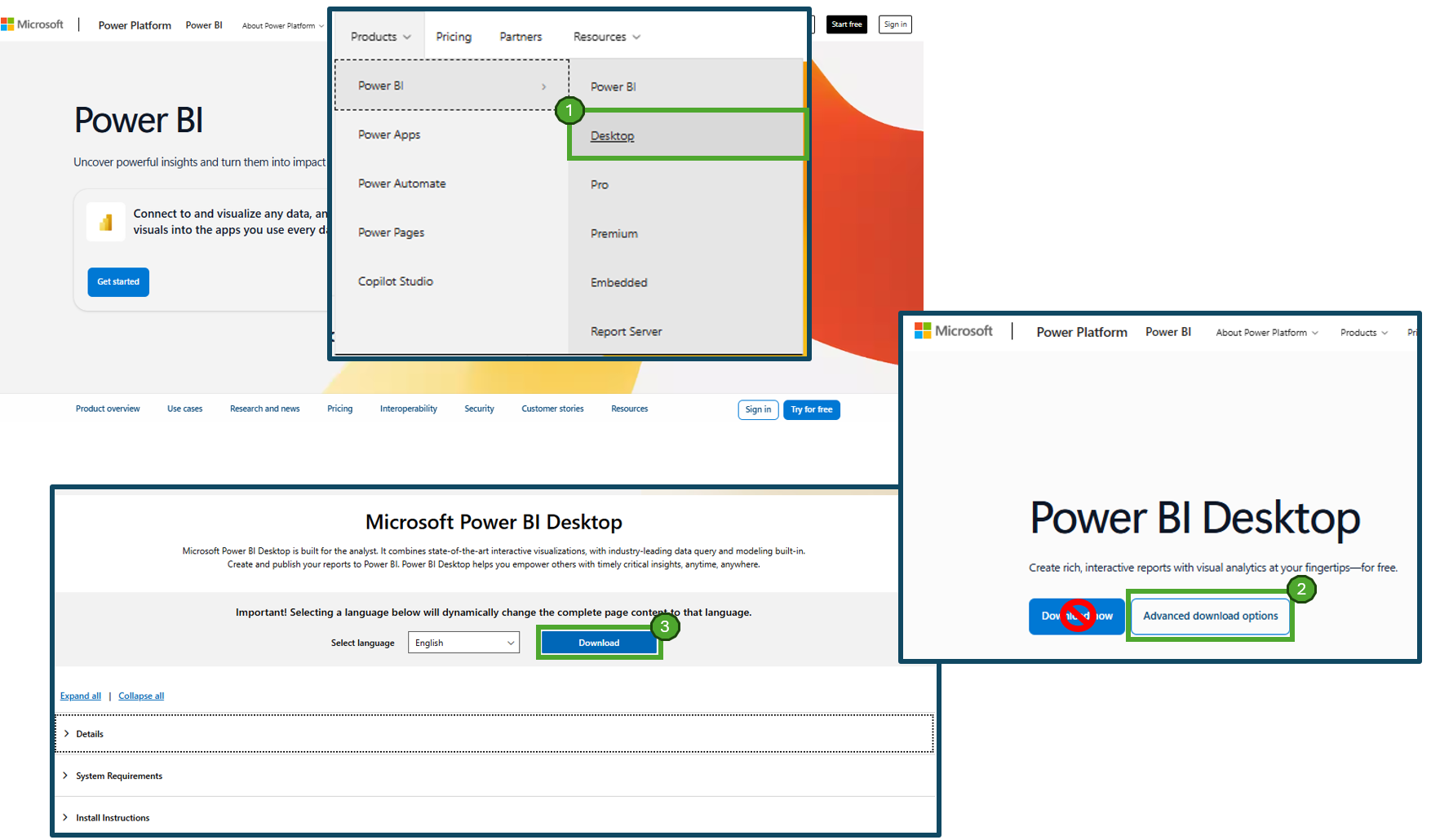
You can download Power BI Desktop directly from https://powerbi.microsoft.com/.
Important detail: if you simply click the main “Download” button, it may redirect you to the Microsoft Store again. Instead, click Desktop and then choose Advanced download options. That takes you to the actual download page where you can download the installer directly through your web browser.
On that advanced page, you can:
- See the exact version number
- Review system requirements
- Download the installer file (.exe)
Keep in mind, this version will not auto-update monthly. You will need to manually download and install new versions when they are released.
2. Download from the Microsoft Store (Windows Store)
If you are using Windows 10 or Windows 11, you can install Power BI Desktop directly from the Microsoft Store. In the Microsoft Store, search for “Power BI”. That is the correct application. Do not confuse it with “Power BI Report Builder”. That is a different tool used for paginated reports and it is not the standard desktop application for data analysis. Wondering what is the difference, well check our blog here which gives you all the details you need: Migrating from SSRS to Power BI Paginated Reports: A Practical Guide.
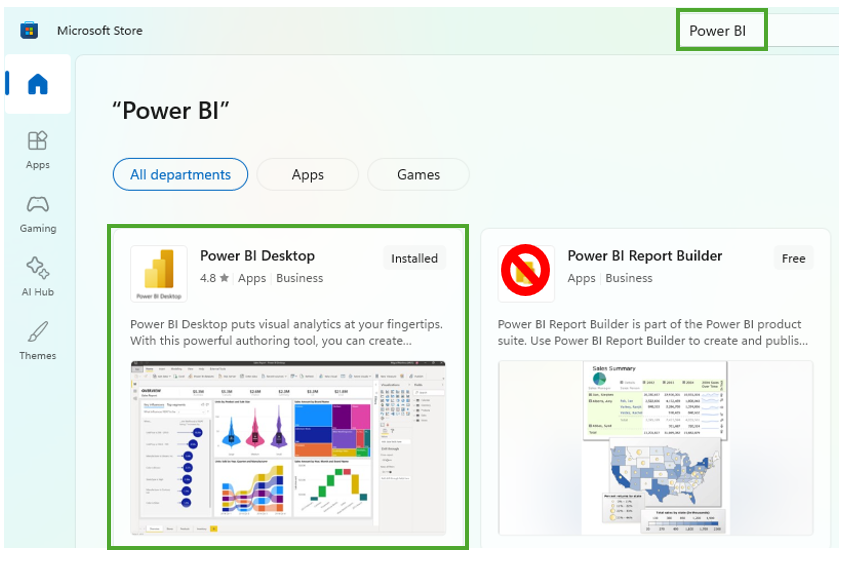
The Microsoft Store version delivers the latest monthly updates automatically. Power BI Desktop is typically updated every month (apart from January… everyone needs some time off). Once installed through the Store, new releases are automatically pushed to your machine.
Now hold on… before you just click download, let us talk about the difference.
Microsoft Store Download – Pros and Cons:
Pros:
- Automatic Updates: The Store version updates automatically when Microsoft releases a new version.
- No Manual Maintenance: Users do not need to monitor release cycles.
- Seamless Installation: Installation is handled entirely through the Windows ecosystem.
Cons:
- Less Version Control: You cannot easily delay or freeze updates.
- Bug Exposure: If a new version introduces an issue, you receive it immediately.
- Not Always Allowed: Some organisations block Microsoft Store access through policy.
I get this all the time in workshops. End users love automatic updates. IT teams sometimes do not.
Web Download – Pros and Cons:
Pros:
- Version Control: Organisations can decide when to upgrade.
- Stable Rollouts: Updates can be tested before deployment.
- Better for Enterprise Governance: Works well with centralised software distribution.
Cons:
- Manual Updates Required: Users must download and install new versions themselves.
- Risk of Outdated Versions: Teams can end up months behind if no one manages updates.
Think about it… an analyst stuck on a very old version may miss features, performance improvements or compatibility fixes. That frustration is real.
A Quick Note on IT Restrictions
What we always find within clients is this, users often cannot download anything from the web or the Microsoft Store directly.
Many organisations have a Software Centre or internal application portal managed by IT. In that case, you will not be able to install Power BI Desktop yourself.
If that is you, speak to your IT team or the appropriate internal function. They will either publish Power BI Desktop internally or control which version is approved.
Power BI Is Running Slow on My Machine - What Should I Do?
A very common question. My recommendation is simple: minimum 16GB of RAM.
If you are importing data, performing memory-hungry transformations in Power Query, building large models or writing complex DAX, and your machine has 8GB (or less), you will likely hate your life for a moment.
I have been there. Done that. 16GB or more is the right baseline for serious data analysis work in Power BI Desktop.
Which Option Should You Choose?
Here is the thing.
If you are an individual analyst working alone and want the simplest route, the Microsoft Store version is typically easier.
If you are part of a team, especially in a regulated or structured environment, the web download often makes more sense because it gives control over timing and testing.
However, there is no universally correct answer. It depends on your governance model and how disciplined your update process is (your IT people).
Need Help Rolling This Out Properly?
As you see above, downloading the Power BI Desktop application for data analysis is easy. However, governing it across a business is not.
If you are rolling out Power BI Desktop across your organisation and want structured deployment, version control and proper governance, learn more about our services: Power BI governance services and Power BI report development services.
We help organisations avoid version chaos, inconsistent builds and frustrated end users.


.avif)
.png)
