





I get this one a lot (probably top 5 most common questions), and more so since Save As started offering more than one option. Which Power BI file format should I be using? The person asking usually expects a technical answer. In our experience it is more than that, it is a governance answer too, because the file format decides where your data goes and what kind of version control you can do.
Here's the thing. Someone builds a Power BI report, it looks good and sexy, a colleague asks for a copy and the PBIX gets emailed across. In their head they have shared a report. In reality, if the model is in Import mode, they have shared every row of data in it and that copy now sits in an inbox nobody governs. I have seen this with payroll data and with patient-level data (not good). Nobody meant any harm, they just did not know what was inside the file.
So, let's fix that, starting with what is actually inside each file.
The short version
Power BI Desktop produces three file formats. PBIX is a single file that holds the report, the semantic model and in Import mode, the data itself. PBIT is a template, the same report and model definition with the data rows stripped out, although some data values can still persist in the report metadata. PBIP is a Power BI Project, a folder of text files that separates the semantic model and report so the work can be tracked in source control and read by other tools.
Key takeaways:
- The file format decides where the data goes.
- A PBIX file in Import mode carries the data with it.
- A PBIT is smaller and usually safer to share, but it is a snapshot and filter or slicer values can still be saved.
- A PBIP is a folder. It changes how the work is stored on disk and nothing about what the report or model can do.
- PBIX is still the primary format and is not going anywhere.
- Choose the format based on who owns the content and whether anyone needs to see what changed.
To all you experts, yes, I know there are .pbids connection files, .pbiviz custom visuals and theme JSON files too. But Power BI Desktop saves three things and those three file types are what this blog is about. Below, you can see the types you can select when in Power BI Desktop:
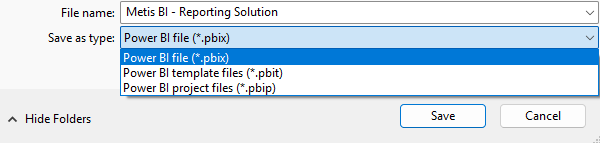
PBIX file, the Power BI Desktop default
What it is
The standard Power BI Desktop file, the one we have all been saving for years. If you have built anything in Power BI, you have made one of these and most seasoned developers will have hundreds of them lying around. One file, everything inside it and the default whenever you hit Save. It can be converted to PBIP and back through Save As.
What is inside
The report pages and visuals, the semantic model (tables, relationships, DAX measures, security roles), the Power Query transformations and, in Import mode, the data itself. It is a binary file, a zip archive underneath, and yes, people do rename it and poke around. Please don't! Microsoft does not support editing a PBIX outside Desktop, and I have seen a file refuse to open after someone "just changed one thing".
Where the data goes
Wherever the file goes. Email it and the data is emailed. Drop it in Teams and the data is in Teams. The exception is DirectQuery or Live Connection, where the file holds the connection/metadata and nothing else, so whoever opens it still needs their own access to the source. In practice, most of the files I come across are Import.
What it is for
- A analyst building a report for their own team. One person, one file, published to a workspace in which they own.
- Anything where a single developer owns the content end to end and nobody else needs to touch it from a development point of view. Plenty of people can still consume it.
- A self-service user who just wants to pull in a spreadsheet or connect to a existing semantic model, build a few visuals and get on with their day. No model to share, no team to hand over to.
- A quick proof of concept you want in front of a stakeholder by Friday.
Where it bites
Three things... in Import mode the data travels with the file, so sharing needs a thought before it happens. Also, there is no built-in way to see what changed between two versions in PBI Desktop. Committing a PBIX to a Git repo whether in GitHub or Azure DevOps stores the whole file every time and tells you nothing about which measure was edited or any other change. I know teams who use Git this way. It works right up until the first "who changed this?" question... and then it doesn't.
Also, and this one comes up at Metis BI all the time, you cannot work on a single PBIX collaboratively. One person wants to add a new measure, another wants to add a visual to a page and tweak the model on the way. On one PBIX only one set of changes survives, whoever saves last wins and the other person's work is overwritten. Not good!
PBIT, the template format
What it is
A Power BI template. This one has been around for many years as well and I have leaned on it more than most people realise. It is the same report and model definition, exported without the data rows. You create one through File > Export > Power BI template (or Save As), and Desktop asks for a description on the way out.
What is inside
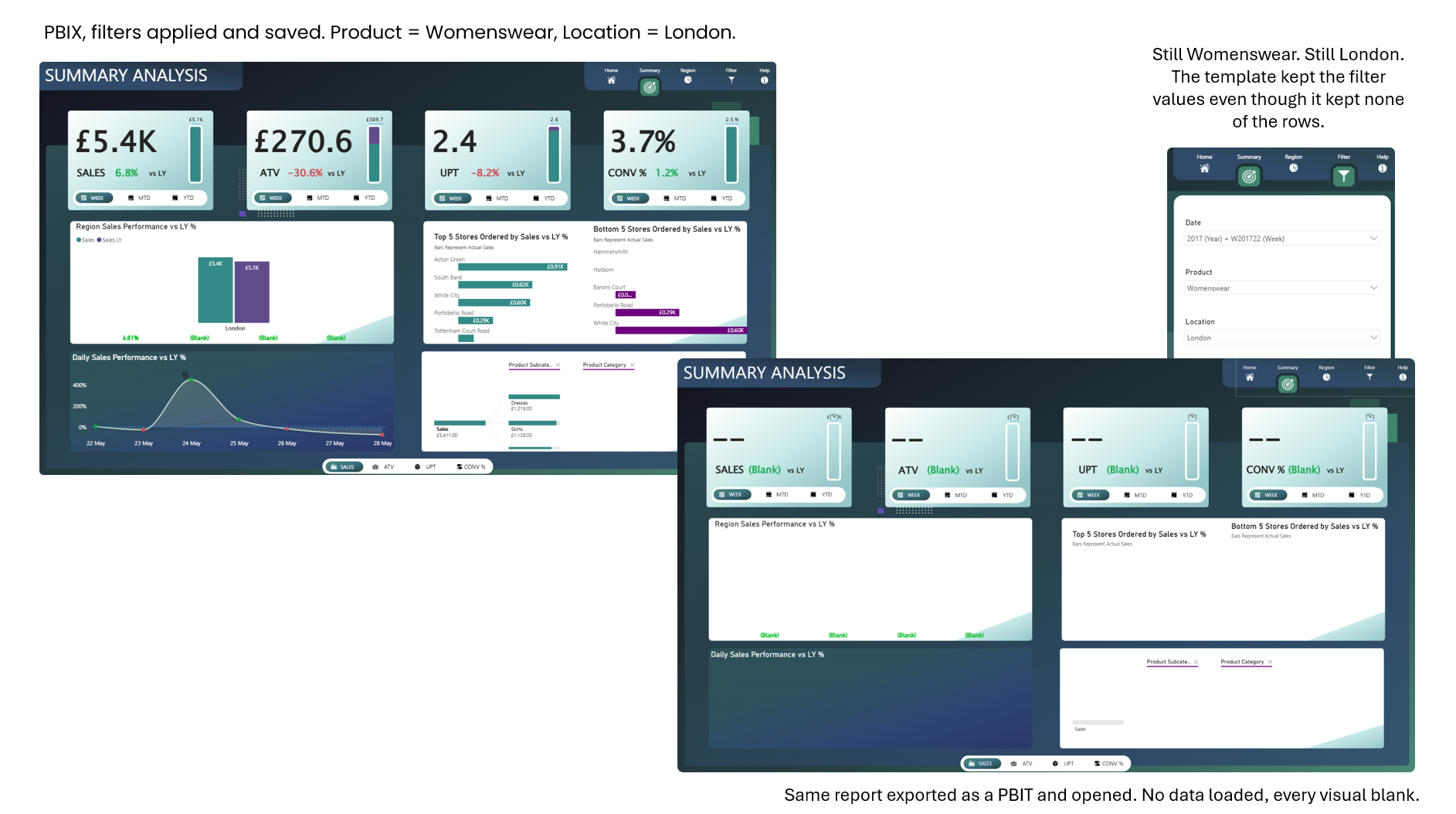
The report pages and visuals, the model definition (schema, relationships, measures and the rest) and every query definition including any parameters. When someone opens it, Desktop asks for parameter values if the model uses any, then goes looking for the data source. If it has the connection details and credentials already, it just starts loading, as it did when I tested it for the screenshot below. If not, it asks. It is a much smaller file and usually safe to email.
Now, here is a nuance many miss and it is in Microsoft's own documentation. "No data" means no data rows. It does not mean no data values. If a visual in the report was filtered to a particular customer, that customer's name is saved in the template. Slicer selections persist. Column widths persist. So a template exported from a client build can still carry customer names, regions or product lines... something to check before you hand one over. I always tell my clients, open the template yourself first and look at every slicer and filter pane.
Where the data goes
In plain terms, the template format sucks the data out. Open the PBIT, cancel the refresh, switch to Table view and every table is empty. This holds for Power BI semantic models of any size, the structure stays and the rows go. Whoever opens it loads the data themselves, and only if they have access to the source and the right credentials, which is the whole point of this report format. The values left behind in filters and slicers are the exception I just described.
What it is for
- A standard starting point across teams, so every department opens the same theme, the same core measures and the same page layout.
- Keeping copies in OneDrive, SharePoint or a file share without archiving the data with every one of them. A PBIT is a fraction of the size of the PBIX and a folder of dated PBIX backups is a folder full of data nobody is governing.
- Rolling one build out to several teams who each hold their own data, where every team opens the template and connects it to their own source. The underlying structure, the tables and the columns, has to be the same across all of them, and in this scenario it is.
- Handing a build to a client or an organisation without their data in it.
Where it bites
A PBIT is a starting point and nothing more. Once someone opens it and saves a PBIX, that file has no link back, so fixing the template later changes nothing already built from it. Copied PBIX files drift the same way, a template just invites it on purpose. Also, a template only lives in Desktop. You cannot publish it or share it as a report, someone has to open it, load data with their own credentials and save a PBIX first. Add the persisted filter values from the section above and a template needs a little more care on the way out than most people give it.
PBIP, the Power BI Project
What it is
A folder. That is the first thing to get your head around, because most people search for a PBIP file and expect one file. When you save as a Power BI Project, Power BI Desktop writes the report and semantic model out as plain text files, each in its own place in a folder structure Desktop lays out for you. It has been in preview for a long stretch and Microsoft has said general availability is planned for 2026.
What is inside
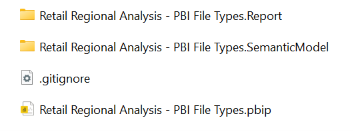
Four things in the root. A Report folder, a SemanticModel folder, a .gitignore file and a small .pbip project file that is really just a pointer to the report folder. The report definition is stored as PBIR (JSON files with published schemas) and the semantic model definition as TMDL (Tabular Model Definition Language), a human-readable format built for exactly this. No data sits in those text files. Your imported data lives in a local cache file inside the model folder, and the .gitignore that Desktop generates keeps that cache out of Git by default.
Where the data goes
It stays in the local cache on your machine. Commit the folder to a Git repo in Azure DevOps or GitHub and the metadata goes up, the data does not. One nuance worth knowing, publishing to the Power BI service from Desktop still sends the data, because Desktop builds a temporary PBIX behind the scenes. Deploying through Microsoft Fabric Git integration or the APIs sends metadata only.
What it is for
- A central BI team where more than one developer needs to collaborate on the same model
- Anyone using source control, because every change to a measure becomes a visible diff someone can review
- A professional services firm running development, test and production workspaces, where "what changed between the two" has to be answerable, and anyone who wants to automate deployment between them
- Anyone planning tool-assisted or AI-assisted Power BI development, since text is what those tools need to read reports and models
This is also what makes Power BI CI/CD possible, continuous integration and continuous deployment, which in plain terms is commit, build, test, deploy. A change goes in as a commit, a pipeline checks it, someone reviews it before it is merged and only then does it deploy. You can enforce code review on a semantic model. Try doing that with a PBIX.
Where it bites
Authoring in Desktop is unchanged, but the thing on disk is very different, and a few things follow from that. Sensitivity labels are not supported yet, which is a real blocker for some of the regulated clients I work with. You cannot save a project straight into OneDrive or SharePoint, and a locally synced OneDrive folder can cause failed saves. Windows has a 260 character path limit and with PBIR every page and visual becomes its own file in its own folder, so long names in a deeply nested folder will break a save (keep the root path short). It is not supported in the Report Server edition of Desktop. Also, a folder of hundreds of files is harder to pass round on Teams than one PBIX, which is rather the point.
The three formats side by side
Choosing the right format
Here's the thing, I don't think the question is "which format is best". I think it is three questions, and the answers point at a format.
Does the data need to travel with the file? If yes, and you have thought about who receives it, PBIX. If no, PBIT or PBIP. Does the structure need reusing by someone else? A starting point other teams will open and fill with their own data is a PBIT. Does anyone need to see what changed? If a second developer or a reviewer ever needs to answer "what changed between Tuesday and today", that is PBIP. Nothing else answers it cleanly.
Now, there is advice going round that PBIP should be everyone's default and PBIX the exception you have to justify. I disagree and I say the same thing to every client. Let me be clear, PBIP is the more enterprise approach and the better one for the long term and with AI tooling now reading models and reports as text, the case for it is only getting stronger. But it comes with a skills bill. If the team looking after the content does not know what Git is, what a repo is, local or cloud, what GitHub or Azure DevOps are, what JSON files are or how branching, a main branch and pull requests work, then forcing them down the PBIP route (specifically for version control) causes more harm than good. I have seen it with my own eyes in Metis BI. Get the skills and the training in place first and if it is a central BI team that will own it, then yes, I am for PBIP. Mandating it for a business analyst who builds their own reports creates support tickets and very little maturity. They do not have Git, they do not want a Git workflow and the first time a save fails because of a path length they are back in Excel. The file format should follow who owns the content. A central team owns it and has the skills, PBIP. A self-service author owns it, PBIX, published to a workspace with the right guardrails. It is the same principle we apply to workspaces and ownership.
The mistake I see is rarely someone choosing PBIX. The mistake is not deciding at all, so PBIX files scattered across SharePoint, Teams and inboxes become the version control, and nobody can tell you which one is live.
So, a rule of thumb, in our experience. Self-service authors, PBIX. Reusable templates and client handovers, PBIT. Central teams with the skills in place and anything that touches source control, PBIP.
PBIP is the direction of travel for professional Power BI development and I said above I am for it where the skills exist. But it is not replacing PBIX. Microsoft has said plainly that PBIX stays the primary format and I would expect most reports in most organisations to be PBIX for more years. Both things are true at once. The point is to decide which one you are and to be able to say why.
What sits inside a PBIP (PBIR and TMDL)
I will keep this short, because PBIP deserves its own blog and it is getting one. For a quick answer, open the folder and you will see a JSON file per page and per visual under the report and a TMDL file per table under the model. Any of them opens in VS Code or a plain text editor and the model side opens in Tabular Editor too. The report side (the PBIR format) governs what the reader sees. The model side (TMDL) governs the tables, relationships, measures and security, which is where most of the value sits, as I argued in why the semantic model matters more in the age of AI. All of this is still preview, so you switch it on in Power BI Desktop under Options, Preview features, alongside the PBIP save option itself, and Microsoft has said PBIR becomes the default report format on the way to general availability. Microsoft's Power BI Desktop projects overview covers the folder layout if you want the mechanics today.
Inside the SemanticModel folder, the model is written out as TMDL, one file per table (with its columns and measures inside), plus separate files for the model itself, the relationships, the shared M expressions and parameters, a cultures folder for translations, and a roles folder if you have row-level security. TMDL replaced the old model.bim file, which was one big JSON document holding the whole model. TMDL is the same information written as readable text, indented like a document rather than nested in braces, and broken into files, so a change to one measure is a change to a few lines in one file.
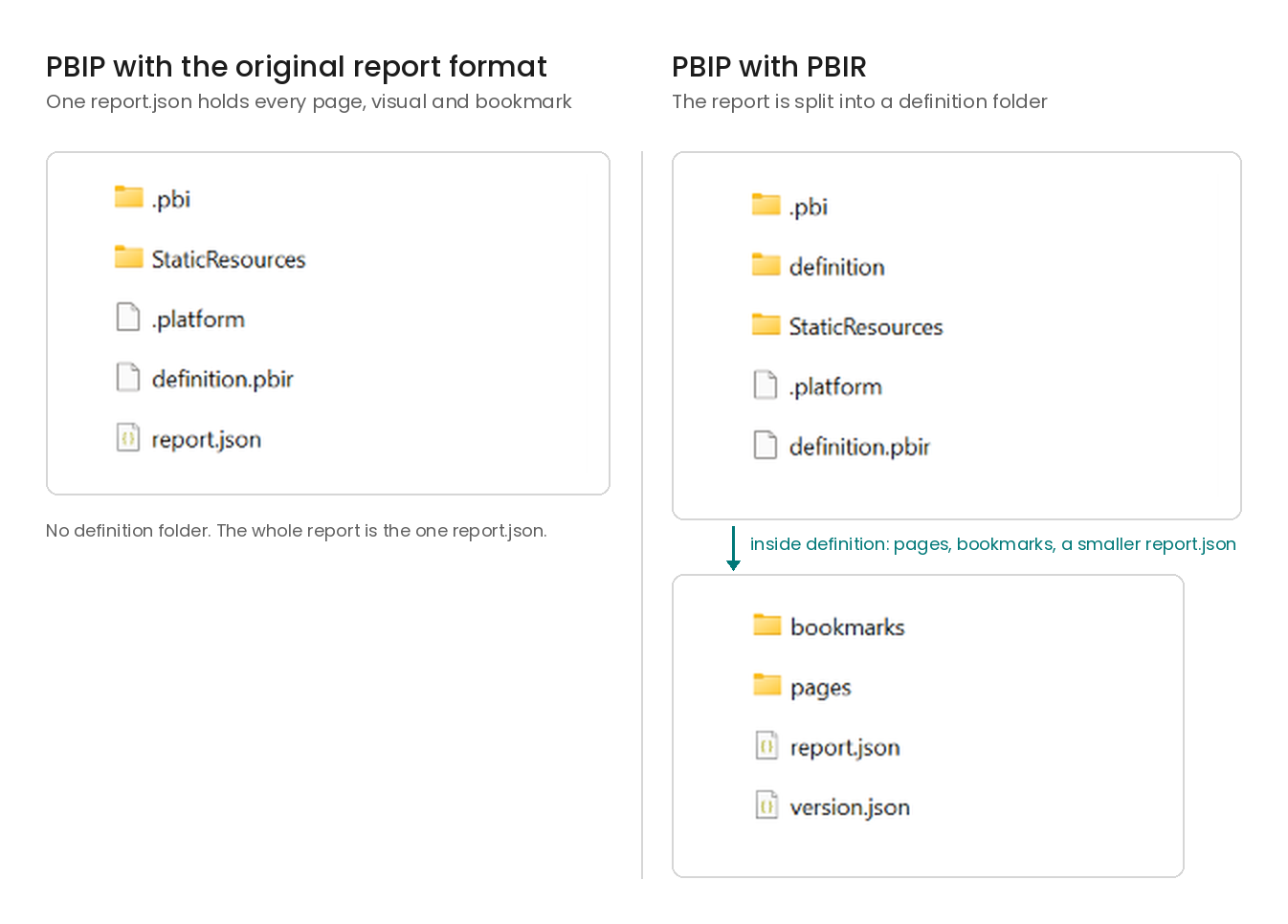
Inside the Report folder, it depends which report format you are on, and this is where PBIR comes in. I get asked about PBIR constantly and the confusion is fair, so let me be clear. PBIR is not replacing PBIP. PBIP is the folder on disk. PBIR is the format the report inside that folder is written in, and you can even switch a PBIX to PBIR without touching PBIP at all. When PBIP first arrived, the whole report lived in a single report.json file. Every page, every visual, every bookmark, all in one file. Still text, technically readable, but not built for editing by hand, and still miles better than a PBIX for many reasons explained in this blog. It could be a huge file, though, and two people editing it would still collide. PBIR takes that one file and breaks it up. Think of it as one file per visual, then a folder per page, then bookmarks and the rest each in their own place. Page folders and bookmark files are named by ID rather than display name, so do not expect to see "Overview" in File Explorer; the name lives inside the page.json. Same PBIP folder, a more granular report inside it.
The quickest way to tell which one you are looking at is File Explorer. The older layout has one large report.json sitting directly in the Report folder. With PBIR there is a definition folder instead, and inside it a pages folder, a bookmarks folder if you have any, and a much smaller report.json that only holds report-level settings.
Common mistakes I see
- Treating a PBIX like a document. In import mode it carries the whole dataset, so emailing it is emailing the data. Publish it and share access instead
- Handing over a template with the client's values still sitting in the slicers. Check every slicer and the filter pane before it leaves you
- Committing PBIX files to Git and calling it version control. It is a backup, and not a very good one
- Saving a project into a synced OneDrive folder and losing an afternoon to failed saves
- Mandating PBIP for everyone in the tenant, then wondering why the self-service community went quiet
File formats are one small part of the governance picture. Choosing the right one takes a minute. Deciding who owns what, where content lives and what happens when it goes wrong takes longer, and that is the work many organisations skip. We help central BI teams put ownership, workspace design and a working development process around Power BI and Microsoft Fabric, so decisions like this one get made once rather than re-argued every project. It is for organisations working with Power BI where it has grown faster than the rules around it. Learn more about how we approach Power BI governance.
Summary
Three file formats, three different jobs. PBIX carries everything, including the data, which makes it the right choice for a single owner and the wrong thing to email around. PBIT carries the structure and drops the rows, which makes it a starting point and a handover format, as long as somebody owns it and checks what values were left inside. PBIP turns the work into text, TMDL for the model and PBIR for the report, which is what makes review, history and deployment possible for a team. PBIR is not a fourth format and it is not replacing PBIP; it is how the report is written inside it. The format follows who owns the content, and the real failure is never making the choice at all.
Lots more to come on PBIP: the folder anatomy in detail, working in Git and editing the model and report outside Desktop, so keep an eye out for that one.


.png)
.png)
.png)