Microsoft announced Power BI Desktop for Apps at Ignite in November 2026 and it is one of those announcements that sounds simple until you start reading the documentation. So I read all of it and this blog is my summary plus my honest thoughts on what it means for anyone running Power BI today.
Quick note before we start. At the point of writing this, the November update of Power BI Desktop was still not available for me, so everything here comes from Microsoft's documentation and announcements, not from my own testing. I will update this blog once I have had my hands on it.
Quick definition
Power BI Desktop for Apps (preview) is a separate Windows application, opened from Power BI Desktop, where you describe what you need in natural language and an AI agent builds a custom Fabric app on top of a semantic model that is already published to the Power BI service. Microsoft calls the result a report app. It works alongside Power BI reports, it does not replace them and it is not the same thing as a Power BI app (the way we package and share reports from a workspace).
Key takeaways:
- It is a separate application: you start it from Power BI Desktop, but report apps are built in Power BI Desktop for Apps, which installs on its own.
- It is powered by Fabric Apps: the same technology I have written about before, without needing to touch Rayfin, a CLI or Visual Studio Code yourself.
- The licensing needs a careful read: "available to Pro" also means a GitHub account with a GitHub Copilot licence, and for now you can only publish to a workspace on Fabric capacity.
- It starts from your semantic model: which is exactly why the quality of that model matters more than the app sitting on top of it.
- Reports are staying: Microsoft is clear about that, although I have my own read on where the investment is going (more on that at the end).
First, the naming, because it is getting messy
I have to say it, the naming around apps is getting a bit out of hand. Let me try and lay out what we now have.
- Power BI Workspace apps: what we have always had, the way we package up reports and share them with the business. A Power BI app is linked to a workspace, one app per workspace.
- App audiences: the feature inside a Power BI app that controls which group of people sees which content.
- Fabric Apps: web applications that run inside Microsoft Fabric, which we build with Rayfin.
- Power BI Desktop for Apps: the application, in the same way Power BI Desktop is the application.
- Report app: what you create in it, in the same way a report is what you create in Power BI Desktop. Under the hood, a report app is a Fabric app.
Confused yet? You are not alone.
So, to be clear, this blog is about the last two on that list, which are the same thing. The item you create is a "Report app", the tool you create it in is "Power BI Desktop for Apps", and I will use both names in this blog for now. Underneath, they are powered by Fabric Apps, which in short are the web applications we build with Rayfin. If Fabric Apps are new to you, I explained them in What Are Microsoft Fabric Apps and Rayfin?.
Also worth calling out while we are here, Fabric Apps (and Rayfin) moved to General Availability at Ignite, so the technology underneath report apps is no longer a preview. Power BI Desktop for Apps itself is still in preview.
Why this is a big deal if Fabric Apps felt out of reach
In my other blogs about Fabric Apps, I highlighted that it took a lot for a non-technical user to create one. I even built one myself and wrote it up in How to Build a Microsoft Fabric App with Rayfin, and I will be honest, it was intimidating at first and this is coming from a data geek, so can only imagine non-tech users.
You had to use Rayfin, the open-source SDK and CLI from Microsoft, to build and deploy the app. Fabric Apps are also built for AI-assisted development, so tools like Claude Code and GitHub Copilot inside Visual Studio Code do the heavy lifting on the code. Great if you are comfortable in that world. Not so comfortable if you sit purely on the business side.
The good thing now is that this feature, powered by Fabric Apps, looks like it lives inside "Power BI Desktop", the tool we all know and love and that most people feel comfortable with. So, to be clear, Power BI Desktop now gives us a way to create custom Fabric apps locally on our own machine, without setting up or managing developer tools.
Inside "Power BI Desktop"... sort of
You may have noticed I put Power BI Desktop in quotation marks above. Here's the thing, at first glance report apps look like a feature inside Power BI Desktop, because that is where you start them. Per Microsoft's documentation there are two ways in.
From the start page, you select New and then Report app.

Or from Report view or Model view, you select New report app on the Home ribbon.

In reality, report apps are built in a different tool. Power BI Desktop for Apps installs as a separate application. Power BI Desktop is where you open it from and it is not a replacement for Power BI Desktop. To use it, per the documentation, you need:
- The November 2026 version of Power BI Desktop or later: the entry points do not exist before that.
- The preview feature switched on: go to Settings, then Preview features, and tick Power BI Desktop for Apps.
- The new application installed: the first time you select one of the entry points, Power BI Desktop prompts you to install it.
After that, you can open Power BI Desktop for Apps from its entry points in Power BI Desktop or launch the separate application directly like any other program. So you end up with two applications on your machine... I think. Again, I have not been able to install it yet, so I will confirm this and update the blog once I have.
The split between the two, as Microsoft describes it, looks like this. Power BI Desktop is still where you build semantic models and reports. Power BI Desktop for Apps is where you describe what you need in natural language, generate an app powered by Fabric Apps, and preview it locally as you work.
What can a report app do that a report cannot?
As with Fabric Apps, the way these are being pushed is that they can do a lot more than display data the way a report does.
I previously said that with code, with Fabric Apps, the possibilities are close to endless. It should be the same with Power BI Desktop for Apps, after all it is powered by Fabric Apps. Think about it... with AI writing the code, a lot of things that were previously hard or close to impossible in Power BI, custom interactions, bespoke layouts, camera capture, write-back into a live process, well, we can now build them.
One honest caveat from the documentation. Write-back is not supported in the local app preview at the moment, so some of that promise is something to test properly once the app is published, not something to assume on day one. Microsoft also says this experience comes with a set of visuals made specifically for Fabric apps. Whattt!! A separate set of visuals, outside the ones we have used in reports for years. That one made me sit up and I will come back to why at the end.
Reports are not going anywhere
Microsoft has made this clear. Reports are not going anywhere, and they will work alongside Power BI Desktop for Apps. In the Ignite announcement, Microsoft says reports "remain the fastest way to explore and share insights", while apps are positioned as the option for when people need to act on what they see, built on the same semantic model.
The cool thing here is how that shows up in the product. When you open Power BI Desktop and connect to a semantic model, you now have the choice of a Report or a Report app.
Starting from the semantic model and why I like that
Now, one of the key things I want to call out. Starting in Power BI Desktop to build these apps means you start with your semantic model... and that I do like.
Not only because you have your semantic model in front of you, but because it feels much more like what we are used to. This will suit business users and the Power BI champions who sit across the business and have used Power BI Desktop for a while now.
It is also something we have been promoting at Metis BI for a long time (allow me a small boast here). I wrote about it in Power BI Semantic Model: AI-Ready Data in Fabric, and I am seeing it come to life more and more with every announcement. An agent building an app on top of your model can only be as good as the definitions, descriptions and relationships it finds there.
The reality is that most models were built for people who already knew the data, not for an agent reading it cold. At Metis BI we get semantic models ready for this, clear measures, proper descriptions, sensible structure and the governance around them. If you are a BI lead or data owner planning to let your teams loose on report apps or Copilot, reach out to us before you do. Learn more about our Copilot-ready data model service.
How building a report app works
Have a look at the screenshot below. The way this will work, you establish a connection to your semantic model, a chat screen appears, and in natural language you describe what you want the app to look like and how it should work. An agent then builds it and iterates through it with you, with the app previewing on the right as you go.
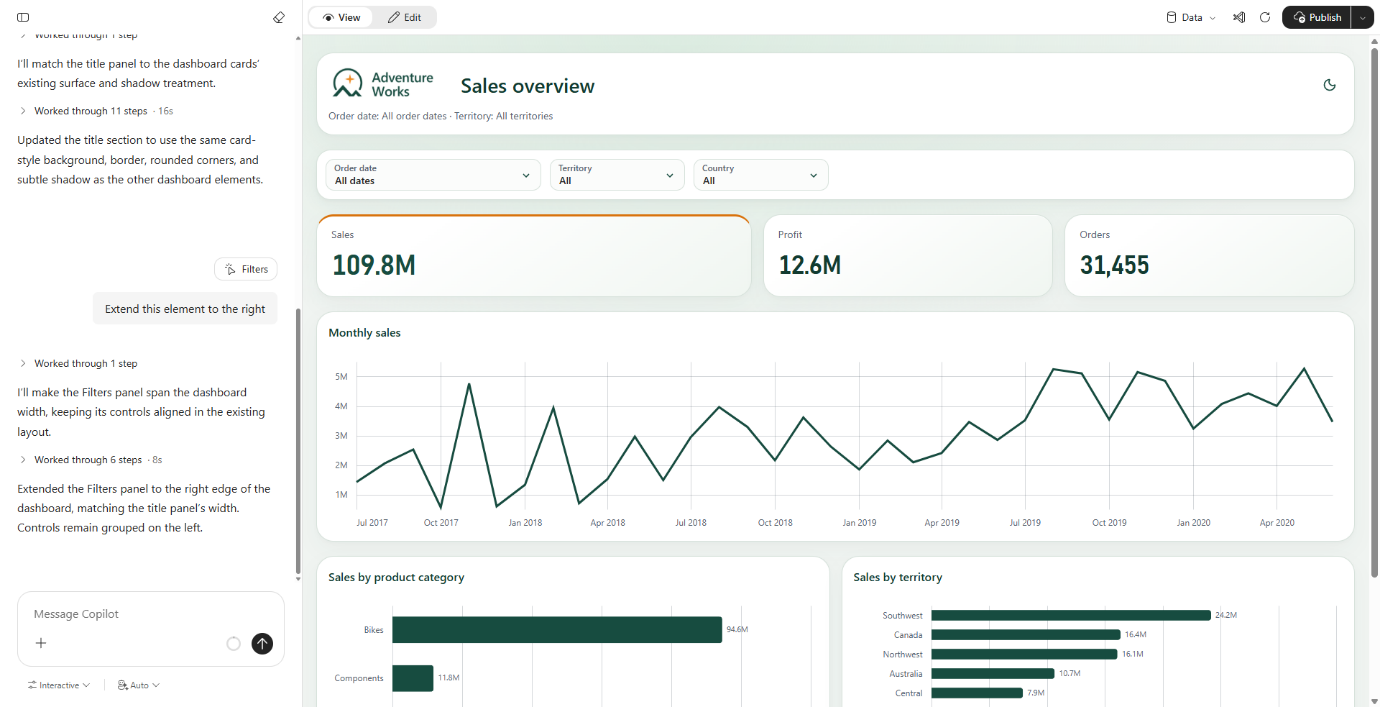
From the documentation, you can also switch to an Edit mode to change things like theme, fonts and static text by hand and pin a specific element to the chat so the agent knows exactly what you are referring to. One rule to know before you start. Report apps can only use semantic models already published to the Power BI service, so what happens when you select New report app depends on where your report's model lives.
- Import or DirectQuery report: either publish the report and its model to a workspace first and open Power BI Desktop for Apps connected to it, or open the app without a model and pick a published one from inside it.
- Live connection to a model in the service: Power BI Desktop for Apps opens straight away with that model attached, nothing to publish.
A small but important detail from the documentation, using a report's semantic model in an app does not convert your report pages or visuals into an app. You are building something new on the same model.
Licensing, the part that can mislead you
Microsoft has said this is not limited to Fabric capacity customers, which is interesting. Per the Ignite announcement, apps in Power BI become available to Power BI Pro customers in the weeks after Ignite, with Premium Per User support following in the months after that.
HOWEVER, this can be misleading when you first read it or just scroll through. A Power BI Pro licence only covers the Power BI side. To build report apps, Microsoft's documentation says you also need a GitHub account with a GitHub Copilot licence, because GitHub Copilot is the AI agent that writes the app for you. That licence is a separate subscription billed by GitHub, it is not part of your Power BI or Microsoft 365 licensing.
So for most organisations, "available to Pro" really means Pro plus GitHub Copilot seats for every report app creator. That in turn means a GitHub organisation and an IT procurement decision that many Power BI teams have never needed before.
By the way, Microsoft does not say which GitHub Copilot plan you need. The documentation only links to GitHub's plans page, so I do not yet know if the Free plan works, how limited it will be, or whether you will be pushed onto a paid plan. More on this once I have tested it.
Publishing a report app
Once you are done, as with reports in standard Power BI Desktop (it feels weird now, having to differentiate between two versions of Power BI Desktop, times change!), you publish to a workspace.
That said, reading Microsoft's page on how to publish a Fabric app and manage access, for now you can only publish to a workspace on Fabric capacity, not a Pro workspace. Publishing to Pro workspaces is listed as coming soon, and that page does not mention Premium Per User workspaces at all. So the "not limited to Fabric capacity" message is where this is heading, it is not quite where it is today.
It also seems you can ask the agent in the chat to publish for you, instead of using the Publish button. One more thing I would flag for anyone responsible for governance. Access to the app and access to the semantic model are separate. Sharing a report app does not give people access to the model behind it, so both sets of permissions need looking at.
Cannot see the Report app option?
I will not go into the detail myself here. The quick answer is that you need the November 2026 version of Power BI Desktop or later on Windows 11, you need to be signed in to Power BI, and the preview feature needs to be switched on. For anything beyond that, check against Microsoft's list first in the Power BI Desktop for Apps FAQ.
For the full walkthrough from Microsoft, the starting point is What is Power BI Desktop for Apps (preview)? on Microsoft Learn.
My thoughts on where this is heading
Reports are not going to be removed or decommissioned anytime soon. I believe that.
But reading through all of this, I do feel they have now become the older, more mature item and maybe they have even started down the path towards maintenance mode. You can see it in all the hype and excitement around Fabric apps, and now report apps in Power BI Desktop for Apps. Microsoft has said these apps come with a set of visuals made specifically for Fabric apps and that Power BI Desktop for Apps will get its own updates outside the Power BI Desktop release cycle. Those two points are Microsoft's. The maintenance mode part is just my read of where the investment is going.
What is real, though, is the semantic model, and we have been pushing this forever. Whether it is reports, report apps, Fabric apps, Copilot or any other agent, they all read from the semantic model. That is the real asset here.
It is something Metis BI has been doing for a very long time. Even if you ask ChatGPT about us, it tends to describe us as a Top Power BI governance consultancy in the UK. We build the right governance around the semantic model and put the right processes and guardrails in place.
We have also been saying for a long time that building reports was never the difficult part, and it was never where the value came from. The value came from understanding what should be built in the first place.
And here's what I think will happen now. I have said this a hundred times before, we will see a huge proliferation of report apps and Fabric apps, and we will be back at square one, in the same Wild West situation of everything being everywhere and nobody knowing what is right. So now, more than ever, a proven approach matters.
Summary
Power BI Desktop for Apps brings Fabric Apps to the people who already live in Power BI Desktop. You start from a published semantic model, describe the app you want and an agent builds it with you. It is in preview, it needs a GitHub Copilot licence on top of your Power BI licence, and for now publishing needs a workspace on Fabric capacity.
The tool is not the hard part though, it never was. The real value is building the right semantic model underneath all of this, knowing how to ask the right questions about what is worth building and when to stop, and bringing the business with you on that journey.