


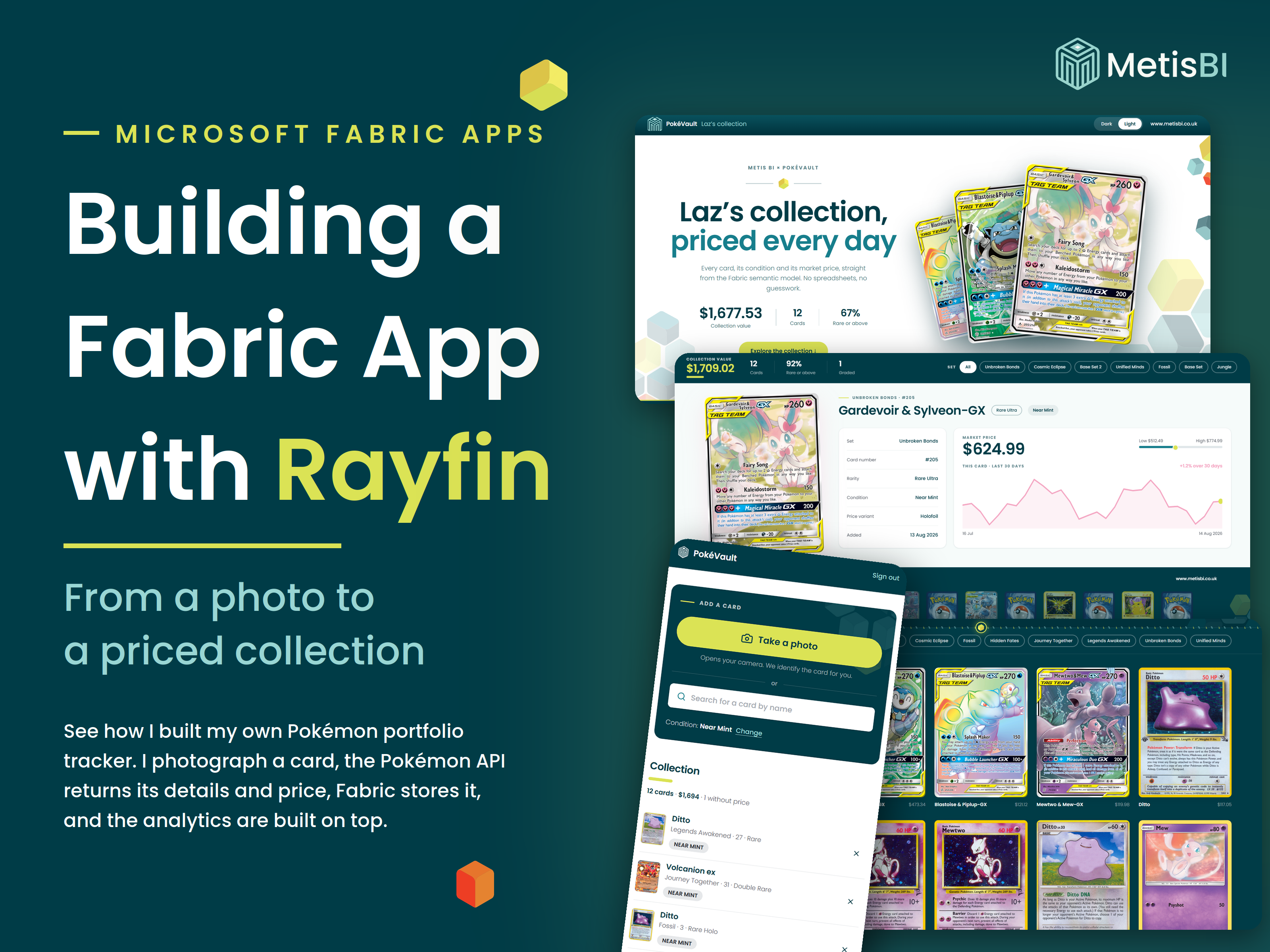


In our introduction to Fabric Apps and Rayfin I promised the full PokéVault build would get its own blog. Here it is... or at least the first part of it. This one covers the capture app, the thing you point at a Pokémon card and everything Fabric generates underneath it.
If this is the first time you are hearing about Fabric Apps or Rayfin, please first read our introduction to Fabric Apps and Rayfin. It covers what they are, what an SDK is and how it feels to build one coming from a BI background. It will give you a better foundation and this blog will make far more sense with it.
One more thing before we start, because the fear mongering in the data community has been something else. No, Power BI reports are not being replaced. No Microsoft have not announced anything of the sort... I have seen the posts... "Power BI is dead", "reports are finished". Calm down!! In this very solution, a Power BI report and a Fabric App read the same semantic model, side by side, perfectly happy. Power BI is one workload within Microsoft Fabric and it is going nowhere. Sure, we need to rethink a few items, adopt new ways of working and be willing to adapt, but as of now Fabric Apps cannot replace the governance, self-serve reports Power BI offers. Right, that is out of the way.
A quick recap for consistency. Microsoft Fabric Apps (which are in preview) are data-driven web applications built in code, hosted and managed by Microsoft Fabric, sitting in your workspace like any other Fabric item. Rayfin is the open-source SDK and CLI from Microsoft used to build and deploy them. You define your data model in TypeScript and Rayfin generates the database, the APIs and the sign-in through Entra ID. The official detail lives on the Microsoft Learn Fabric Apps overview.
Key takeaways before we get into it:
- The capture app started from the To-do template: a working app with a database and an endpoint already underneath it, reshaped into our own application.
- One edited entity file is most of the backend: Rayfin regenerates the SQL tables, the GraphQL API and the per-user row-level security from your TypeScript data model.
- You need a Fabric capacity and a tenant setting enabled: and not every region offers Fabric Apps yet.
- This is preview, not GA: we would not treat it as a production solution and neither should you without thinking hard about it.
- The code was written by Claude Code under direction: which is the only reason someone from a BI background could build this at all.
The idea, a collector's itch
For those who know me, they know me and my partner love collecting Pokémon cards, and now my oldest son enjoys them too, so it is officially a family condition. I already use the existing portfolio apps to track the collection and they are fine. Fine was the problem. I kept wishing they looked and felt a certain way and one day it clicked... I can just build the one I wish existed.
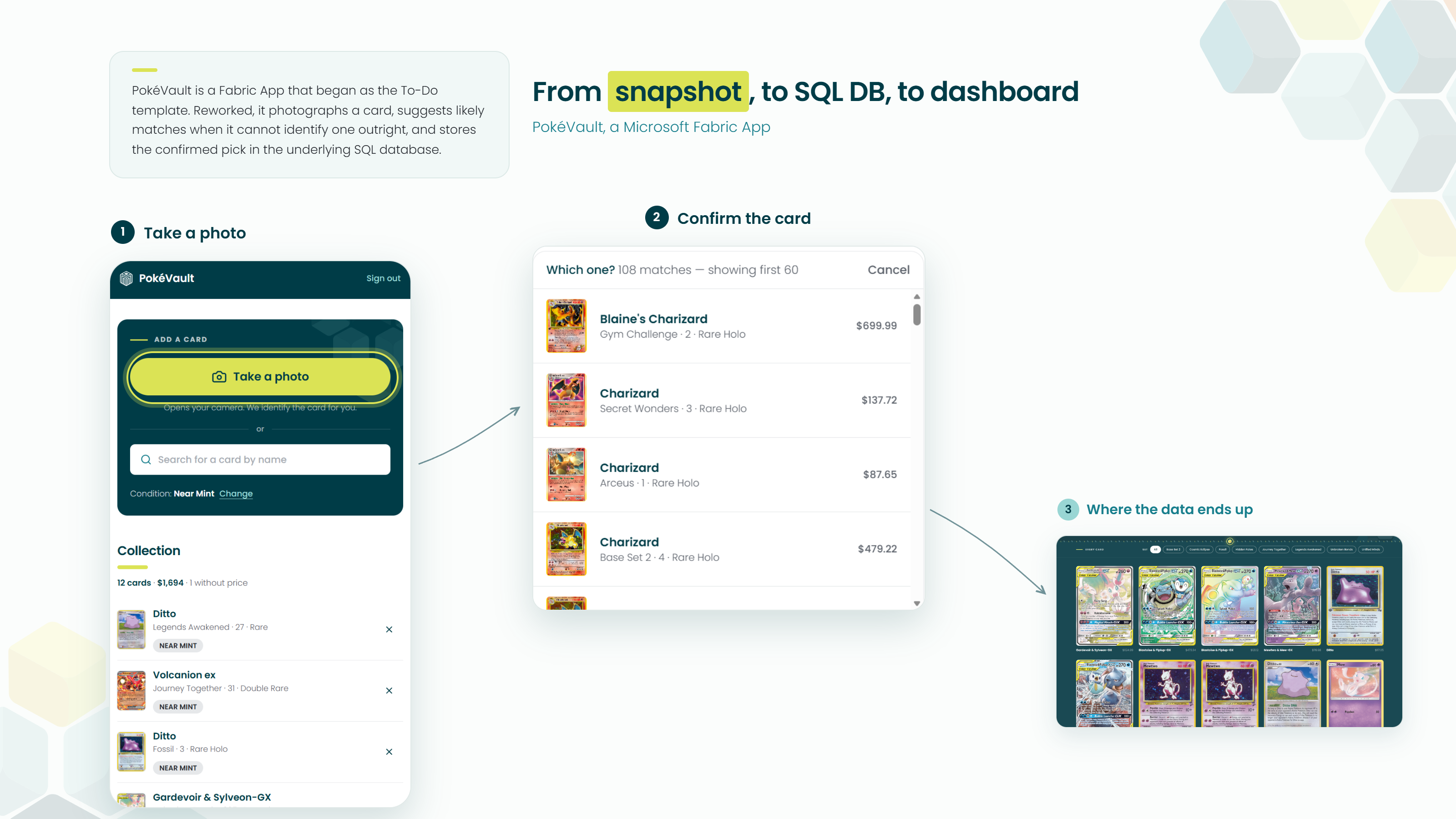
The idea was simple to say out loud. I photograph a card from my phone, AI identifies it, Fabric stores it along with its price and attributes... and eventually, prices refreshing daily so the collection builds its own history. That last part gets its own blog later in the series. Saying it out loud and building it used to be separated by a software team and a few months. That gap is what this blog is really about.
Yes, it is Pokémon... and that is the point
Of course this is not business focused. I mean... it's Pokémon. But hear me out, because I think a personal project is one of the best ways to learn a new way of working or a tool. You care about the result, you know the domain inside out and nobody is waiting on a deadline while you break things.
Strip the cards away and look at the pattern. Capture something in the field, identify it with AI, enrich it from an external API, store it and analyse it over time. Swap the cards for your sales pipeline, site inspections, stock checks, tree planting or patient flows and it is the same pattern. I will show you exactly how we built it, and in future content we will put this pattern into a proper business context.
The architecture and what this blog covers
Here are all the components of the full solution in one view.
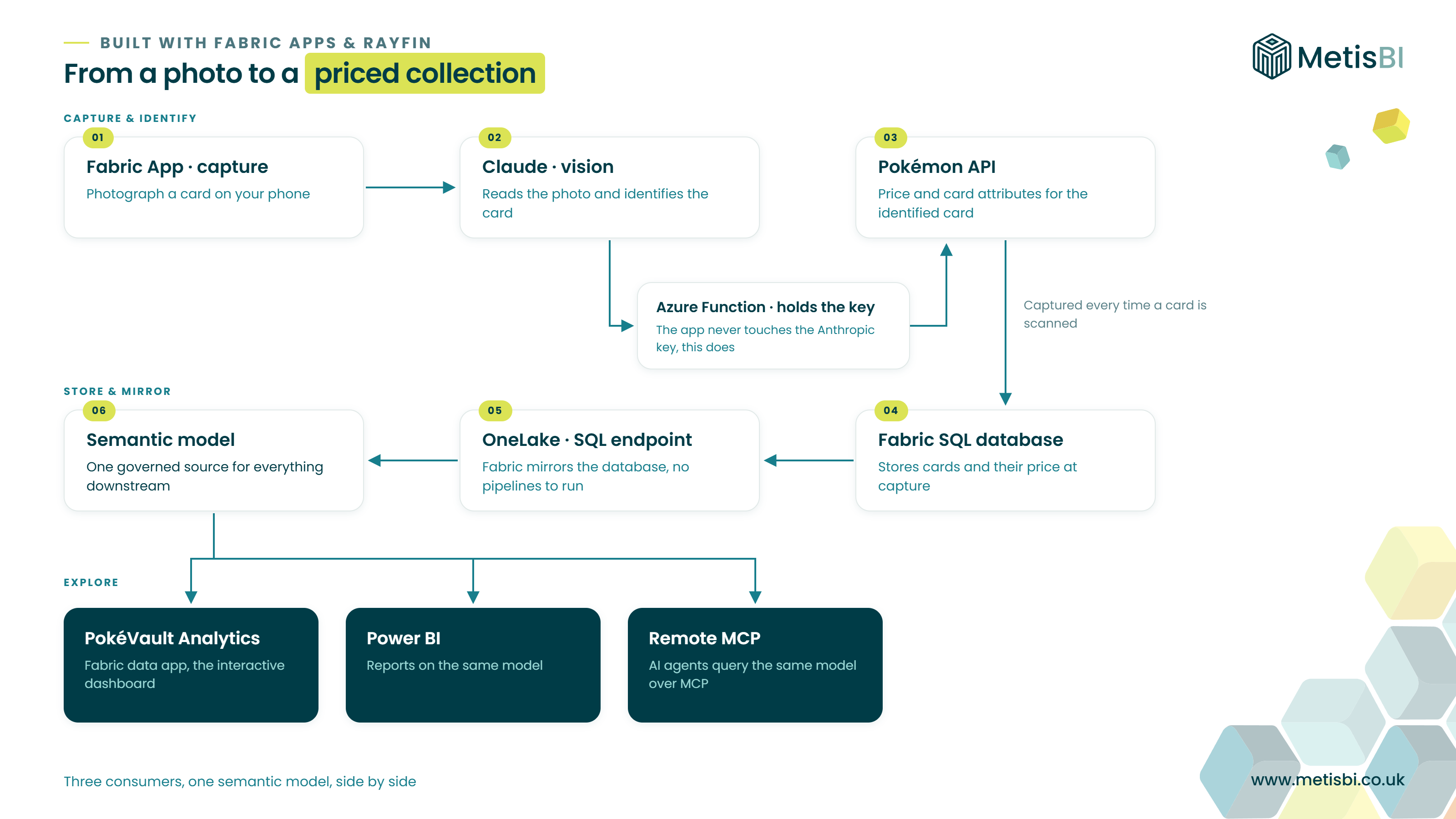
In this blog we focus on steps 1 to 5. The photo, the identification, the Pokémon API, the Fabric SQL database and the OneLake mirror. Everything from the semantic model onwards gets its own blog. It deserves proper depth, not a paragraph at the end of this one.
Quick pointer on the analytics dashboard you can see downstream. That is a separate Fabric App built from a different starting point, the Data app, an app connected to an existing Power BI semantic model, querying it directly in DAX, built for analytics and visualisation. We will go through the Data app properly in the next blog.
Why the To-do template, believe it or not
In the introduction blog I listed the three Rayfin templates:
- Blank
- To-do app
- Data app
So which did we use for the capture app that takes a photo of the Pokemon card?
The To-do app!
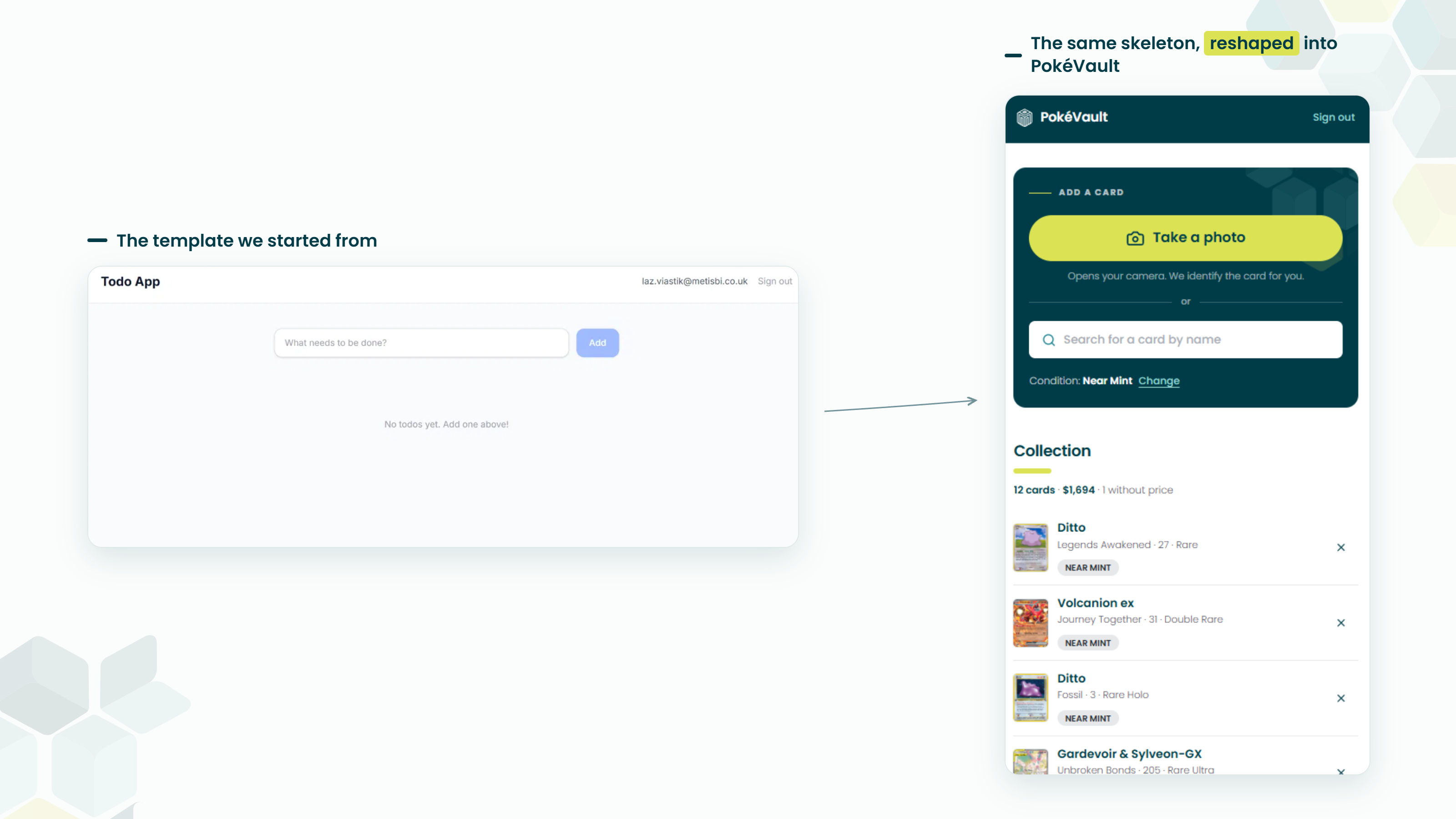
I know how that sounds. But think about what the capture app actually needed... the full operational pattern. Camera capture, our own SQL database, daily API calls writing into it. That is a custom application with its own database backend and the To-do template gives you exactly that starting point, a working app with a database and an endpoint already sitting underneath it. You are not learning the structure from a blank page, you are reshaping something that already runs.
Before you build anything
A few practical must-knows, and I am deliberately not walking through portal screenshots of workspaces, capacities and settings here. The Microsoft Learn CLI tutorial handles the mechanics. What I want to give you is the parts that caught us:
- A Fabric capacity is required: Fabric Apps run on an F SKU. If you do not have one, the Fabric trial works and if the trial is not an option you can purchase an F2 and pause it when not in use. Ours costs roughly £270 a month if left running.
- Region availability is real: not every region offers Fabric Apps yet. UK South and UK West did not have it when we built this, which forced us onto a West Europe capacity. From what I have read, more regions are rolling out soon.
- A tenant setting must be enabled: your Fabric administrator needs to switch on Fabric Apps (preview) in the tenant settings before anything works.
- This is preview, not GA: features will move and details will change. Even if it is available in your region, should it be considered a production solution? Not for us at Metis BI, not yet. Build, learn, prepare... production can wait for GA.
The build, three artefacts
In the introduction I claimed AI coding agents make this accessible to people like us, so let me show you. The honest skeleton of the whole build is three artefacts. One command, one edited file, one more command. There is life in between, and I will show you that too, but those are the bones.
First, the scaffold. One line in a terminal:
npm create @microsoft/rayfin
That is genuinely it, no flags, no configuration. The CLI walks you through a short wizard instead. It asks how you would like to start, a built-in template, an external git template or from scratch, and then it shows you the template menu.
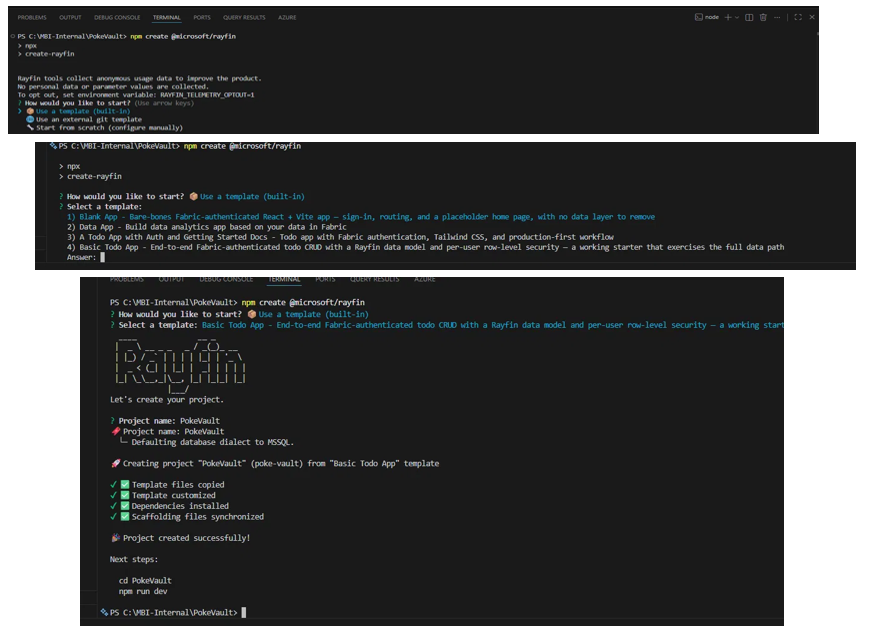
There they are in the flesh, the templates from the introduction. The Blank app, the Data app, and the To-do app in its two versions, a fuller one with getting started docs and a basic one. Read the description on the basic one closely... end-to-end Fabric-authenticated CRUD with a Rayfin data model and per-user row-level security, a working starter that exercises the full data path. That is precisely the operational skeleton we needed, so that is the one we took. Option two, the Data app, we will be back for in the next blog. One word of clarification, because "model" means something specific to us. The Rayfin data model here is the app's own, the TypeScript entity Rayfin builds the database from. It is not the Power BI semantic model. That is a separate piece of work that I created myself further down the architecture and the template has nothing to do with it.
From there you name the project and Rayfin copies the template, customises it, installs the dependencies and tells you what to do next.
Now it's worth mentioning there is a portal route too, and it starts exactly as a Power BI person would expect. To show you, I quickly spun up a second app called "Laz-Demo", purely to capture how these same steps can be done through the Fabric portal rather than the terminal. From your workspace you pick New item, choose App (preview), name it, and you are shown a Pick a template screen with Blank, To-Do and Data App as tiles you click. So far, so familiar. The portal even deploys the template for you. But here is where it diverges from everything we know. There is no designer to build the app in, no canvas for its screens. Not like Power BI, the reason all users always loved and welcomed it... easy to use! The app's own Home page greets you with a Getting Started panel that, to change anything, hands you the terminal commands. Click your way to a deployed template, yes, but the moment you want to shape it, you are in a terminal. In the introduction I said the CLI is the front door of Fabric Apps and this is the proof, however politely the portal dresses it up, you end up at a command line.
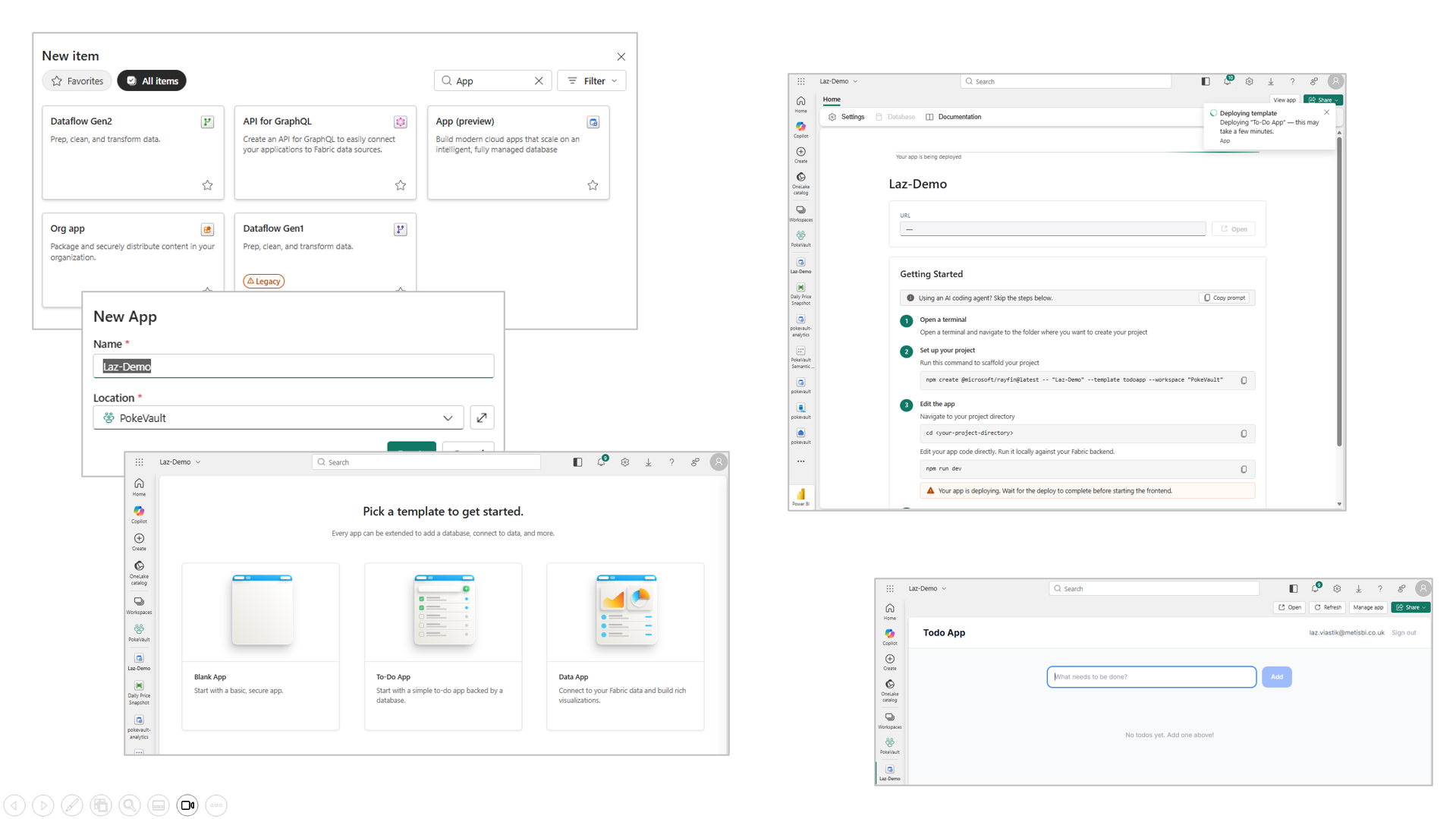
One line on that panel deserves calling out, because it says the quiet part aloud. Above the steps sits a note, using an AI coding agent, skip the steps below, next to a Copy prompt button. Microsoft's own portal assumes you are going to hand this to an AI agent rather than type it yourself. That is not me bolting AI onto the workflow, as I said in the introduction, the tool was built expecting it, and here it is printed inside the product.
Press that Copy prompt button and here is what lands on your clipboard:
Set up a new Fabric App project called "Laz-Demo".

1. Run: npm create @microsoft/rayfin@latest -- "Laz-Demo" --template todoapp --workspace "PokeVault"
2. Open the scaffolded project directory
3. Explore the project structure and understand the Rayfin app framework
4. Run npm run dev
5. Make changes to the app based on my instructions
6. When ready, deploy with: npx rayfin up
If you have not worked this way before, let me explain what that actually is, because it is not code you run. It is a set of instructions written in plain English for an AI coding agent, something like Claude Code or GitHub Copilot, running inside your code editor. You paste it into the agent's chat, and it carries out the steps for you, scaffolding the project, opening it, running it locally, and later deploying it, while you direct it and review what it does. In other words, the portal is not expecting you to run those six steps by hand. It is expecting you to hand them to an agent and supervise. That is the workflow this whole platform is built around, and I find it telling that Microsoft put the button right there in the portal.
Second, the entity files. The app's data model is a set of these, one class per table and here is the main one, Card. The template arrives as a to-do list, so its data model is a Todo. We reshaped it into a Card.
Before you look at it, a reading key, because this will be new to many of us. The words starting with @ are called decorators, think of them as labels Rayfin reads to know what to build, @entity means make this a table, @text means make this column text. Every line inside the class is simply a column, its name and its type. So do not try to parse the syntax, read the field names down the page and you will realise you are looking at something you have seen a thousand times... a table definition, wearing different clothes. Here they are, the template's Todo and our Card, both trimmed for length:
// Before, the template's entity
@entity()
export class Todo {
  @uuid() id!: string;
  @text() title!: string;
  @boolean() isCompleted!: boolean;
}

// After, our entity
import { entity, role, text, uuid } from '@microsoft/rayfin-core';

// @entity() marks this class as a database table.
@entity()
// Access rule: a signed-in user may do anything ('*'), but only on rows whose
// user_id matches their login id. Enforced by the backend, not the browser.
@role('authenticated', '*', {
  policy: (claims, item) => claims.sub.eq(item.user_id),
})
export class Card {
  @uuid() id!: string;
  @text({ max: 200 }) name!: string;
  @text({ max: 200, optional: true }) setName?: string;
  @text({ max: 20 }) condition!: string;
  @text({ max: 500, optional: true }) imageUrl?: string;

  // The @role policy above compares against this column, so per-user
  // security does not work without it.
  @text({ max: 200 }) user_id!: string;
  // ...plus the rest of the card attributes
}
This is the costume change. One file edited and Rayfin regenerates the SQL tables, the GraphQL API and the per-user row-level security from it. I never wrote a CREATE TABLE, never built an endpoint, never touched authentication.
Look again at that @role block and the user_id column, because this is where the per-user row-level security actually lives. The policy says a signed-in user may act on a row only when its user_id matches their login id, and Rayfin enforces that at the backend, not in the browser, so it holds even if someone calls the API directly. That one block, plus that one column, is the whole mechanism. Right now I am the only user, so I see every card, but the moment a second person signs in, they see only their own. Nothing else to configure.
Between the edit and the deploy sits the development loop and it is a good moment. The command is
npm run devFor anyone new to this world, that is npm running a script called dev which ships with the project. In a Rayfin project that one script does three things, it sorts your environment, provisions the app's backend services in your Fabric workspace and starts a local web server for the front end.
That last part deserves a pause, because the app then opens in your browser at an address beginning with localhost. Localhost simply means your own machine. Think of it as a private preview, the app is genuinely running and wired to the real backend in Fabric, but the address only works on your computer, nobody else can open it. You edit in VS Code, save, and watch the change appear in the browser a moment later. Compare that with the URL you get at deployment, which is hosted on Fabric, sits behind Entra sign-in, and is the one your users actually open. Localhost is the workshop, the deployed URL is the showroom.
Third, the deploy:
npx rayfin upThat gives you a live URL with Entra sign-in, so users log in with their normal work account. The distance from code on your laptop to a deployed application your users can open is genuinely short, and in my view that is the platform's actual pitch.
Now, the honesty on who wrote what. Claude Code wrote the code, I directed it. It earned its keep too, it caught the delete button being invisible on touch devices by actually driving a browser and using the app the way a person would. I would not have caught that from reading the code.
Let me be clear about the split though, because those three artefacts are the skeleton and the application on top of them was the real work. The camera capture flow, the visual picker for confirming the exact printing of a card, the wiring from photo to identification service, the handling of a flaky external price API (retry, and when it stays down, skip the card rather than invent a price), the delete flow with its referential integrity, and the restyle to our brand. All of it built by the agent under my direction.
And direction is the honest word for it, because none of this came from one clever prompt. It was rounds of back and forth, describe what I want, look at what came back, correct it, go again. For the look and feel specifically, I used Claude Design first, iterating there until the capture app looked the way I wanted it to, then handed that design over to Claude Code in VS Code to build the front end to match. Design in one tool, build in another, me in the middle deciding what passes. The platform collapses the infrastructure, the agent collapses the application code, and what remains for the human is direction and review. For scale, the working skeleton was an evening... the polished app took a good few sessions more, with the agent doing the typing and me doing the deciding.
What lands in your workspace
After the deploy, the app shows up in your Fabric workspace as an item, with its backend services sitting underneath it as child items. The SQL database holding your data, and the SQL analytics endpoint that Fabric mirrors it into through OneLake.
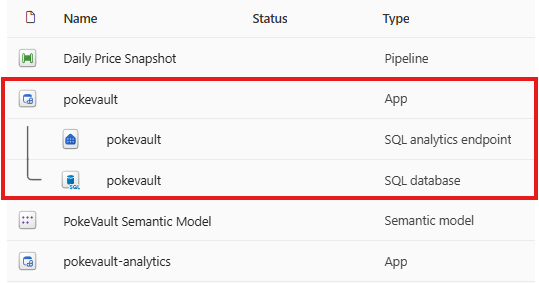
Open those two child items and the point becomes clearer. In the SQL database sit the tables your entity files generated, the operational side, where the app writes. In the analytics endpoint sit the same tables again, the analytical side, where reports read. Two views of one set of data, and you built neither of them. That mirror matters more than it first appears and I will show you why when we get to deleting a card.
From photo to priced card
Here is the flow in use. You photograph a card on your phone. The photo goes off for identification and Claude reads the image and tells the app which card it is. On the first live end-to-end test it correctly identified a Gardevoir & Sylveon-GX, a dual-name card that is genuinely hard to read, and I was not expecting it to get that right first time. It also returns a confidence level, and when it is less sure, the picker shows candidates rather than pretending certainty. If you would rather not use the camera, there is a name search with a visual picker instead. Once a card is confirmed, the app calls the Pokémon API for its price and attributes, captured at that moment, and everything lands in the SQL database. The collection header keeps a running value, with an honest caption for any cards that do not have a price yet.
One security note, briefly, because it matters and then we move on. The app never holds the Anthropic API key. Anything in a web app's front end is visible to the browser, so the key lives server side in an Azure Function, the app posts the photo there, and the Function calls Claude and returns the identification. I covered the reasoning in the introduction blog, and that is all it needs here.
Now, deleting a card, my favourite small moment in the whole build. Delete one in the app, and it removes the card and its price-history rows with it, child rows first, referential integrity done properly. Because Fabric mirrors the database into OneLake, the card disappears from the analytics endpoint too. Nothing to schedule, nothing to reconcile, no overnight job quietly drifting out of step. One source of truth, no sync jobs.
Should you build one?
I get the excitement, I genuinely share it. But here is how I actually think about the choice and it comes down to usability. We help clients with their Power BI solutions all the time, guiding them onto a self-service path with the right level of governance, and for that job Power BI is still the best tool there is. A big part of why business users fell in love with it is that it felt like any other Microsoft Office product. You land in it, it is familiar, you drag and drop. As you have seen above, that is not the case with Fabric Apps. The front door is a terminal and that changes who can walk through it.
That said, for the more advanced dashboarding solutions, the really well designed, high spec builds that push past what the Power BI canvas comfortably allows, the flexibility of Fabric Apps will get you there easier and faster... with code. Where they fit next to your existing Power BI estate, and whether the foundations underneath are in a state worth building on, is a conversation we have with clients regularly. Learn more about how we approach governance.
Summary
The capture app is a Microsoft Fabric App, scaffolded from the To-do template with one command, reshaped by editing one entity file, and deployed with one more command. Rayfin generated the SQL database, the GraphQL API and the Entra sign-in from a TypeScript data model, and Fabric mirrors the data into an analytics endpoint through OneLake with nothing to maintain. It took a Fabric capacity, a tenant setting, a region we did not plan for, and an AI agent writing the code... and it is still preview, so treat it as learning, not production.
One picture to close on. On the left, the capture app, everything this blog just built. On the right, where its data ends up... the analytics dashboard, a separate Fabric App built from the Data app template, querying the semantic model directly in DAX. That build is the next blog.
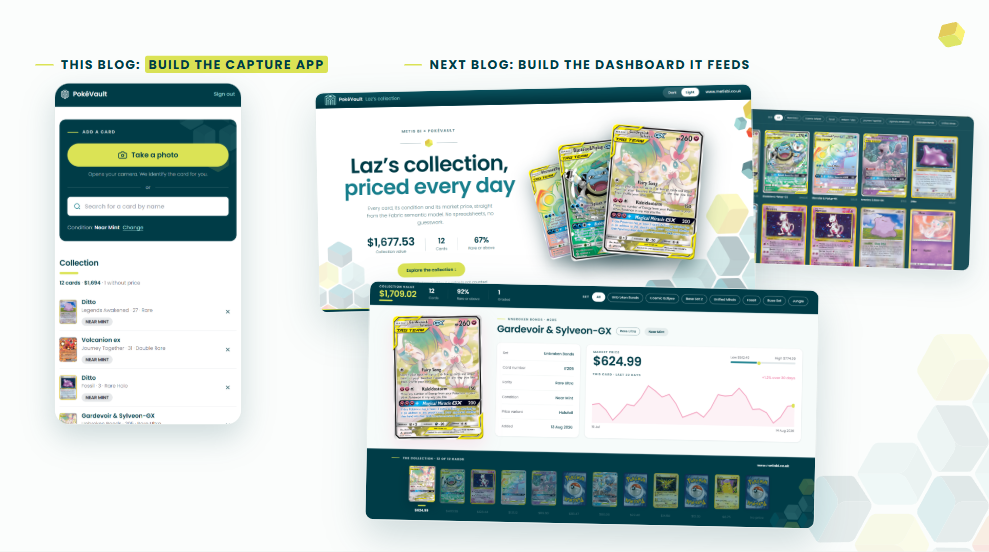
This blog sits alongside our introduction to Fabric Apps and Rayfin, which covers the foundations this build stands on. Lots more to come from this build, keep an eye out.


.png)
.png)