

Microsoft Fabric Apps are one of the biggest additions to MS Fabric in a while and I have been building with them since they landed in preview. Even though there is quite a bit of content already, this blog is the beginner's introduction I would have liked to read from the beginning. What they are, what Rayfin is, how they compare to Power BI, and honestly... how it feels to build one when you come from a BI background rather than a software one.
Definition: Microsoft Fabric Apps (preview) are data-driven web applications that run on Microsoft Fabric and are managed by it. In practice that means you can build dashboards to visualise your data, and other applications that work with your data, hosted inside Fabric itself. The difference from everything you know in Power BI is a big one, this is all done in code.
Key takeaways before we get into it:
- Fabric Apps are web applications built in code, hosted and managed by Microsoft Fabric, sitting in your workspace like any other Fabric item.
- Rayfin is the open-source SDK and CLI from Microsoft used to build and deploy Fabric Apps.
- They are built for AI-assisted development, tools like Claude Code and GitHub Copilot do the heavy lifting on the code.
- They offer far more design and functional freedom than the Power BI canvas, at the cost of a genuinely new way of working.
- Power BI is not going anywhere, Fabric Apps are another consumer of your data, not a replacement.
Fabric Apps are in preview at the time of writing, so expect things to change. The best place for the official detail is the Microsoft Learn Fabric Apps overview.
What does "managed" mean?
When I say a Fabric App is managed, I mean Fabric takes care of everything an application normally needs behind the scenes. The database, the APIs, the sign-in (through Entra ID, so users log in with their normal work account), and the hosting. You do not stand up servers, you do not configure authentication flows, you do not arrange hosting somewhere else. You write the application, deploy it to your Fabric workspace, and Fabric runs it as a managed service alongside your lakehouses, semantic models and reports.
Here is the part that makes this realistic for people like us. You do not write that application alone. You can use Claude Code or GitHub Copilot inside VS Code to write the code with you, and in my experience, for most of us coming from BI... for you. More on that later, because it deserves its own section.
Hold on, what is a web app?
Let me keep this simple, because not everyone reading this builds software. A web app is an application that runs in your browser. No installation, no desktop icon, you open a link and it works. Gmail is a web app. The Power BI Service (app.powerbi.com) is a web app. Your online banking is a web app. Compare that with an application you must install on your machine before you can use it... Power BI Desktop is a perfect example, that is not a web app. So when I say Fabric Apps are web applications, I mean you build something your users open in a browser, sign into with their work account, and interact with. Buttons, forms, camera input on a phone, charts, whatever the solution needs.
"All done in code"... meet Rayfin
I said earlier that Fabric Apps are built in code, and the thing that makes that possible is called Rayfin. For now, all you need to know is this, Rayfin is the SDK used for developing Fabric Apps. You write your application using it, and it handles turning that code into a deployed, working Fabric App. We will unpack what an SDK actually is a bit further down, because I know from conversations with other Power BI developers that the term is not as universally understood as software people assume.
What we built with it
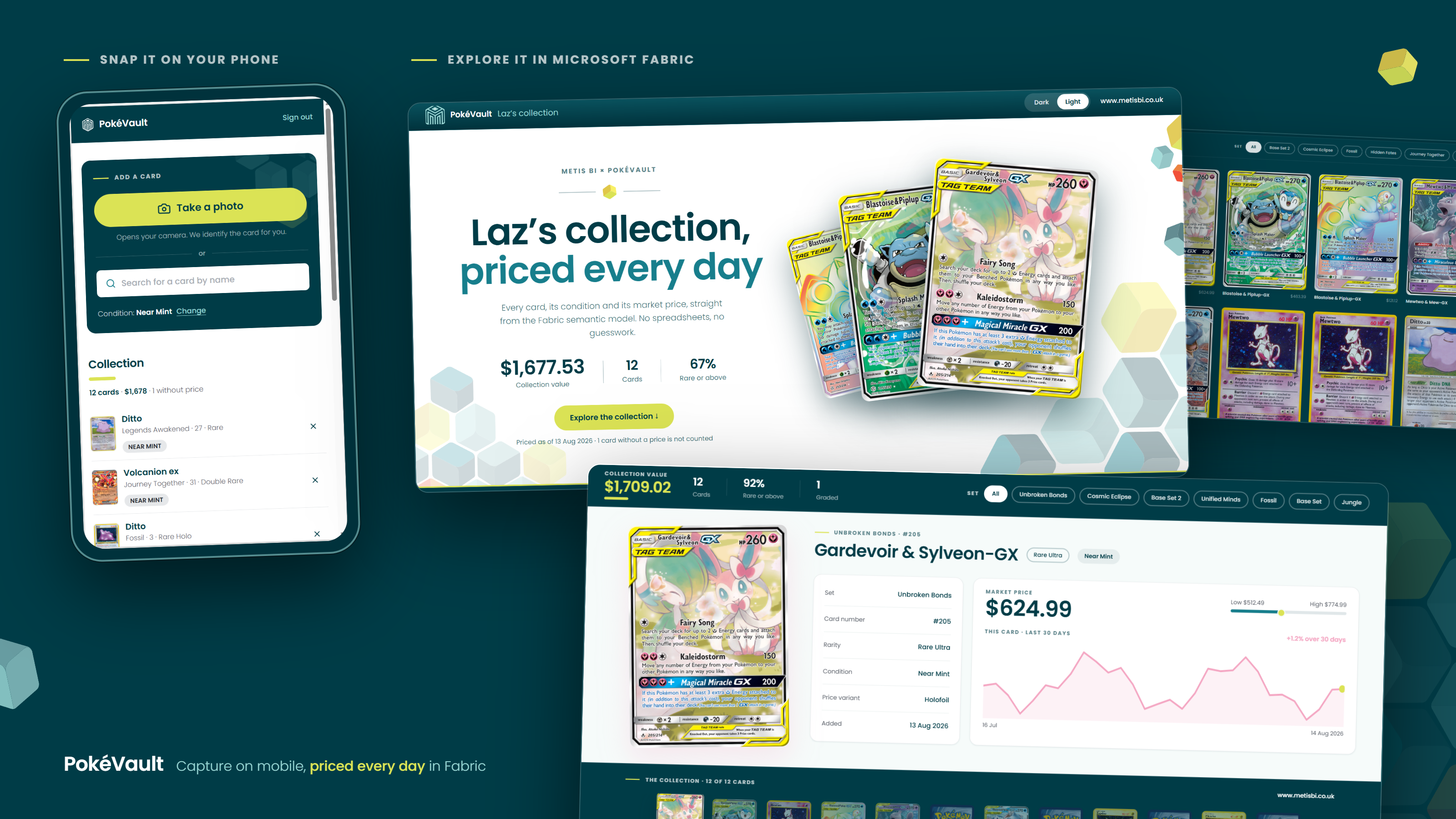
The best way to understand any of this is to see one. Below is our PokéVault solution, the interface and a diagram of the architecture behind it. For those who know me, they know me and my partner love collecting Pokémon cards, so I created something I would genuinely use. Also, created many other Fabric Apps, but thought this would be a cool one to showcase first:
And here is how it all fits together behind the scenes. I explained the flow of the solution below:
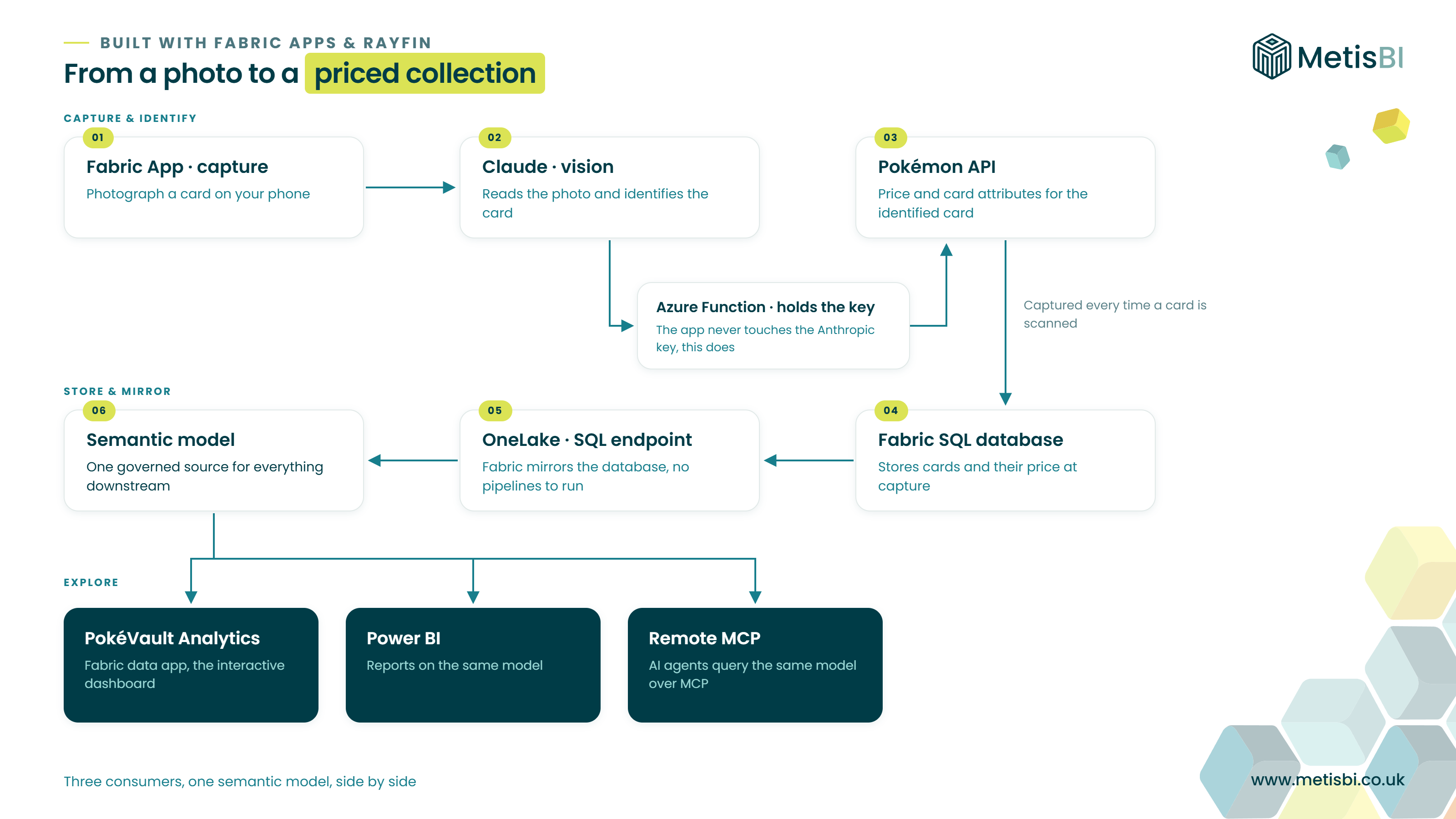
Here is what it does. A Fabric App captures an image of a Pokémon card and AI identifies it, Claude reads the image through its vision capability and tells us which card it is. The app then calls a Pokémon API to collect price information and other attributes for the card. Everything is stored in a SQL database, and the API is called each day for each card so we build up price history over time. Fabric then mirrors that database into a SQL endpoint, which we ingest into a semantic model, and a second Fabric App sits on top visualising it all through an interactive dashboard. One detail worth calling out for anyone thinking about security, the API key never sits in the app itself. Anything in a web app's front end is visible to the browser, so the key lives server side in a Azure Function and the app calls that instead.
Claude Code assisted in writing the app's code, and Rayfin turned that code into a deployed Fabric App... database, API, sign-in and hosting, all handled. This is what is known as an operational app, it captures and processes data as part of a live process, with its own managed database behind it.
Of course, it can all be much simpler than that. A Fabric App built from an existing semantic model, visualising what is already there, and that's that. This is what Microsoft calls a data app, and for many teams it will be the natural starting point.
Quick note before we continue, the PokéVault solution deserves proper depth, so I will be explaining the full build in a separate blog, and possibly a video too. This blog stays a beginner's introduction.
More flexibility than Power BI
Here is the thing that got me genuinely excited. With code, the possibilities are close to endless, and with AI writing that code, they are reachable. A lot of things that were previously hard or nearly impossible in Power BI, custom interactions, bespoke layouts, camera capture, write-back into a live process... well, we can now build them. The Power BI canvas is brilliant at what it does, but it is a canvas with rules. A web application has far fewer.
So what is Rayfin?
Time to unpack it properly. In my experience many Power BI developers do not know what an SDK is, and there is no shame in that, it has never been part of our world. So here it is.
An SDK, a software development kit, is a box of building blocks for developers. Instead of writing every piece of an application from nothing, an SDK gives you ready-made components, commands and structure so you build on top of a foundation rather than from scratch. Think of it a bit like a template plus a toolkit in one.
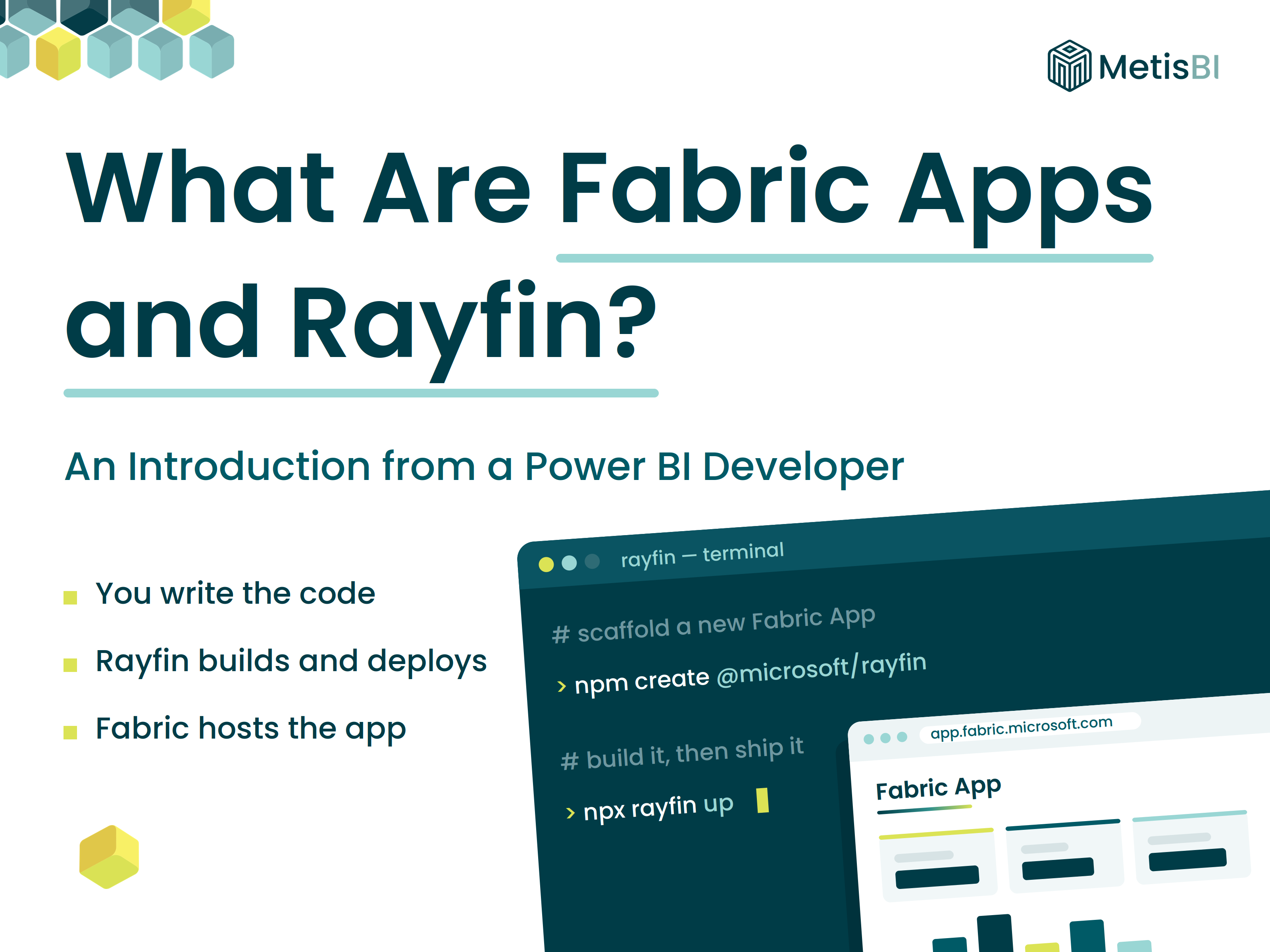
Rayfin is Microsoft's SDK, open source, for building Fabric Apps. You define your data model in TypeScript, and Rayfin generates the database schema, the APIs and the plumbing around them. It also comes with a CLI, a command line interface, which is how you create a new project, run it locally on your machine, and deploy it to Fabric with a single command. To give you a feel for it, this one line scaffolds a whole new project from a template:
npm create @microsoft/rayfin@latest -- "<appitemname>" --template todoapp --workspace <workspacename>The difference between Rayfin and a Fabric App catches people out, so let me state it plainly. Rayfin is the tool you build with. A Fabric App is the thing you build. Rayfin lives on your machine and in your code editor, the Fabric App lives in your Fabric workspace where your users access it.
Types of Fabric Apps
Rayfin gives you templates to start from, and choosing one is the first real decision you make. At the time of writing the templates are:
- Blank: an empty starting point when you want full control over what gets built
- To-do app: a working sample application, available in a full and a simplified version, useful for learning the structure before building anything real
- Data app: an app connected to an existing Power BI semantic model, querying it directly in DAX, built for analytics and visualisation
In the PokéVault solution above we needed the full operational pattern, camera capture, our own SQL database, daily API calls, so we built the capture app as a custom application with its own database backend. For the analytics side, the interactive dashboard, we used the data app template, because it connects straight to the semantic model and that is exactly the job.
Power BI vs Fabric Apps
There are many ways to compare the two, and I am sure plenty of blogs will run the full feature-by-feature exercise. Here I want to call out the difference that actually matters when you sit down to build.
With Power BI you have an interface, Power BI Desktop. You click, you drag, you publish. With Fabric Apps there is no interface like that. You open a terminal, like the one in VS Code, and run the Rayfin CLI to scaffold the project. That sentence alone will have filtered some readers out, and that is exactly the point I am making. Power BI is drag and drop with a UI. Fabric Apps is writing code, with the assistance of AI to write it.
Building a Power BI report means working inside one tool. Building a Fabric App means writing actual software, TypeScript, CSS, DAX and YAML configuration, built and deployed like a real project. That is genuinely harder... but it also means genuinely more freedom, because you are no longer boxed in by what the Power BI canvas allows. Power BI gives you a canvas with rules. Fabric Apps give you a blank page and a compiler.
Unless you are a web developer, that complexity is exactly where AI coding agents earn their keep. Claude Code wrote the code, I directed it, and PokéVault Analytics went from spec to deployed app without me writing a line myself.
Licensing, the must knows
I am not going deep on pricing here, but there are a few things you should know before you go and build one, because this catches people out.
- Fabric Apps run on Fabric capacity: your workspace must have a Fabric capacity (an F SKU) assigned. No capacity, no app.
- Apps consume capacity units (CUs): every operation an app performs draws from that capacity. The three services that consume CUs are the SQL database (compute and storage), the GraphQL API (the reads and writes your app makes), and OneLake storage serving your app's front end files.
- Some parts are free, at this time: the app hosting service itself, sign-in through Entra SSO, and deployment operations do not carry their own CU charge, beyond the SQL and OneLake operations they trigger.
- You can monitor it: CU consumption shows up in the Microsoft Fabric Capacity Metrics app, per item and per operation, so keep an eye on it like you would any other Fabric workload.
This is preview, so expect the details to move. The full breakdown is on the Fabric Apps pricing and capacity usage page.
I could not have done this without AI, and Microsoft knows it
Let me be clear about something, because I think honesty matters more than looking clever here. Without AI assistance writing the code, this would not have been possible for me. Not harder, not slower... not possible. I suspect the same is true for many others coming from the BI and analytics space, where TypeScript and web frameworks have simply never been part of the job.
Microsoft knows this too. Rayfin was introduced as an AI-first way to build, in Microsoft's own words, designed from the start for developers and coding agents to work with, and their documentation walks you through building with GitHub Copilot as a standard part of the workflow. This is not me bolting AI onto a tool that was not expecting it. The tool was built expecting it.
The part nobody talks about... how it feels
I want to share a real moment from my experience building Fabric Apps, and I have now built more than one, because I suspect it is coming for a lot of us.
When I initiated a new app, the Rayfin folder structure popped up in VS Code and my mind went into overload. Files everywhere, formats I did not recognise, languages I honestly did not know. My instinct said I needed to understand all of it, every file, every segment of code within those files.
Some background on why. Coming from BI and analytics, I started with the MS BI stack, SSIS, SSAS, SSRS, both multidimensional and tabular models after that, then Power BI. Through all of it I made it my goal to understand everything. The UI, all the buttons, all the features, how the VertiPaq engine works, how to write DAX, how the M is formed in Power Query, and so on. That approach served me well for over a decade. Now here, staring at this folder structure, I felt the same obligation... until I had a chat with a software engineer who has been coding for 15+ years and now uses AI across his entire workflow.
His advice was calming. "You're doing it wrong." You are not meant to understand everything to that depth, he explained. Know the structure, okay, then get good at writing briefs, inspecting the outputs the AI generates, and thinking about security, governance, maintainability and scalability. That put my mind at ease, and I am still working through it myself.
For now, what I would say to you is this. Find a balance. Do not blindly follow everything the AI produces and give zero attention to the framework, the folder structure, the files and their code. But do not try to understand absolutely everything within either, as that, I feel, is a losing battle. Helpfully, Microsoft has published documentation on exactly this, the Fabric Apps project structure page walks through the folder layout, the configuration files and what each key component does. A good place to build that baseline understanding.
Pros and cons, from my own experience
I have now used Fabric Apps in some depth, so this list is personal experience, not a repackaged feature sheet.
The pros first.
- Design flexibility: as someone who has an eye for design and appreciates a really well built dashboard, the level of flexibility on offer is amazing. I use Claude Design in my process to feed in what I want the end result to look like, and it works really well.
- Speed, once you are past the first build: yes, the first solution took more time, but the more I use it the faster I get to the end result. Future solutions come together quickly.
- Less trickery (in Power BI): in another blog Choosing the Right Visual in Power BI I explain how I like to combine native visuals, custom visuals, SVG measures and HTML to make Power BI look how I want. Here, we need less of that trickery, to some level, to make a visual look the way it should.
Now the cons, and I touched on some of these above.
- I must use AI: I am not a software engineer and I have never developed production web applications before, so I cannot do this without AI helping me build it. That is a dependency worth being honest about.
- Running out of tokens is a hard stop: linked to the first point, I have many times hit my AI usage limits and come to a standstill. That's it! I could not continue without it, which goes straight back to the earlier point about knowing the basics and finding a balance.
- Learning is needed: this is a new way of building and working, and there is no shortcut around that.
- The languages are new to me: I am not an expert in JavaScript, TypeScript and the other languages involved, which means more learning, or at the very least getting familiar.
- Security, maintenance and scalability: these are front and centre in my mind, and I feel many others do not think about them enough. When you build software, they stop being someone else's problem. They are a huge must.
Why didn't we always do this? Do we still need Power BI?
This was one of the first questions that came to my mind when I heard about and saw Fabric Apps. If code gives this much freedom, why did the industry build BI tools at all, why not always write applications?
Because for most of the last two decades, building a data application meant a team of software engineers, months of work, and ongoing maintenance nobody budgeted for. Removing that cost is a big part of why BI tools like Power BI took off, though far from the only reason, they also brought self-service to analysts, a shared way of working, and governance the business could actually manage. An analyst could connect to data, build a semantic model and publish a report in days, not months, without writing software. That trade, less freedom for far less effort, was the right trade for most reporting needs, and in my view it still is.
So no, this does not mean we do not need Power BI any longer. Power BI remains one workload within Microsoft Fabric, and in our own PokéVault solution, Power BI and the Fabric App consume the same semantic model side by side. They are consumers next to each other, not replacements for each other. For the bulk of organisational reporting, drag and drop in Power BI is still the fastest, most governable and most skills-available route. Fabric Apps earn their place where the requirement genuinely goes beyond what a report should do, operational capture, bespoke interaction, applications that happen to be data-driven.
One honest observation from the organisations I talk to and have worked with. This will wow them, and I can see why the excitement exists. But for many, right now, it is not the right move, because it is a drastic change in how you work. Plenty of teams do not yet have the skills or the training in place, to build well through the Power BI Desktop UI... let alone open VS Code, deploy a solution from a terminal and manage everything in Git for version control. Walk before you run!
Here is where I will be upfront about what we do. At Metis BI we help organisations get the foundations right before chasing new surfaces, because a Fabric App on top of an ungoverned data estate inherits every one of its problems. If you are exploring Fabric Apps, or trying to work out where they fit next to your existing Power BI estate, that is a conversation we have with clients regularly, and the starting point is almost always governance and the model, not the app. Learn more about how we approach it.
Summary
Microsoft Fabric Apps are managed, data-driven web applications built in code and hosted on MS Fabric, with Rayfin as the SDK and CLI that gets you from a folder on your laptop to a deployed app in your workspace. They offer a level of freedom the Power BI canvas cannot, and they are deliberately built for AI-assisted development, which is the only reason people like me, from a BI background, can build them at all.
They are also in preview, they demand a new way of working, and they do not replace Power BI, they sit alongside it, consuming the same governed data. Foundations before flexibility, same as always. The full PokéVault build is coming in its own blog, keep an eye out.


.png)
%20(8).png)