




Workspaces and apps get confused to this day and I mean all the time. The names do not help, and I get why, but the distinction matters, because once it clicks, most of your later Power BI decisions get easier.
The short answer
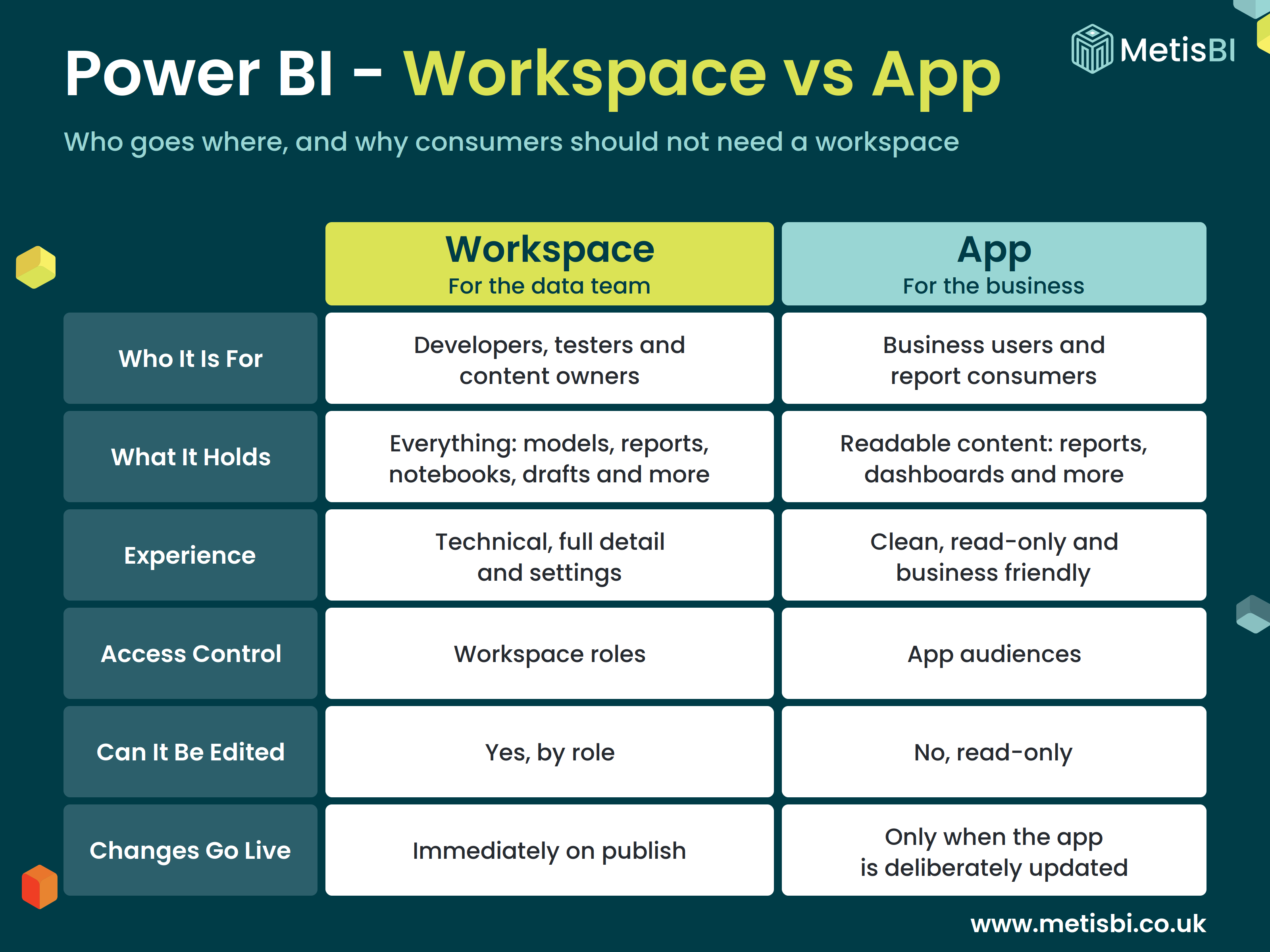
A workspace is the collaborative environment where content is built and tested, think of it as a folder in the Power BI Service that also acts as a security boundary, aimed at the core data team and content owners. An app is the read-only, packaged version of selected items from that workspace, published for business users and report consumers, traditionally one app for one workspace. The rule of thumb is simple, developers and content owners work in workspaces, consumers get the app, and should never need to set foot in a workspace at all.
I have covered each building block in far more detail in its own blog, What Is a Power BI Workspace?, What Is a Power BI App? and What Are Power BI App Audiences?, so if you want the depth on any one of them, start there. This blog is about the split itself.
Key takeaways
- A workspace is for development and collaboration; an app is for consumption.
- The app is published on top of the workspace and contains only the items you choose, so drafts never reach the business.
- Workspace access is controlled through roles; app access is controlled separately, through audiences.
- Report consumers should hold no workspace role at all. Their route for consumption is through the app.
- Traditionally one app per workspace, a one to one relationship, with audiences handling the different groups inside it.
- Org Apps recently made it to GA from public preview, which changes the one app per workspace tradition, so they must be considered in your decisions moving forward.
Side by side
That last row above is underrated, but it is worth being precise about what actually waits. Data refreshes flow straight through, the app points at the same semantic model, so a refresh reaches consumers on its own. Model changes are picked up too, add a measure or fix some DAX and the reports in the app query the live model, so they see it straight away. What waits for a deliberate app update is report content, new reports, changed visuals, a reworked page. That gap between building and releasing report content is a governance control, not an inconvenience. In fact, when thinking pure Power BI, even the PROD workspace can be seen as pre-production to some degree, changes land and get checked there first, and the true final consumption area is the app sitting on top of it.
Where people go wrong
A common mistake I see, and I mean regularly, is giving business users the Viewer role on the workspace instead of publishing an app. It feels quicker, but it hands consumers a window into the working environment, drafts and half-finished content included, and it is exactly what the app exists to avoid. A common mistake is resorting to shareable links, though it is the common approach we find, which gives you no structure and no real way to know who can see what. Also another one I hear often, folders. Workspaces can contain folders, and some assume access can be separated through them. Not true, folders in a workspace are purely for tidying items up, they carry no security at all. Access is controlled at the workspace level and who sees what in the app is controlled through audiences. To be clear, if its an informal basis between you and a colleague, etc. sure use workspaces only. But when you start distributing to large audiences, go with apps (or now Org Apps).
There is one wrinkle worth knowing, consumers accessing reports through an app still need Read permission on the semantic model those reports connect to (if they are what are known as thin reports). Audience membership alone is not enough, and this catches a lot of teams out the first time they separate models from reports.
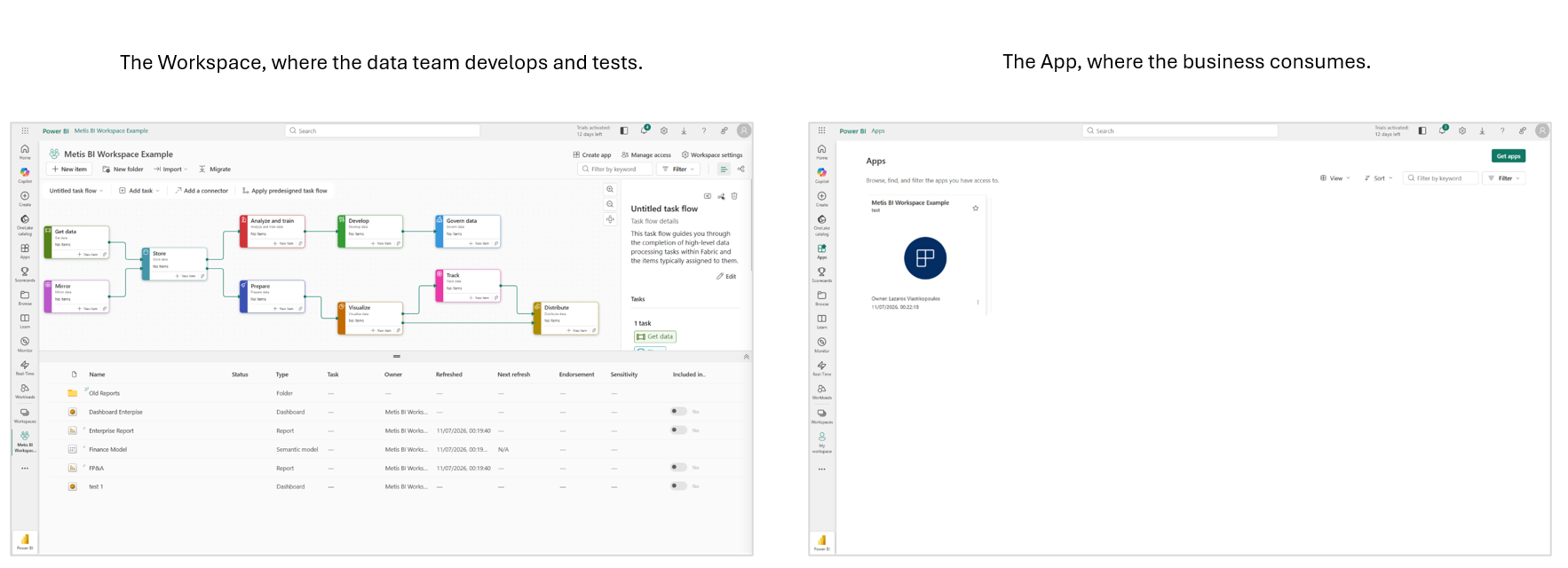
To make the difference visual, here is the same environment from both sides. On the left, the workspace, the full working view the data team lives in, drafts, semantic models, task flows, settings, everything. On the right, the app, the clean front door the business opens instead. Consumers should only ever land on the right-hand experience, the step before they view a report, never on the left.
When you need which
You always need both. Every app is published from a workspace, traditionally one app per workspace (Org Apps change that, and I cover where they fit in the framework blog), so the question is never workspace or app, it is who goes where. Developers and content owners get workspace roles. Everyone else opens the app, with audiences deciding which content each group sees. As I mentioned above, I have written about each building block in its own right, in What Is a Power BI Workspace? and What Is a Power BI App?, and how to structure the workspaces themselves is the subject of Designing a Power BI and Microsoft Fabric Framework, so I will not rebuild that thinking here.
How Metis BI helps
Many of the sprawled estates we untangle trace back to this one distinction being missed, consumers ended up in workspaces, or content ended up in links, and structure never stood a chance. We help organisations put the split back in place, workspaces for developers, one app as the front door, audiences controlling who sees what. If your estate has drifted, our Power BI and Microsoft Fabric governance assessment is a good place to start.
Frequently asked questions
Can I use a workspace instead of an app to share reports? You can, via the Viewer role, but in most cases you should not. Consumers would see the working environment, drafts included, and you lose the deliberate release step that an app gives you.
Does every workspace need an app? Development and testing workspaces usually do not. Your production workspace should publish one, and that app should be the only route business users need.
Do changes in the workspace appear in the app straight away? Data refreshes flow through automatically. Content changes, new reports or changed visuals, only reach the app when you deliberately update it.


.png)
.png)
.png)