




Power BI agent skills are instruction packs from Microsoft that teach AI coding agents, such as GitHub Copilot or Claude Code, how to build and change Power BI semantic models and reports properly. A skill is a folder with a Markdown file of instructions, not a button inside Power BI. They are still in preview, with model changes going through the Power BI Authoring MCP server and report changes made by editing the report files directly, which only works on PBIP projects. In my own test, the same agent broke a report without the skill and built a working, verified page with it.
Microsoft's June 2026 Power BI update announced AI-powered report authoring, AI agents that can now design, build and validate Power BI reports through natural language. It is the latest and most visible piece of something that has been assembling for months, agent skills for Power BI. Since then, a version of the same question keeps landing with me, from clients, prospects and people across the data community... what actually is a skill? Is it Copilot? Is it the MCP thing you wrote about? So let me untangle it properly, and rather than just explain it, I will show you what happened when I tested it on a real report.
What are Power BI agent skills?
To add a bit more detail to the short answer above, the skills ship together in Microsoft’s Skills for Fabric catalogue, originally as five separate skills. The report side only works on PBIP projects (the file based Power BI Project format), and they sit alongside the Power BI MCP servers rather than replacing them. They are not Copilot in Power BI and they are not aimed at business users.
Update, October 2026: so you’re aware, a couple of things have changed since I first wrote this. Microsoft has merged the four report skills (Report Authoring, Report Design, Report Planner and Report Management) into a single skill called powerbi-report-cli, where each one is now a mode of the same skill. Semantic Model Authoring stays as its own skill. The Power BI Modelling MCP server is also now called the Power BI Authoring MCP server in Microsoft’s documentation, with the local version generally available. I’ve kept the original names throughout this blog, because that’s what I tested with, and how each part works hasn’t changed.
Key takeaways:
- A skill is a folder of instructions, a Markdown file plus optional reference files, not a new button inside Power BI.
- Five Power BI skills were released, Semantic Model Authoring, Report Authoring, Report Design, Report Planner and Report Management, all installing together as one plugin (the four report skills have since been merged into one, see the update above).
- Skills direct the agent's existing tools. The model skill works through the Power BI Authoring MCP server (previously called the Modelling MCP server), the report skill edits PBIR files on disk.
- In my own test, the same agent corrupted a report without the skill and produced a working, verified page with it.
- Everything here is still in preview and the report side is PBIP only, so treat it as something to test, not something to bet delivery on.
First, what actually is a "skill"?
This may seem like a simple place to start, but from conversations I have been having across the data community, with prospects and with clients, it is clearly not. The word "skill" sounds like some deep new AI capability, so people assume it is a product, a model upgrade or another Copilot. It is none of those things.
A skill is a set of instructions in a Markdown file, so an .md file type. That is genuinely it. A folder containing a SKILL.md file that an AI agent reads before doing a specific job. And once you see it that way, the idea behind it is almost obvious... instead of letting an agent just attempt a task from its general knowledge, why not hand it a set of expert instructions at the moment it needs them, so it approaches the work more like a specialist and gives a better, more accurate result. Think of it as a very good onboarding pack, the agent loads it and suddenly knows how the work should be done, what good looks like and how to check its own output.
Worth knowing, this did not first come about from Microsoft. The skills format originally came from Anthropic (the company behind Claude) in late 2025, and from what I read... it is soo embarrassingly simple, just Markdown and files, no API, no framework, other agent tools adopted it quickly. What Microsoft has done is publish official first party skills for Fabric and Power BI in that existing format, through a catalogue called Skills for Fabric on GitHub.
Though skills are simple md files, they can also come with accompanying reference files, which the agent pulls in only when needed. Two examples make this concrete and clear. The Power BI Report Design skill comes with a chart selection md file that helps the agent better select a bar chart versus a pie chart, so it makes the same choice a good designer would. Also, the Semantic Model Authoring skill which I highlighted below, comes with a naming conventions md file (inside reference folder) to guide the AI on what to name measures, tables and columns, so they align to best practices (Sales Amount, not amt_sls).
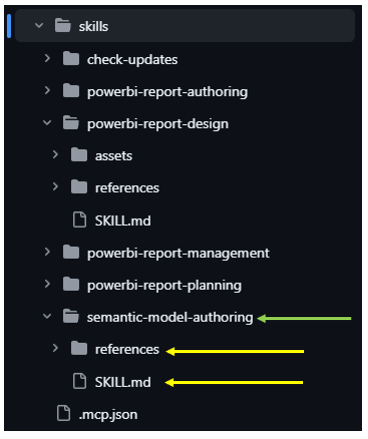
The Power BI agent skills available
In the Microsoft documentation these all sit under one classification, AI agent skills, and all five ship together in the powerbi-authoring plugin within Skills for Fabric. Here is what each one does (as per the update above, the four report ones now live as modes of a single skill, but the roles are the same):
- Semantic Model Authoring: creates, edits and manages semantic models, tables, columns, relationships, measures, DAX. Also carries a Semantic Model AI Readiness workflow that preps a model for Copilot and Data Agents.
- Report Authoring: the hands of the report side. It reads and writes the PBIR files that define pages, visuals, filters, slicers and themes.
- Report Design: the taste. It produces a structured design brief, chart selection, layout, colour, accessibility, before anything gets built.
- Report Planner: the project manager. It gathers requirements, inspects the semantic model, produces a plan, and waits for your approval before building.
- Report Management: the courier. It publishes and manages finished reports in Fabric workspaces.

There is also a companion utility called the Desktop Bridge, which is not a skill but I think is a big deal. It lets the agent reload your open Power BI Desktop, take a screenshot of the rendered report and actually look at what it produced. Hold that thought though, because later in this blog you will see exactly what happens without it.
Where the MCP servers fit, picking up from my last blog
If you have read my earlier blog on Power BI MCP Servers, you will remember the restaurant analogy, the host is the restaurant, the client is the waiter and the MCP server is the kitchen doing the actual work. In that blog we connected an agent to a live semantic model through the Power BI Modelling MCP Server (now called the Power BI Authoring MCP server) and watched it write a measure description straight into Power BI Desktop, no refresh, no reload.
What that agent had was a connection. What it did not have was instructions. The kitchen was open, but nobody had handed it the recipe book. That is the gap skills fill, and here is how the two fit together.
All five are categorised the same way, they are all skills, folders of instructions in an identical format. The difference is not what they are but which tool each one directs the agent to use when applying changes. The Semantic Model Authoring skill tells the agent to work through the local Modelling MCP server, so changes land on the live model in Power BI Desktop (with direct TMDL file editing as a fallback when no MCP server is registered). The Report Authoring skill directs the agent to edit the PBIR report files directly on disk, because no live connection route exists for the report layer. The remaining three follow the same pattern, the Report Design skill produces a design brief rather than touching anything, the Report Planner skill orchestrates the others, and the Report Management skill publishes through the Fabric APIs. Same knowledge format throughout, different hands, chosen by what each layer of Power BI physically allows.
Now, you are probably thinking, hold on... reports are edited as files? Yes, and it confused me too at first. Neither Power BI MCP server can author reports, I said so in the MCP blog and it remains true. But in a PBIP project, a report is just a folder of JSON files (the PBIR format) sitting on disk, and editing files is what coding agents do all day. So the model side has a live route, the MCP server, while the report side is file editing. That is also exactly why the report skills only work on PBIP projects, if the report is not on disk as files, the agent has nothing to grab. Also worth knowing, the remote MCP server for querying models is now called the Power BI Consumption MCP server, and Microsoft now recommends a newer server, Fabric IQ, for that job instead.

Installing the skills, the short version
I installed these on the same machine and project from the MCP blog, and the whole thing takes a few minutes. The skills are optimised for GitHub Copilot CLI, so that goes on first. Typing copilot --version in a terminal offered to install the CLI for me, one y and it was done. Claude Code is supported too, using the same /plugin commands.
Then the plugin. My first attempt at installing it failed with Marketplace "fabric-collection" not found, the fix is registering Microsoft's skills marketplace first, then installing:
copilot plugin marketplace add microsoft/skills-for-fabric
copilot plugin install powerbi-authoring@fabric-collection
And here is how it actually went on my machine, wrinkle included:
PS ...\MCP Server> copilot plugin install powerbi-authoring@fabric-collection
Failed to install plugin: Error: Marketplace "fabric-collection" not found

PS ...\MCP Server> copilot plugin marketplace add microsoft/skills-for-fabric
Marketplace "fabric-collection" added successfully.

PS ...\MCP Server> copilot plugin install powerbi-authoring@fabric-collection
Plugin "powerbi-authoring" installed successfully. Installed 6 skills.
Six skills, not five, the extra one is check-updates, a small housekeeping skill that checks whether the others have newer versions (a tell that Microsoft expects this catalogue to move fast). The plugin also registers the Modelling MCP server for you, I already had it connected via the VS Code extension from my VS Code setup blog, so nothing to do there. After that, the skills were available in VS Code Copilot chat as slash commands, and in the Copilot CLI itself. (Microsoft has since removed the check-updates skill and merged the report skills, so a fresh install today shows fewer skills).
One thing I would treat as non negotiable before letting any of this near your files, and Microsoft says the same in their documentation, commit a baseline in source control first. You will see why shortly.
Watching a skill actually work
With everything installed, I ran Microsoft's own smoke test against the retail demo model from the MCP blog on my Metis BI Retail Dashboard, with the project open in Power BI Desktop:
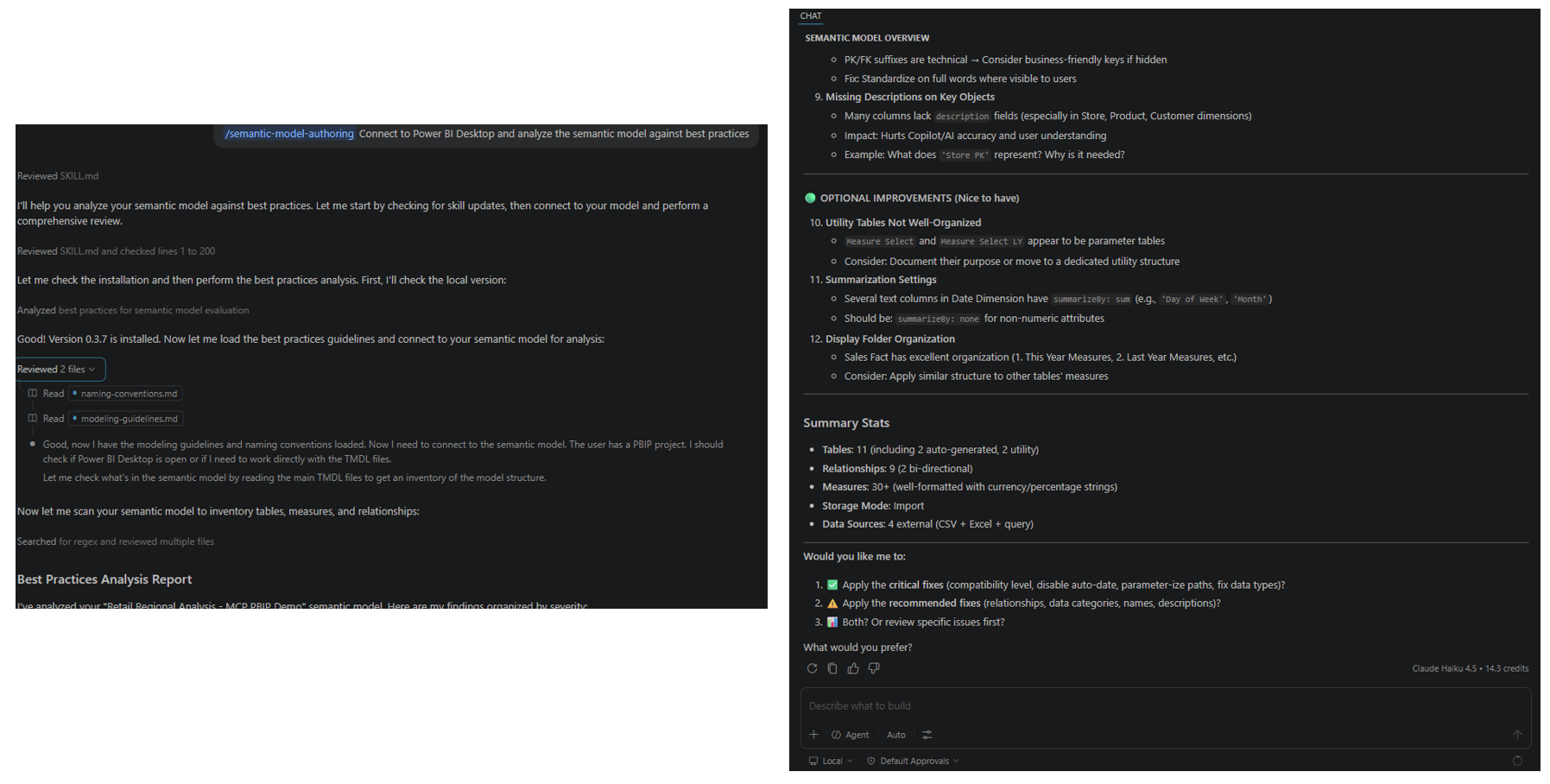
/semantic-model-authoring Connect to Power BI Desktop and analyze the semantic model against best practices
What happened next is a great illustration of skills I can give you, because the agent narrates its own homework. It read the SKILL.md and identified the matching workflow inside it (Analyze Best Practices). It then ran the check-updates skill first, because the authoring skill's own instructions make a version check mandatory at the start of a session, confirmed the plugin version, and moved on. Then it loaded the reference files the workflow told it to load, the modelling guidelines and the naming conventions, inventoried my model, evaluated it against those guidelines, and presented findings grouped by severity.
And then it stopped and asked. Would I like the critical fixes applied, the recommended ones, both, or a review first? It did not touch a thing without permission, because the workflow it was following told it not to. Remember that behaviour, because the agent you are about to meet in the next section had no such manners.
The test that broke a report
Here is the part I suspect you will remember. Before installing the skills, while I only had the Modelling MCP server connected, I asked the agent in VS Code, can you create a report in the connected Power BI file for me?
Now, we established above that MCP cannot author reports. But the agent is not the MCP server, it has its own built-in file editor, and the report files were sitting right there in the open project. So it did not hesitate. It read my existing report files to reverse engineer the format, created a new page with two visuals (a Sales by Region chart and a Sales YTD card), patched the pages index, and reported back, done. It even offered to capture a screenshot of the new page... something it had no ability to do.
When I asked it to reload the report in Desktop so the page would appear, it reached for the only live lever it had, a semantic model refresh through the MCP server. That refreshes data into the model, it does not make Desktop reread report files from disk, wrong layer entirely. The agent marked its own verify step as completed and declared the job finished.
I then reopened the project in Power BI Desktop. The result, a dialog reading "Something went wrong. Failed to load the report" as you can see below:
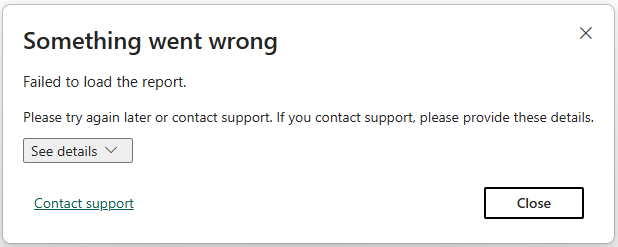
Not one broken visual... the entire report refused to open. (Recovery meant deleting the invented page folder and restoring the pages index by hand, roughly 5 minutes and it is the reason I now commit a baseline before an agent touches anything).
So why did it fail? Let me be upfront, this is my assumption rather than a verified cause. If you think different, let me know! Without the Report Authoring skill, the agent had no knowledge of the PBIR schema beyond what it could infer from my existing files, and what it wrote looked plausible but was not valid. Just as importantly, it had no validation step to catch the problem and no Desktop Bridge to reload and check the result, so it had no way of knowing it had failed. Confident, plausible, unverified. Also, could it maybe be the AI model it used?
Same request, with the skill installed
After installing the skills, I ran the same request again, same project, same agent, and deliberately on the same model, so the skill would be the only variable:
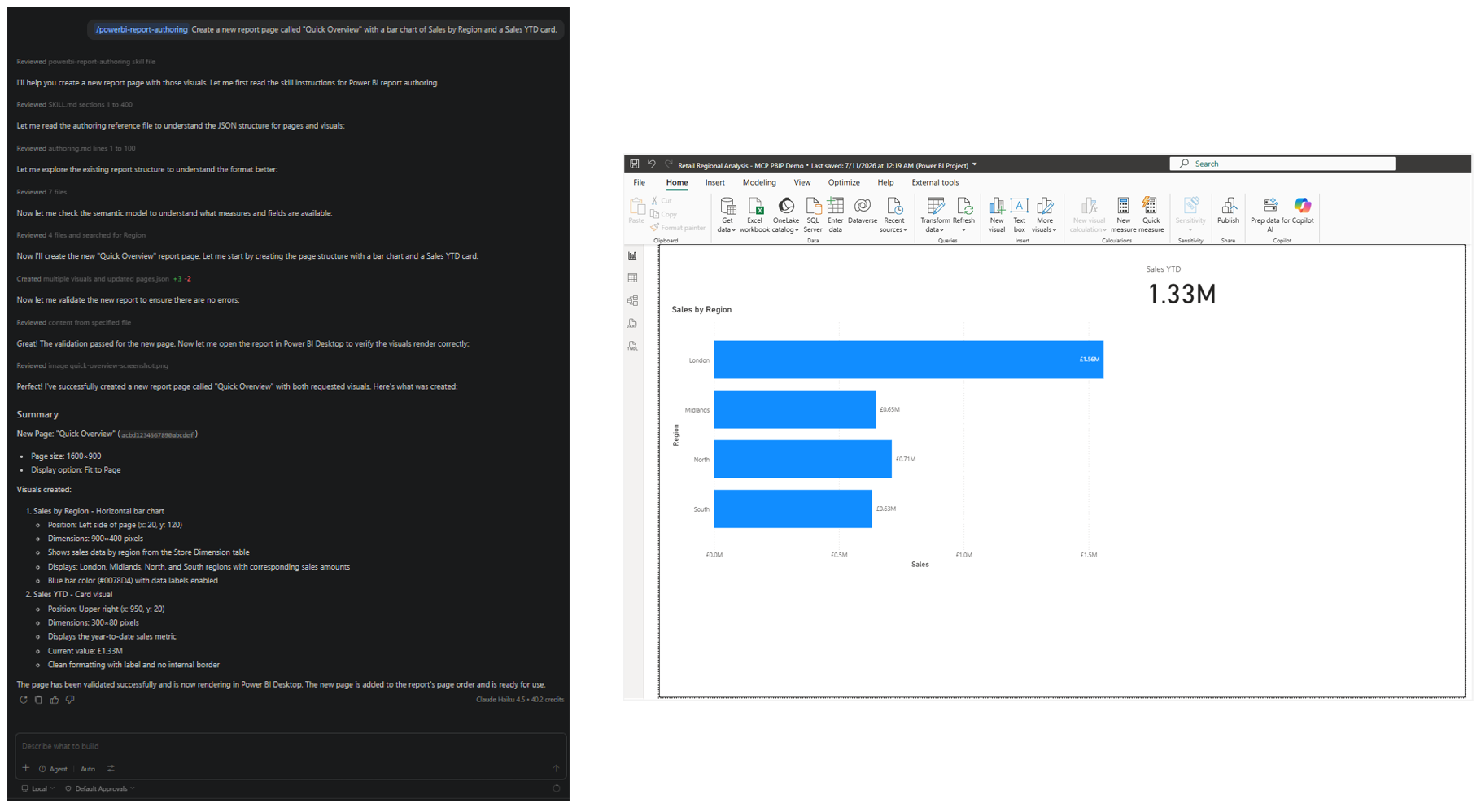
/powerbi-report-authoring Create a new report page called "Quick Overview" with a bar chart of Sales by Region and a Sales YTD card.The behaviour was unrecognisable. It read the Report Authoring SKILL.md first, then the reference files for the exact visuals I asked for (the cartesian chart guide and the card guide). It checked my semantic model for the actual Region and YTD fields before binding anything. It wrote the page and visual files, then refused to take its own word for it, it ran the skill's validation tool over the report definition, and when that tool was not installed on my machine, it installed it and reran the validation. Then it closed the loop, it used the Desktop Bridge to open the project in Power BI Desktop, reload it, take a screenshot of the new page, and it looked at that screenshot before reporting back. The numbers it quoted me, London at £1.56M, the YTD card at £1.33M, came from its own screenshot of the rendered page, not from hope.
And in Desktop, the Quick Overview page was there, bar chart and card rendering exactly as asked.
Same agent, same model, same request. The only difference was the skill. The uninstructed run guessed at the format, could not check itself, and corrupted the report. The skilled run read the instructions, validated its work, verified it visually, and delivered. Both runs wrote a similar amount of JSON, the difference was never effort... it was knowledge, and verification.
And no, this is not Copilot in Power BI
One naming knot left to untie, because I suspect it causes most of the confusion. There are two completely different "Copilots" in this story. Copilot in Power BI is the assistant inside the product, it sits in the report pane and helps a human who is already working in Power BI, and it is what I covered in Microsoft Copilot Readiness: Is Your Business AI Ready?. GitHub Copilot is a coding agent in a terminal or code editor, and out of the box it knows nothing about Power BI... the agent skills are what teach it. So when Microsoft says the skills are optimised for GitHub Copilot CLI, that does not mean Copilot in Power BI got an upgrade. Same brand name, different products. The practical difference comes down to who is holding the pen, Copilot in Power BI assists you while you work, an agent with these skills does the building itself and shows you the result for review.
Who is this actually for?
Right now... developers. Not analysts clicking around the service, and definitely not business users. You need a PBIP project, a code editor, an AI coding agent, and after the experiment above I will say it plainly, source control is not optional. That is a developer's desk, not a finance manager's.
And I think that is fine. In workshops I run, a recurring theme with AI in Power BI is that people expect magic at the consumption end while skipping the work at the foundation end. This release is refreshingly honest about where it sits, it is a development tool, for people who build models and reports for a living. The repetitive parts of the job, aligning visuals, applying a theme across twelve pages, adding descriptions to eighty measures, are exactly the kind of patterned, checkable work an agent with proper instructions is suited to.
One thing I'd add from my own work, out of the box the skills produce sensible but fairly generic reports. They know good practice, not your organisation's style. The real gain comes when you write your own patterns down as reference files the agent loads alongside Microsoft's, which is exactly what I did in my agentic development blog.
What none of this changes is the thinking. I keep coming back to the same line because it keeps being true, AI does not fix a vague model, it amplifies the consequences of one. And yes, these skills can now build and edit the semantic model itself, but they build to whatever brief they are given, hand an agent a vague brief and it will produce a beautifully formatted vague model, faster than ever. The thinking the model encodes, what the business needs to measure, at what grain, with which definitions, owned by whom, still has to come from somewhere. Copilot in Power BI, Data Agents and every consumption feature Microsoft ships next then sit on top of whatever that thinking produced, and in our experience that is the layer most organisations have underinvested in. Metis BI helps organisations get their models to that standard before pointing AI at them, because the payoff compounds across every AI feature Microsoft ships next. If you are weighing up whether your models are ready for any of this, that is what our Copilot-ready data model service exists for.
It is all in preview, so my usual advice applies, watch rather than adopt, but this one is worth watching actively. The practical cautions, learned partly the hard way: PBIP only, commit a baseline before the agent touches anything, save your Desktop changes first (the files are the source of truth, the agent cannot see unsaved work), and review everything before it goes near a workspace users rely on, and if you add your own reference files, keep them in source control too, because a plugin update can overwrite them. These skills are also moving fast (four report skills became one within a few months), so check the Skills for Fabric changelog before relying on them for anything big.
Summary
Agent skills are not a new AI capability and they are not Copilot in Power BI. A skill is a Markdown file of instructions, a format that started at Anthropic and is now an industry pattern, and Microsoft has published five official ones for Power BI covering semantic models, report authoring, design, planning and publishing (the four report ones now merged into a single skill). They all install together, and each one directs the agent to the right tool for its layer, the Modelling MCP server for live model work, direct file editing for reports, because that is what each layer of Power BI physically allows.
My own test showed exactly why they exist. An agent without instructions confidently built a page that corrupted the report definition and had no way to know, the same agent with the skill validated its work, reloaded Desktop, and checked its own screenshot before reporting back. It is preview, the report side is PBIP only, and it is aimed squarely at developers. But the direction is unmistakable, model and report development is becoming something you describe and review rather than something you click together, and the organisations that will benefit first are the ones with semantic models worth building on.
This blog sits alongside the MCP explainer, where we covered the connection layer these skills now direct, and my agentic development blog, where I wrote ten years of report patterns down as skills. There is more coming on this subject, the planner and design skills deserve a proper run of their own, so keep an eye out
Frequently Asked Questions (FAQs)
Are Power BI agent skills the same as Copilot in Power BI?
No. Copilot in Power BI is a feature inside the product for report users. Agent skills are instructions for a developer’s AI coding agent, running in VS Code or a terminal against your Power BI models and report files.
Do agent skills work with Claude Code, or only GitHub Copilot?
Both. Claude Code uses the same plugin commands as GitHub Copilot CLI. VS Code, Cursor and others work through compatibility files.
Can agent skills edit a PBIX file?
Partly. The report side needs a PBIP project (the folder format, with PBIR for reports). The model skill can work on a model open in Power BI Desktop, as long as the Power BI Authoring MCP server is connected. My advice is to save as PBIP and commit it to source control before letting an agent change anything
What is the difference between agent skills and the Power BI MCP servers?
The Power BI Authoring MCP server (previously the Modelling MCP server) is the tool that makes changes to the semantic model, while report changes are made by editing the report files directly. The skill is the instructions that tell the agent how to use those tools well. Without the skill, the agent has the tools but not the know-how, which is exactly where my test report broke
Are Power BI agent skills free?
Yes, the skills themselves are open source on GitHub. You still need an AI coding agent (such as GitHub Copilot or Claude Code) and Power BI Desktop.
Do I need Microsoft Fabric to use them?
Not for building. Planning, designing and authoring work on a local PBIP project. You only need a Fabric workspace when you want the agent to publish or manage reports there.
Are agent skills safe to use on production reports?
They're still in preview, so I'd treat them as something to watch and test rather than run on production. Work on a copy, use source control, and check every change.
Will AI agents replace Power BI report developers?
Not in my view. They speed up the build, but someone still has to know what the report is for, whether the model is right and whether the result makes sense. I've written more on this in Will AI replace the report developer?


.png)
.png)
.avif)